
1. Introduction
This manual provides essential information for the proper installation, operation, and maintenance of the DSC PC5908 Power-832 Paging System Audio Interface Module Card. The PC5908 module is designed to integrate a paging system with a DSC Power-832 security control panel, enabling audio communication through the security system.
Please read this manual thoroughly before attempting any installation or configuration to ensure safe and correct usage.
2. Product Overview
The DSC PC5908 is an audio interface module card specifically engineered for the Power-832 series security systems. It facilitates the connection of an external paging system, allowing for audio output through the security panel's communication channels. The module features various electronic components, including capacitors, resistors, integrated circuits, and connectors, all mounted on a green printed circuit board.
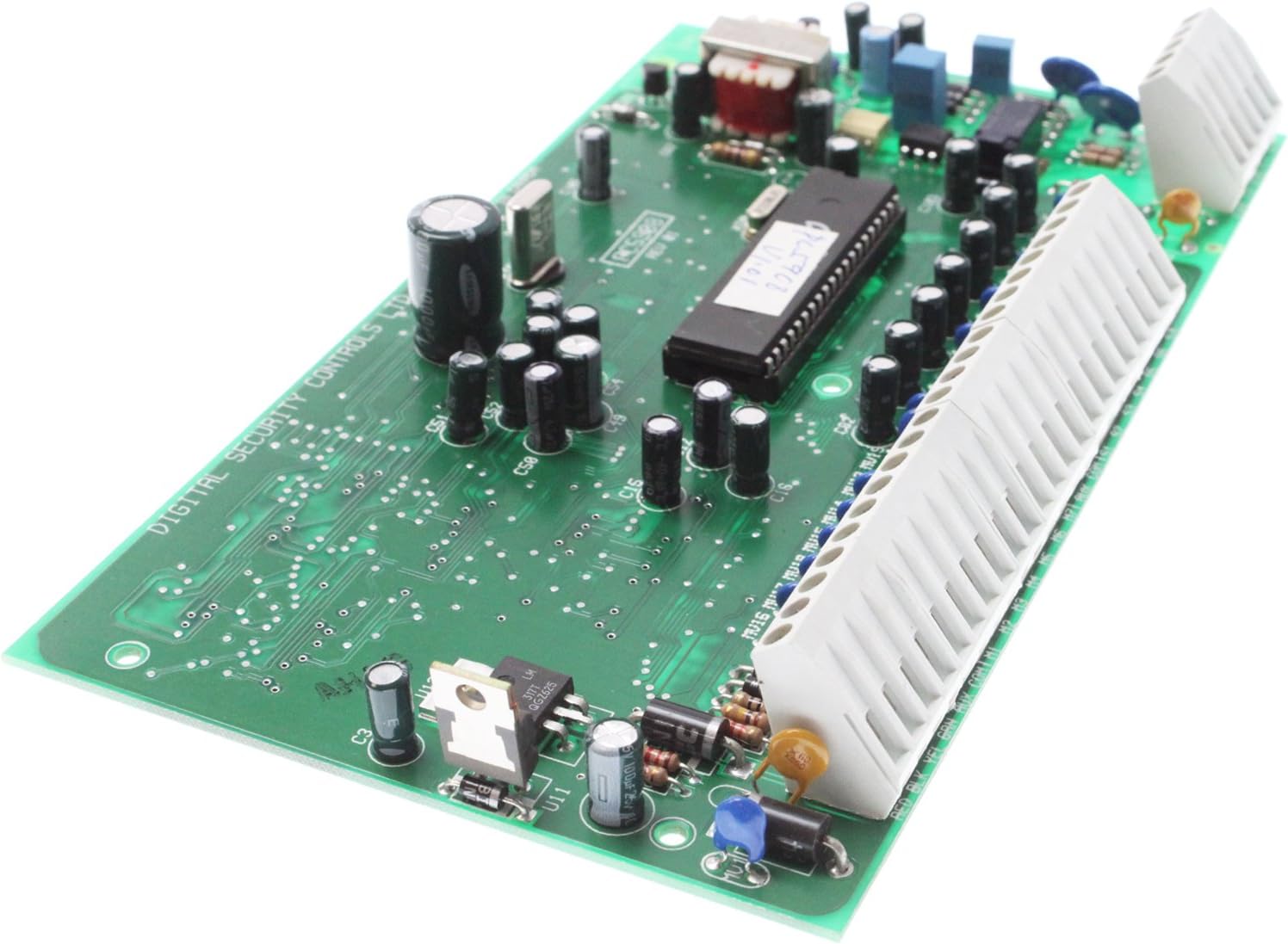
Figure 2.1: Top view of the DSC PC5908 module card, showing the main integrated circuit, various capacitors, resistors, and the multi-pin connector for integration with the security panel.
Key features include robust construction and compatibility with specific DSC security panels. The module is designed for internal installation within the security system enclosure.

Figure 2.2: Angled view of the DSC PC5908 module card, highlighting the various electronic components and the connector pins. This view provides a clearer perspective of the component density and layout.
3. Setup and Installation
Important Safety Notice: Installation of this module should only be performed by qualified personnel. Disconnect all power to the security control panel before beginning installation. Failure to do so may result in electric shock, damage to the equipment, or both.
3.1 Pre-Installation Checklist
- Ensure the security control panel is a DSC Power-832 series.
- Verify all necessary tools are available (screwdriver, wire strippers, multimeter).
- Confirm the installation environment is dry and free from extreme temperatures.
3.2 Installation Steps
- Power Disconnection: Disconnect the AC power and battery backup from the DSC Power-832 control panel.
- Enclosure Access: Open the control panel enclosure.
- Module Placement: Carefully align the PC5908 module card with the designated expansion slot or connector pins on the main control panel board. Refer to the Power-832 panel's manual for exact location.
- Secure Connection: Gently press the module into place until it is firmly seated. Avoid excessive force.
- Wiring (if applicable): Connect the paging system's audio output to the appropriate terminals on the PC5908 module. Consult the wiring diagram provided with the Power-832 panel or the PC5908's supplementary documentation for specific terminal assignments.
- Power Reconnection: Close the control panel enclosure. Reconnect the battery backup, then the AC power.
- System Test: Power on the security system and perform a functional test of the paging system integration as per the Power-832 programming instructions.
4. Operating Instructions
The DSC PC5908 module operates as an interface, translating signals between the Power-832 security panel and the connected paging system. Its operation is largely passive, facilitating audio transmission based on commands or events programmed within the security panel.
4.1 Paging System Integration
- Once installed and configured, the PC5908 allows the Power-832 panel to trigger audio messages or live paging through the connected paging system.
- Specific events (e.g., alarm activation, system status changes) can be programmed in the Power-832 panel to initiate audio output via the PC5908.
- Refer to the DSC Power-832 programming manual for detailed instructions on configuring audio output events and zones.
4.2 Audio Output Control
Control over the audio output, such as volume levels or specific message selection, is typically managed through the connected paging system's controls or the Power-832 panel's programming interface. The PC5908 module itself does not have user-adjustable controls.
5. Maintenance
The DSC PC5908 module is designed for long-term, maintenance-free operation. However, adhering to general electronic component care practices can prolong its lifespan and ensure reliable performance.
- Environment: Ensure the control panel enclosure remains clean, dry, and within recommended temperature and humidity ranges. Avoid exposure to dust, moisture, and corrosive substances.
- Cleaning: If necessary, gently clean the module using a soft, dry, lint-free cloth. Do not use liquid cleaners or solvents. Ensure power is disconnected before cleaning.
- Inspections: Periodically inspect the module and its connections for any signs of damage, corrosion, or loose wiring. Address any issues promptly.
6. Troubleshooting
If you experience issues with the PC5908 module or its integration, consider the following troubleshooting steps:
| Problem | Possible Cause | Solution |
|---|---|---|
| No audio output from paging system. |
|
|
| Distorted or low-quality audio. |
|
|
| Module not recognized by Power-832 panel. |
|
|
If troubleshooting steps do not resolve the issue, contact DSC technical support or a qualified security system technician.
7. Specifications
| Attribute | Detail |
|---|---|
| Model Number | PC5908 |
| Manufacturer | DSC |
| Part Number | PC5908 |
| Product Dimensions | 7.5 x 4.5 x 1 inches |
| Item Weight | 8 ounces |
| Color | Green (PCB) |
| Power Source | Wired Electric (powered by control panel) |
| Compatible Devices | DSC Power-832 Security Control Panels |
8. Warranty and Support
For warranty information regarding the DSC PC5908 module, please refer to the documentation provided with your DSC Power-832 security control panel or contact DSC directly. Warranty terms and conditions may vary.
For technical assistance, support, or further inquiries, please contact DSC customer support through their official website or designated support channels. Always provide your product model number (PC5908) and the serial number of your Power-832 panel when seeking support.
DSC Official Website: www.dsc.com

