1. Introduction
The Monster Diesel VEKTR On-Ear Headphones, model MH DESL ON CTU WW, are designed to deliver a high-fidelity audio experience. This product is a collaboration between Diesel and Monster, featuring a distinctive multi-planar design. These headphones aim to provide clear audio with accurate mid-range and deep bass response.

Figure 1: Monster Diesel VEKTR On-Ear Headphones.
2. What's in the Box
Verify that all components are present in the packaging:
- Ultra Performance Folding Headphone: The main headphone unit, co-developed by Diesel and Monster R&D.
- High-Def Cable: A unique triangular cable designed to prevent tangling.
- Touring Case: A specially designed case for secure protection and transport of your headphones.
- Cleaning Cloth: A Monster cleaning cloth with advanced Aegis Microbe Shield for maintaining the headphones.
- ControlTalk Universal: An in-line remote on the cable for hands-free control of music and phone calls.
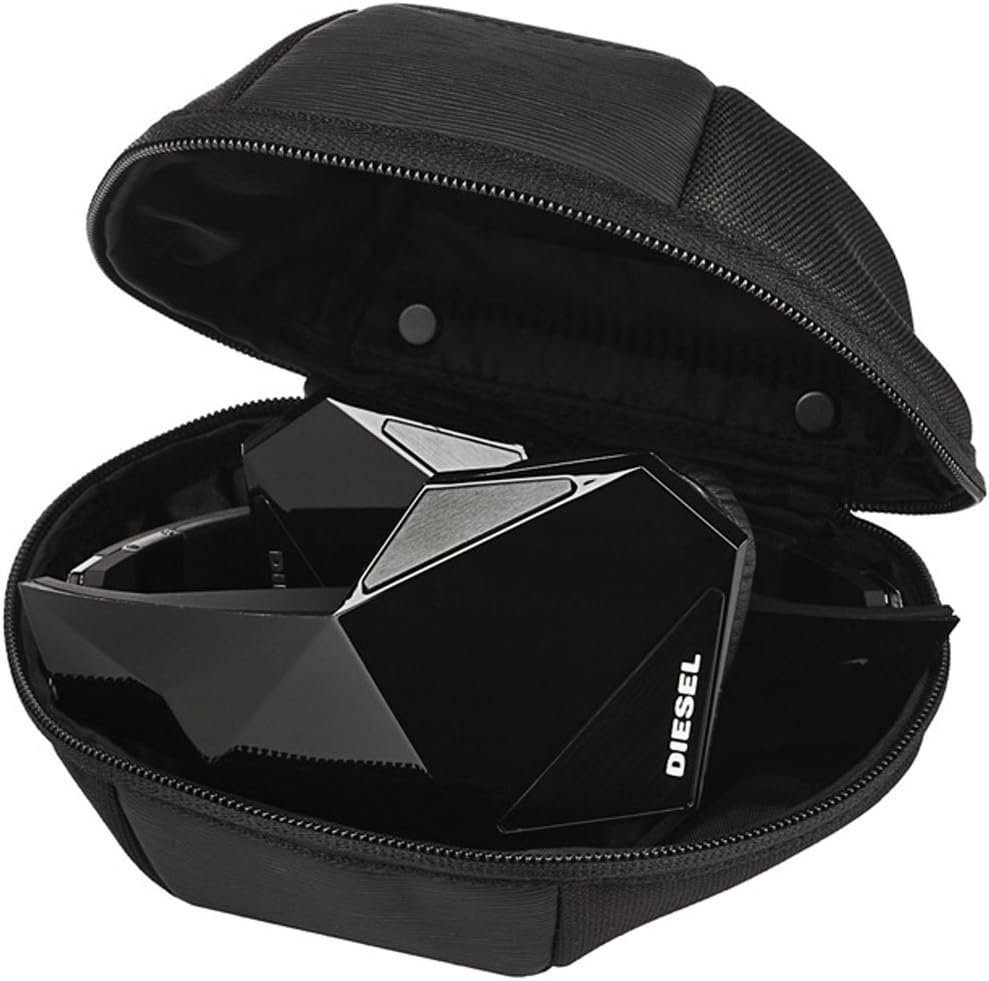
Figure 2: Headphones and accessories stored in the touring case.
3. Setup
- Connect the Audio Cable:
Locate the audio input port on the left earcup of the headphones. Insert the smaller end of the triangular audio cable firmly into this port. Connect the other end (3.5mm jack) to your audio device (smartphone, tablet, computer, etc.). The cable features both a straight plug and a right-angle connector for convenience.

Figure 3: Connecting the audio cable to the headphone.

Figure 4: Detail of the 3.5mm audio jack.
- Adjust the Headband:
Gently extend or retract the headband slides on both sides to achieve a comfortable and secure fit over your ears. The earcups should rest comfortably on your ears, creating an acoustic seal.

Figure 5: Headband adjustment mechanism.
4. Operating Instructions
4.1. ControlTalk Universal Functions
The ControlTalk Universal feature, located on the audio cable, allows for convenient control of your music and phone calls without needing to access your device directly. Functionality may vary slightly depending on your specific device model and operating system.

Figure 6: ControlTalk Universal button on the cable.
- Play/Pause Music: Press the center button once to play or pause the current track.
- Skip Track: Press the center button twice quickly to skip to the next track.
- Previous Track: Press the center button three times quickly to go back to the previous track.
- Answer/End Call: Press the center button once to answer an incoming call or end an active call.
- Decline Call: Press and hold the center button for approximately two seconds to decline an incoming call.
- Volume Control: Volume adjustment is typically managed directly on your connected audio device. The ControlTalk button on this model primarily handles playback and call management.
4.2. Folding Mechanism
The Diesel VEKTR headphones feature a tri-fold design for compact storage and portability. To fold, gently collapse the earcups inwards towards the headband until they lock into a compact position. Ensure the cable is detached or carefully managed to avoid damage during folding.

Figure 7: Headphones in folded position for storage.
5. Maintenance
- Cleaning: Use the provided Monster cleaning cloth to gently wipe the earcups and headband. The cloth is designed with Aegis Microbe Shield. Avoid using harsh chemicals or abrasive materials.
- Cable Care: The triangular cable is designed to resist tangling. When storing, coil the cable loosely rather than wrapping it tightly to prevent stress on the connectors.
- Storage: When not in use, store the headphones in the provided touring case to protect them from dust, scratches, and impacts. Ensure the headphones are folded correctly before placing them in the case.
- Avoid Moisture: Do not expose the headphones to excessive moisture or liquids. If they become wet, dry them thoroughly before use or storage.
6. Troubleshooting
- No Sound or Intermittent Audio:
- Ensure the audio cable is securely plugged into both the headphones and your audio device.
- Check the volume level on your audio device.
- Test the headphones with a different audio device or a different cable if available, to isolate the issue.
- Verify that the audio output settings on your device are correctly configured.
- Poor Sound Quality (Distortion, Muffled Sound):
- Ensure the audio cable connections are firm.
- Try playing different audio files or sources to determine if the issue is with the content.
- Adjust the equalizer settings on your audio device, if applicable.
- Clean the 3.5mm jack on both the cable and your device to remove any debris.
- ControlTalk Button Not Responding:
- Ensure the cable is fully inserted into both the headphones and the audio device.
- ControlTalk functionality can vary by device. Verify compatibility with your specific smartphone or media player.
- Restart your audio device.
- Discomfort During Use:
- Adjust the headband to ensure a proper fit.
- Take short breaks during extended listening sessions.
7. Specifications
| Feature | Specification |
|---|---|
| Model Name | MH DESL ON CTU WW |
| Connectivity Technology | Wired |
| Headphones Jack | 3.5 mm Jack |
| Ear Placement | On Ear |
| Form Factor | On Ear |
| Noise Control | Sound Isolation |
| Control Type | Volume Control (via device), Playback/Call Control (via ControlTalk) |
| Cable Feature | Detachable, High Def, Triangular shape (tangle free) |
| Special Feature | Foldable, Tangle Free Cord, Universal Phone Control |
| Material | Plastic |
| Item Weight | 8 ounces |
| Product Dimensions | 2.2 x 6.45 x 7 inches |
| Compatible Devices | Laptops, Desktops, Tablets, Telephones, Smart Speakers, Televisions, Car Audio Systems, Cellphones |
| UPC | 050644582059, 611231451136, 710239465890 |
8. Warranty and Support
For warranty information, technical support, or service inquiries regarding your Monster Diesel VEKTR On-Ear Headphones, please refer to the official Monster product documentation or visit the Monster Support Website. Keep your proof of purchase for any warranty claims.


