
1. Introduction
This manual provides essential information for the safe and efficient installation, operation, and maintenance of your Xantrex Freedom SW3012 12V 3000W Inverter/Charger. The Freedom SW series is designed to provide reliable AC power from a DC battery bank and efficiently charge batteries from an AC source. This unit is suitable for various applications, including RVs and marine environments.
The Xantrex Freedom SW3012 is a sophisticated inverter/charger featuring a true sine wave output, a built-in transfer switch, and advanced charging capabilities for various battery types. It is engineered for robust performance and quick AC transfer times, ensuring a seamless power transition for connected loads.
2. Safety Information
WARNING: Read all instructions and warnings in this manual before installing or operating this product. Failure to follow these instructions may result in electric shock, fire, severe injury, or death.
- Electrical Hazard: This unit operates with high voltage and current. Installation and servicing must be performed by qualified personnel.
- Battery Safety: Batteries can produce explosive gases. Ensure adequate ventilation and avoid sparks or flames near batteries. Wear eye protection.
- Proper Ventilation: The inverter/charger generates heat. Ensure the installation location provides sufficient airflow to prevent overheating.
- Grounding: The unit must be properly grounded according to local and national electrical codes.
- Overload Protection: Do not exceed the rated output of the inverter/charger. Use appropriate circuit breakers and fuses.
- Water Exposure: Avoid exposing the unit to water or excessive moisture.
3. What's in the Box
Upon unpacking, verify that all components are present:
- One Xantrex Freedom SW3012 12V 3000W Inverter/Charger (Model 815-3012)
- One Battery Temperature Sensor
- Documentation (this manual and any supplementary guides)
If any items are missing or damaged, contact your dealer immediately.
4. Setup and Installation
Proper installation is crucial for the performance and safety of your inverter/charger. Refer to the detailed wiring diagrams in the full installation guide for specific connections.
4.1 Mounting the Unit
The Xantrex Freedom SW3012 has dimensions of approximately 7.75 inches (H) x 13.5 inches (W) x 15.25 inches (L) and weighs 73.7 lbs. Choose a secure, dry, and well-ventilated location. Ensure the mounting surface can support the unit's weight and that there is adequate clearance for air circulation around the vents.
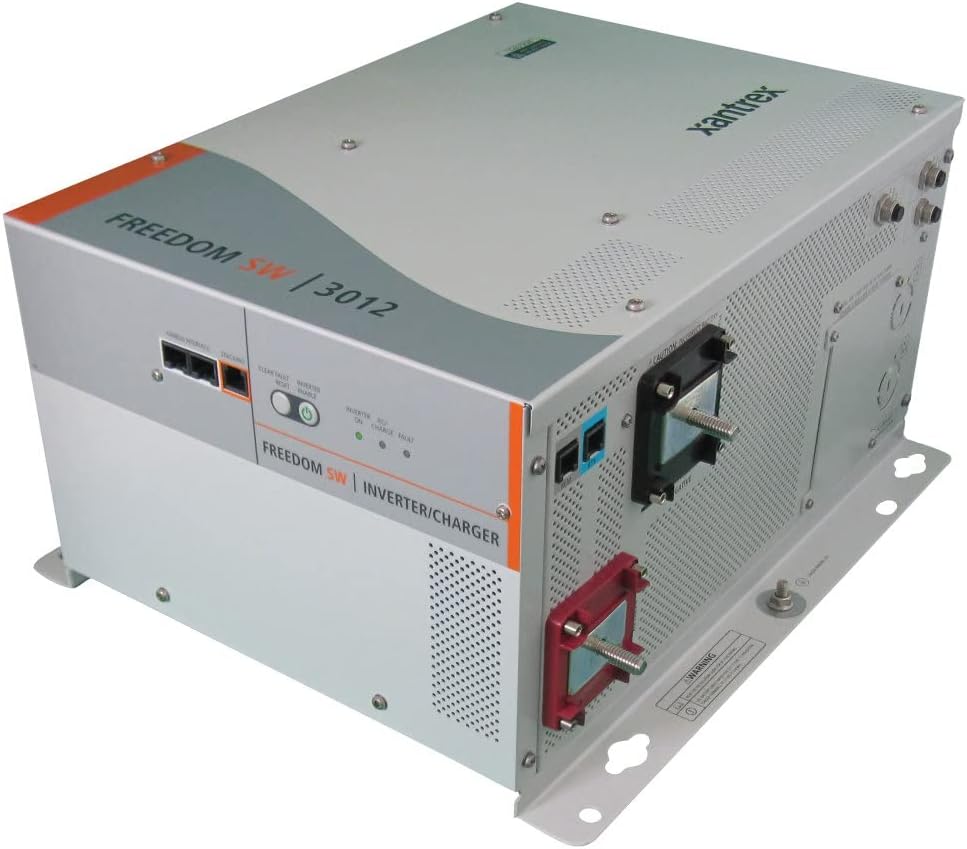
Figure 1: Front view of the Xantrex Freedom SW3012 Inverter/Charger, showing the control panel and connection points.

Figure 2: Rear view of the Xantrex Freedom SW3012 Inverter/Charger, highlighting the DC and AC wiring terminals.
4.2 DC Wiring
Connect the inverter/charger to your 12V battery bank using appropriately sized cables. The unit is compatible with LiFePO4, Flooded, Gel, and AGM battery types. Ensure all DC connections are tight and secure to prevent voltage drop and overheating.
4.3 AC Wiring
The unit supports split phase in/dual out or dual in/dual out AC connections. Connect the incoming AC power (shore power or generator) to the AC input terminals and your AC loads to the AC output terminals. All AC wiring must comply with applicable electrical codes.
4.4 Battery Temperature Sensor
Connect the included battery temperature sensor to the designated port on the inverter/charger and attach the sensor to the battery bank. This allows for temperature-compensated charging, optimizing battery life and performance across a wide operating temperature range of -4°F to 140°F (-20°C to 60°C).
5. Operating Instructions
The Freedom SW3012 operates in two primary modes: Inverter Mode and Charger Mode, with an automatic transfer switch managing the transition between them.
5.1 Inverter Mode
When no external AC power is present, the unit converts 12V DC power from your battery bank into 120V AC true sine wave power to supply your connected loads. The continuous output power is 3000 W at 40°C.
5.2 Charger Mode
When external AC power (shore power or generator) is connected, the unit automatically switches to charger mode, converting incoming AC power to DC to recharge your battery bank. The charger is capable of charging batteries drained to extremely low voltages.
5.3 Automatic Transfer Switch
The built-in transfer switch automatically detects the presence of incoming AC power. If external AC power is lost, the unit transfers loads to inverter power in less than 10 milliseconds, ensuring a virtually uninterrupted power supply to sensitive electronics.

Figure 3: Front panel of the inverter/charger, showing LED indicators for power, inverter status, and charge status.
6. Maintenance
Regular maintenance ensures the longevity and optimal performance of your Xantrex Freedom SW3012 Inverter/Charger.
- Cleaning: Periodically clean the exterior of the unit with a dry cloth. Ensure ventilation openings are free from dust and debris. Do not use liquid cleaners.
- Connections: Annually inspect all DC and AC connections for tightness and corrosion. Loose connections can cause overheating and poor performance.
- Battery Inspection: Regularly check your battery bank for proper fluid levels (if applicable), corrosion, and overall condition.
- Ventilation: Ensure the area around the inverter/charger remains clear and well-ventilated.
- Long-Term Storage: For long-term storage, it is recommended to disconnect the battery leads or install a battery disconnect switch to completely power down the unit and prevent parasitic draw.
7. Troubleshooting
This section addresses common issues you might encounter with your inverter/charger. For complex problems, contact Xantrex technical support.
7.1 No AC Output in Inverter Mode
- Check DC Input: Ensure the battery bank is adequately charged and all DC connections are secure. Low battery voltage will cause the inverter to shut down.
- Overload: Disconnect some AC loads to see if the inverter resumes operation. The unit may have shut down due to an overload.
- Over-temperature: Check if the unit is hot. Ensure proper ventilation and allow it to cool down.
7.2 Batteries Not Charging
- AC Input: Verify that the incoming AC power source (shore power/generator) is active and properly connected to the inverter/charger. Check AC breakers.
- AC Input Recognition: Ensure the inverter/charger recognizes the incoming AC power. If the unit does not detect a 'validated' power source, it will not initiate charging. Consult the full manual for specific AC input requirements and troubleshooting steps for this condition.
- Battery Connections: Confirm all battery connections are secure and free of corrosion.
- Battery Temperature Sensor: Ensure the battery temperature sensor is correctly installed and functioning. A faulty sensor can affect charging.
7.3 Unit Not Powering On
- DC Power: Check the main DC fuse or breaker between the battery bank and the inverter/charger. Ensure the battery bank has sufficient voltage.
- Control Panel: If using a remote control panel, ensure it is properly connected and functioning.
8. Specifications
| Feature | Specification |
|---|---|
| Model | Freedom SW3012 (815-3012) |
| Continuous Output Power (at 40°C) | 3000 W |
| Input Voltage | 12 Volts DC |
| Output Voltage | 120 Volts AC |
| Output Wave Form | True Sine Wave |
| Output Frequency | 60 Hz |
| Peak Output Current | 80 A |
| No Load Power Draw (Inverting) | 3 Adc |
| AC Connections | Split phase in / dual out, Dual in / dual out |
| Compatible Battery Types | LiFePO4, Flooded, Gel, AGM |
| Operating Temperature Range | -4°F to 140°F (-20°C to 60°C) |
| Dimensions (H x W x L) | 7.75" x 13.5" x 15.25" |
| Weight | 73.7 lbs (Product), 77 lbs (Item) |
| Approvals | UL458 with marine supplement, CSA, ABYC, FCC Class B |
9. Warranty and Support
9.1 Warranty Information
Xantrex products are manufactured to high-quality standards. For specific warranty terms and conditions, please refer to the warranty card included with your product or visit the official Xantrex website. Keep your proof of purchase for warranty claims.
9.2 Technical Support
If you encounter issues that cannot be resolved using the troubleshooting guide, or require further technical assistance, please contact Xantrex customer support. Have your product model number (SW3012 or 815-3012) and serial number ready when contacting support.
For the latest support information, FAQs, and contact details, please visit the official Xantrex website: www.xantrex.com


