
Introduction
This manual provides comprehensive instructions for the safe and effective use of your Manfrotto MH057A5-LONG Precision Panorama Head. This panoramic head is designed for large cameras, enabling the capture of continuous images around a single axis for creating panoramic photographs. Please read this manual thoroughly before operating the device and retain it for future reference.
Safety Information
Observe the following safety precautions to prevent damage to the product or injury to yourself:
- Ensure the panorama head is securely mounted to a stable tripod before attaching a camera.
- Do not exceed the maximum weight recommendation of 2 kilograms for attached equipment.
- Always check that all locking mechanisms are tightened before leaving the equipment unattended.
- Handle the unit with care to avoid dropping or impacting it, which could cause damage.
- Keep the unit away from extreme temperatures, moisture, and corrosive substances.
Product Overview
The Manfrotto MH057A5-LONG Precision Panorama Head features a robust design for precise camera positioning. Key components include:
- Base Rotation Unit: Provides smooth 360-degree horizontal rotation with marked degree increments.
- Horizontal Sliding Plate: Allows for precise nodal point adjustment along the horizontal axis.
- Magnesium L-Bracket: Enables mounting the camera in both horizontal and vertical orientations.
- Vertical Sliding Plate: Facilitates nodal point adjustment along the vertical axis.
- Quick Release Plate: For fast attachment and detachment of your camera.
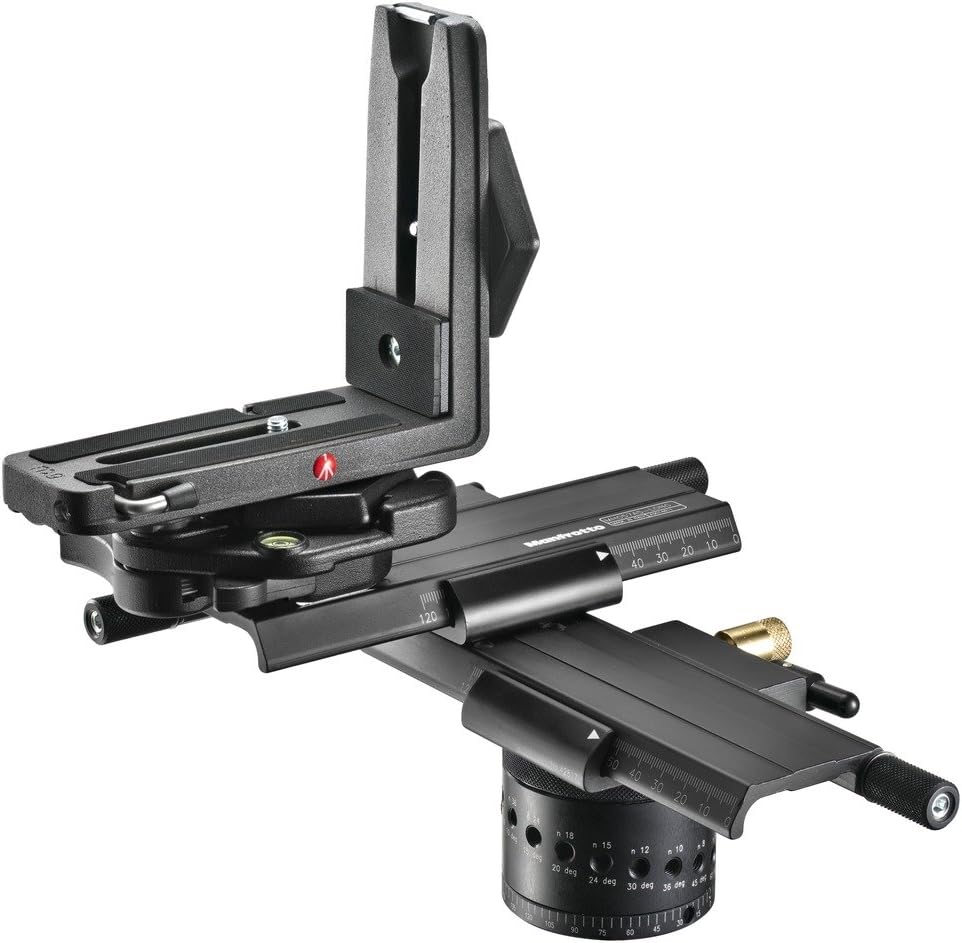
Figure 1: Overview of the Manfrotto MH057A5-LONG Precision Panorama Head. This image shows the complete assembly, including the rotating base, horizontal and vertical sliding plates, and the L-bracket.
Setup
- Attach to Tripod: Securely mount the panorama head to your tripod's head mount. Ensure it is firmly tightened to prevent any movement.
- Level the Head: Use the built-in bubble level (if present) or an external leveling base to ensure the panorama head's base is perfectly level. This is crucial for accurate panoramic stitching.
- Attach Camera:
- Attach your camera to the quick release plate.
- Slide the quick release plate with the camera into the L-bracket's receiver.
- Tighten the locking knob on the L-bracket to secure the camera. The L-bracket allows the camera to be mounted vertically or horizontally.
- Adjust Nodal Point:
- The camera must be positioned so that its nodal point (no-parallax point) is directly above the center of rotation of the panorama head. This prevents parallax errors in your panoramic images.
- Use the horizontal sliding plate to adjust the camera's position forward or backward.
- Use the vertical sliding plate on the L-bracket to adjust the camera's height.
- Refer to your camera lens's specifications or online resources for guidance on finding the nodal point for your specific setup.

Figure 2: Detail of the rotating base and horizontal sliding plate. This view highlights the degree markings and the mechanism for horizontal nodal point adjustment.
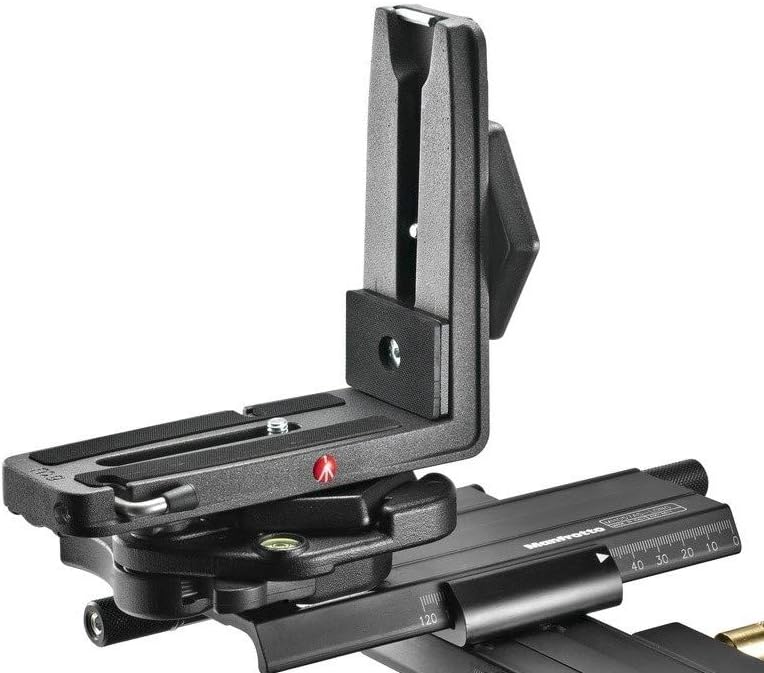
Figure 3: Side view illustrating the L-bracket and its vertical adjustment capabilities. This image demonstrates how the camera can be positioned for vertical or horizontal shooting.
Operating Instructions
Once the panorama head is set up and the nodal point is adjusted, follow these steps to capture panoramic images:
- Set Rotation Angle: The base rotation unit has marked degree increments (e.g., 15, 18, 20, 24, 30, 36 degrees). Select the appropriate angle based on your lens's focal length and desired overlap for stitching.
- Capture First Shot: Take your first photograph.
- Rotate and Lock: Unlock the base rotation, rotate the head by the selected angle, and then lock it securely in place.
- Capture Subsequent Shots: Take the next photograph. Repeat the rotate-and-lock-and-shoot process until you have covered the desired panoramic field of view.
- Vertical Shots (if applicable): If shooting multi-row panoramas, adjust the L-bracket to the vertical orientation and repeat the horizontal rotation process for each row.
Tip: For best results, use a remote shutter release to avoid camera shake and ensure consistent exposures across all frames.
Maintenance
Proper maintenance ensures the longevity and optimal performance of your Manfrotto MH057A5-LONG Precision Panorama Head:
- Cleaning: Wipe the unit with a soft, dry cloth after each use to remove dust and dirt. For stubborn grime, use a slightly damp cloth and then dry thoroughly. Avoid abrasive cleaners or solvents.
- Lubrication: The moving parts are factory-lubricated. Do not apply additional lubricants unless specifically instructed by Manfrotto support.
- Storage: Store the panorama head in a clean, dry environment, away from direct sunlight and extreme temperatures.
- Inspection: Periodically inspect all screws, knobs, and moving parts for any signs of wear or looseness. Tighten as necessary, but do not overtighten.
Troubleshooting
This section addresses common issues you might encounter:
| Problem | Possible Cause | Solution |
|---|---|---|
| Panoramic images show parallax errors (objects appear to shift unnaturally). | Nodal point not correctly set. | Re-adjust the camera's position on the horizontal and vertical sliding plates to align the lens's nodal point with the head's rotation axis. Refer to the "Setup" section. |
| Head rotation is stiff or uneven. | Dirt or debris in the rotation mechanism; overtightened locking knob. | Clean the unit thoroughly. Ensure the rotation locking knob is not overtightened. If the issue persists, contact Manfrotto support. |
| Camera feels unstable on the L-bracket. | Quick release plate or L-bracket locking knob not fully tightened. | Ensure the quick release plate is securely attached to the camera and the L-bracket's locking knob is fully tightened. Verify the camera's weight does not exceed 2 kg. |
Specifications
The following are the technical specifications for the Manfrotto MH057A5-LONG Precision Panorama Head:
- Model: MH057A5-LONG
- Brand: Manfrotto
- Compatible Devices: Camera
- Item Weight: 2 Kilograms
- Maximum Weight Recommendation: 2 Kilograms
- Color: Black
- Manufacturer Part Number: MH057A5-LONG
Warranty Information
Specific warranty details for the Manfrotto MH057A5-LONG Precision Panorama Head are not provided within the available product data. Please refer to the official Manfrotto website or your purchase documentation for comprehensive warranty terms and conditions.
You may visit the Manfrotto Store on Amazon for more information.
Support
For technical assistance, spare parts, or further inquiries regarding your Manfrotto MH057A5-LONG Precision Panorama Head, please contact Manfrotto customer support. Contact information is typically available on the official Manfrotto website or through your local distributor.