
Introduction
This manual provides essential instructions for the safe and effective use of your Fujifilm FinePix HS25EXR digital camera. The HS25EXR is designed for photographers seeking versatility and optical quality, featuring a 16MP EXR CMOS sensor, a 3-inch tilting LCD, a 30x optical zoom lens, and Full HD movie recording capabilities. Please read this manual thoroughly before using your camera and keep it for future reference.

Figure 1: Front view of the Fujifilm FinePix HS25EXR camera with the lens retracted.
Setup
1. Installing Batteries
The Fujifilm FinePix HS25EXR operates on four AA batteries. For optimal performance, use high-quality alkaline or rechargeable Ni-MH batteries.
- Open the battery compartment cover located on the bottom of the camera.
- Insert four AA batteries according to the polarity indicators (+/-) inside the compartment.
- Close the battery compartment cover securely.
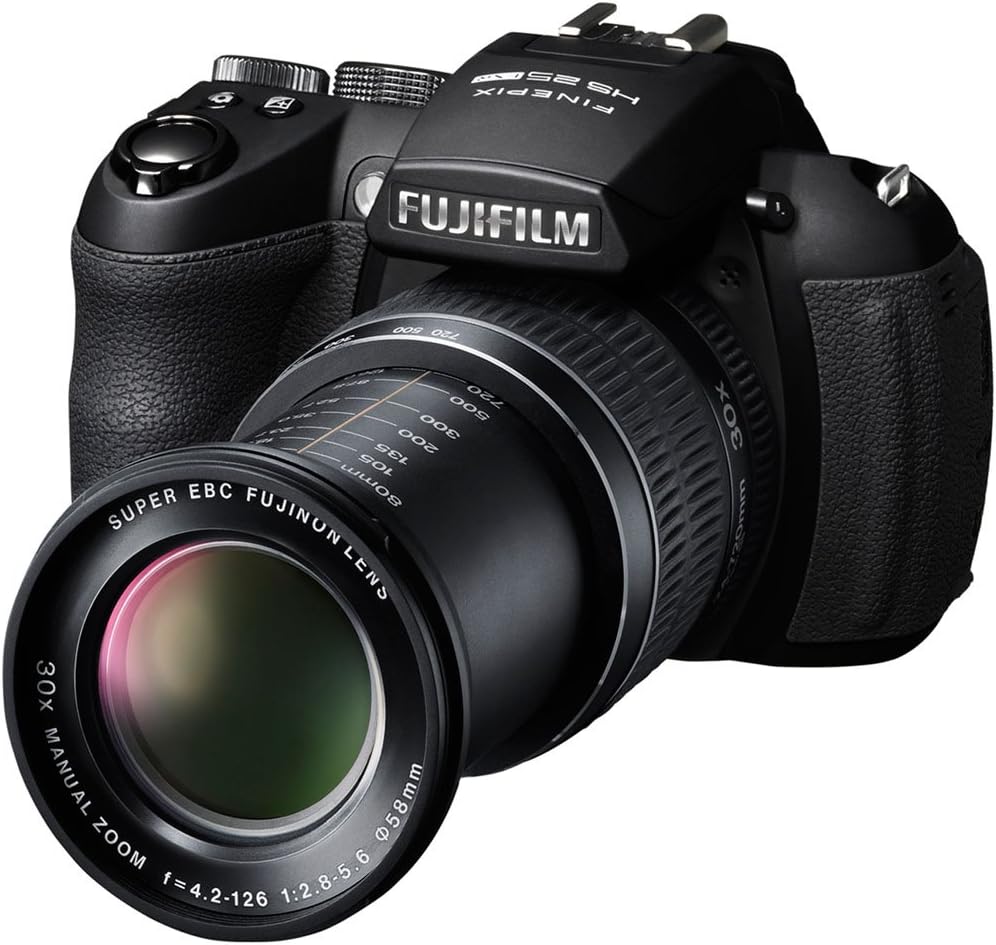
Figure 2: The camera with its 30x optical zoom lens extended, ready for use.
2. Inserting a Memory Card
The camera uses SD, SDHC, or SDXC memory cards (sold separately) to store photos and videos.
- Locate the memory card slot, typically next to the battery compartment or on the side of the camera.
- Insert the memory card with the label facing the correct direction, pushing it gently until it clicks into place.
- To remove, push the card in again until it springs out slightly, then pull it out.
3. Initial Power On and Date/Time Setting
After installing batteries and a memory card:
- Press the ON/OFF button to power on the camera.
- The first time you power on, you may be prompted to set the date and time. Follow the on-screen instructions using the directional pad and MENU/OK button.
Operating the Camera
1. Basic Photography Modes
Rotate the mode dial (located on the top of the camera) to select your desired shooting mode:
- AUTO (SR AUTO): The camera automatically detects the scene and optimizes settings.
- P (Program AE): Camera sets aperture and shutter speed, but you can adjust other settings.
- A (Aperture-Priority AE): You set the aperture, camera sets shutter speed.
- S (Shutter-Priority AE): You set the shutter speed, camera sets aperture.
- M (Manual): You control both aperture and shutter speed.
- EXR: Utilizes the EXR CMOS sensor for enhanced image quality in various conditions (e.g., high resolution, wide dynamic range, high sensitivity/low noise).
- SP (Scene Position): Choose from various scene modes like Portrait, Landscape, Sport, Night, Beach, etc.
- Movie: For recording videos.

Figure 3: Top view of the camera, highlighting the mode dial and manual zoom lens.
2. Focusing and Zooming
- Zoom: The HS25EXR features a 30x manual optical zoom lens. Rotate the zoom ring on the lens to adjust the focal length.
- Autofocus (AF): Half-press the shutter button to activate autofocus. The camera will focus on the subject in the selected AF area.
- Manual Focus (MF): In manual focus mode, rotate the focus ring on the lens to adjust focus. Use the focus assist features on the LCD or EVF for precision.
3. Using the LCD Monitor and Electronic Viewfinder (EVF)
The camera is equipped with a 3-inch tilting LCD monitor and an electronic viewfinder.
- Tilting LCD: The LCD can be tilted for comfortable shooting from various angles, including low-angle and high-angle shots.
- EVF/LCD Button: Press the EVF/LCD button to switch between the electronic viewfinder and the LCD monitor.

Figure 4: Rear view of the camera, showing the LCD monitor and control buttons.

Figure 5: The camera with its tilting LCD screen extended for flexible viewing angles.
4. Recording Full HD Movies
To record videos:
- Rotate the mode dial to the Movie position.
- Press the movie record button (usually a red dot icon) to start and stop recording.
- The camera supports 1080p Full HD video recording.
Maintenance
1. Cleaning the Camera
- Camera Body: Use a soft, dry cloth to wipe the camera body. For stubborn dirt, lightly dampen the cloth with water or a mild cleaning solution.
- Lens: Use a lens brush or blower to remove dust. For smudges, use a lens cleaning cloth and lens cleaning fluid. Avoid touching the lens surface with your fingers.
- LCD Monitor: Gently wipe with a soft, dry cloth. Do not apply pressure.
2. Battery Care
- Remove batteries when the camera will not be used for an extended period.
- Store batteries in a cool, dry place.
- If using rechargeable batteries, follow the manufacturer's charging instructions.
3. Storage
Store the camera in a dry, well-ventilated area, away from direct sunlight, high temperatures, and humidity. Use a camera bag to protect it from dust and physical damage.
Troubleshooting
| Problem | Possible Cause / Solution |
|---|---|
| Camera does not power on. |
|
| Images are blurry or out of focus. |
|
| Images are grainy or noisy. |
|
| Memory card error. |
|
| Flash does not fire. |
|
For further assistance, please refer to the official Fujifilm support resources.
Specifications
| Feature | Detail |
|---|---|
| Model Name | HS25EXR |
| Photo Sensor Resolution | 16 MP |
| Photo Sensor Technology | CMOS (EXR CMOS) |
| Optical Zoom | 30x |
| Minimum Focal Length | 24 Millimeters (equivalent) |
| Maximum Focal Length | 720 Millimeters (equivalent) |
| Maximum Aperture | f/2.8 |
| Image Stabilization | Sensor-shift |
| Screen Size | 3 Inches |
| Display Fixture Type | Tilting LCD |
| Viewfinder | Electronic |
| Video Resolution | 1920 x 1080 (30 fps), 1280 x 720 (60 fps) |
| Supported File Format | JPEG, RAW |
| Power Source | 4 x AA Batteries |
| Connectivity Technology | HDMI, USB |
| Memory Card Type | SD, SDHC, SDXC |
| Item Weight | 2.55 Pounds (approx. 1.16 kg) |
Warranty Information
This product comes with a Limited 1-year parts and labor warranty from the manufacturer, Fujifilm. Please retain your proof of purchase for warranty claims. The warranty covers defects in materials and workmanship under normal use. It does not cover damage caused by misuse, accidents, unauthorized repairs, or normal wear and tear.
For detailed terms and conditions, please refer to the warranty card included with your product or visit the official Fujifilm support website.
Support and Contact
For technical support, service, or additional information regarding your Fujifilm FinePix HS25EXR camera, please visit the official Fujifilm website:
You may also find FAQs and driver downloads on their support pages.


