
1. Product Overview
This manual provides detailed instructions for the installation, operation, and maintenance of the CES SPDT (Single-Pole, Double-Throw) Push Button Switch with ON-ON functionality. This robust switch is designed for panel mounting and features quick connect terminals for ease of installation.
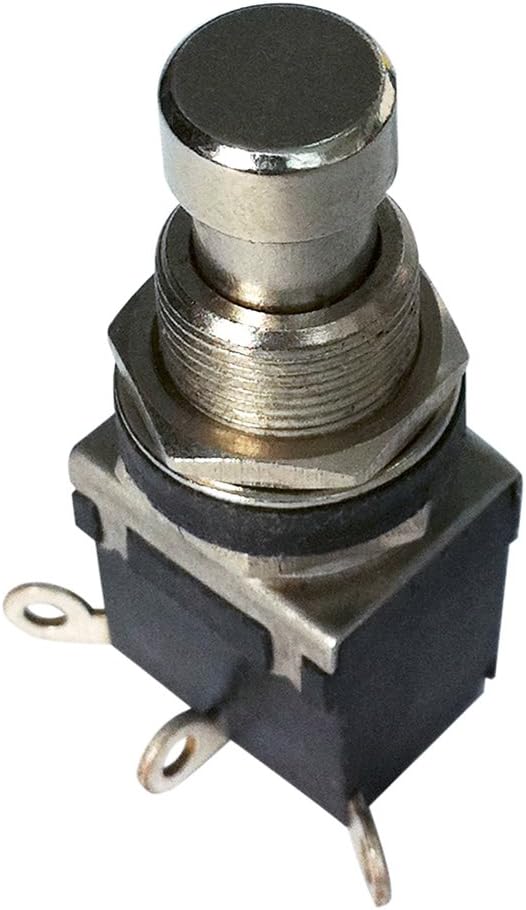
Figure 1: A close-up view of the CES SPDT Push Button Switch, showing its metal button, threaded panel mount shaft, and quick connect terminals at the base.
2. Setup and Installation
Proper installation is crucial for the reliable operation of the switch. Follow these steps carefully:
- Panel Mounting: Identify a suitable location on your panel for mounting. The switch requires a circular cutout for its threaded shaft. Secure the switch using the provided nut and washer on the panel. Ensure the switch is firmly seated to prevent rotation.
- Wiring Connections: The switch features quick connect terminals. Identify the common (COM), normally open (NO), and normally closed (NC) terminals.
- Common (COM): This is the input terminal where power is supplied.
- Normally Open (NO): When the button is in its default (unpressed) ON position, this terminal is connected to COM. When pressed to the other ON position, the connection to COM is broken.
- Normally Closed (NC): When the button is in its default (unpressed) ON position, this terminal is disconnected from COM. When pressed to the other ON position, this terminal is connected to COM.
- Secure Connections: Use appropriate quick connect terminals (spade connectors) on your wires to ensure a secure and reliable electrical connection. Verify all connections are tight and correctly polarized if applicable.
3. Operating Instructions
The CES SPDT Push Button Switch is an ON-ON type, meaning it has two stable operating positions. It is a latching switch, maintaining its state after the button is pressed and released.
- First ON Position: When the button is in its initial or first stable position, the common terminal is connected to one of the output terminals (e.g., NO).
- Second ON Position: Press the button to actuate the switch. The button will latch into its second stable position. In this state, the common terminal is now connected to the other output terminal (e.g., NC).
- Switching States: To return to the first ON position, press the button again. The switch will toggle between these two states with each press.
4. Maintenance
The CES SPDT Push Button Switch is constructed from durable metal and requires minimal maintenance. Regular inspection can help ensure its longevity and reliable performance.
- Cleaning: If necessary, gently wipe the exterior of the switch with a clean, dry cloth. Avoid using abrasive cleaners or solvents that could damage the metal finish or internal components.
- Inspection: Periodically check the wiring connections to ensure they remain secure. Inspect the switch for any signs of physical damage, corrosion, or loose components.
- Environmental Conditions: Ensure the switch is operated within its specified environmental conditions to prevent premature wear or failure.
5. Troubleshooting
If you experience issues with your SPDT Push Button Switch, consider the following troubleshooting steps:
- No Functionality:
- Verify that power is supplied to the common terminal.
- Check all wiring connections for looseness or incorrect wiring.
- Ensure the switch is properly seated in its panel mount and not obstructed.
- Intermittent Operation:
- Inspect for loose or corroded terminals. Clean or re-secure connections as needed.
- Ensure the switch mechanism is not binding or sticking.
- Switch Not Latching:
- If the switch does not maintain its ON-ON state after pressing, the internal latching mechanism may be damaged. Replacement may be necessary.
If problems persist after attempting these steps, contact customer support for further assistance.
6. Specifications
| Feature | Specification |
|---|---|
| Brand | CES |
| Model Type | SPDT Push Button Switch (ON-ON) |
| Mounting Type | Panel Mount |
| Material | Metal |
| Terminal Type | SPDT |
| Connector Type | Quick Connect |
| Contact Material | Metal |
| Operating Voltage | 125 Volts |
| Operation Mode | Push Button (Latching) |
| Manufacturer | CES |
| ASIN | B006M63PB2 |
| Date First Available | December 14, 2011 |
7. Warranty and Support
For information regarding product warranty, please refer to the terms and conditions provided by the original seller or manufacturer at the time of purchase. Warranty details can often be found on the product packaging or the seller's website.
If you require technical support, have questions about installation, or need assistance with troubleshooting beyond the scope of this manual, please contact the seller or manufacturer directly. Provide your product model number (SPDT Push Button Switch ON-ON) and ASIN (B006M63PB2) when seeking support to expedite the process.


