
1. Introduction
The CanDo Magneciser Table-Top Exerciser is designed to provide magnetic, bi-directional resistance for exercising the muscles and joints of the shoulder, arm, and wrist. This device is suitable for rehabilitation, strengthening, and improving range of motion. Its compact design allows for convenient table-top use.
Key features include:
- Ultra-quiet magnetic resistance for smooth operation.
- Bi-directional movement to engage various muscle groups.
- Adjustable arm length (13 to 22 inches) to customize the arc of motion.
- Integrated 5-function digital LCD display for tracking progress.
- Ergonomic grips for comfortable use.
- Non-skid molded feet for stability during exercise.
2. Important Safety Information
Please read all instructions carefully before using the CanDo Magneciser. Failure to follow these instructions may result in injury or damage to the product.
- Consult a Physician: Always consult with a healthcare professional or physical therapist before starting any new exercise program, especially if you have pre-existing medical conditions or are recovering from an injury.
- Proper Placement: Place the Magneciser on a stable, flat, and non-slip surface, such as a sturdy table. Ensure adequate space around the unit for safe operation.
- Supervision: Children and individuals with limited physical or cognitive abilities should be supervised when using the device.
- Inspect Before Use: Before each use, inspect the unit for any signs of damage or wear. Do not use if any parts are loose, damaged, or missing.
- Adjust Resistance Carefully: Adjust the resistance gradually. Do not force the movement or overexert yourself. Stop exercising immediately if you experience pain, dizziness, or discomfort.
- Weight Limit: This device is designed for arm and shoulder exercises. Do not stand on the unit or apply excessive weight beyond its intended use.
- Cleaning: Clean the unit with a damp cloth only. Do not use abrasive cleaners or immerse the unit in water.
- Proposition 65 Warning: This product may contain chemicals known to the State of California to cause cancer and birth defects or other reproductive harm.
3. Package Contents
Verify that all components are present and in good condition upon opening the package.
- CanDo Magneciser Table-Top Exerciser Unit
- Digital LCD Display (pre-installed)
- 2 x AA Batteries (for display, typically included)
- Instruction Manual (this document)
4. Setup and Assembly
The CanDo Magneciser requires minimal assembly.
- Unpack the Unit: Carefully remove all components from the packaging.
- Position the Unit: Place the Magneciser on a stable, flat table or surface. Ensure the non-skid feet are firmly in contact with the surface to prevent movement during use.

Image 1: Proper placement of the CanDo Magneciser on a table. A user is shown holding the handle, demonstrating how the device is used for arm and shoulder exercises.
- Adjust Arm Length: The arm of the exerciser can be adjusted from 13 to 22 inches to modify the arc of the horizontal shoulder wheel. Loosen the adjustment knob on the arm, slide the arm to the desired length, and then tighten the knob securely.
- Check Batteries: The digital LCD display requires 2 AA batteries. These are typically pre-installed. If the display is not functioning, check the battery compartment (usually on the side or back of the display unit) and replace batteries if necessary, ensuring correct polarity.
5. Operating Instructions
Follow these steps to use your CanDo Magneciser effectively.
- Power On: The digital display typically activates automatically when movement is detected or by pressing a button (if available).
- Adjust Resistance: Locate the resistance knob on the unit. Turn the knob clockwise to increase resistance and counter-clockwise to decrease resistance. Start with a low resistance level and gradually increase as your strength improves.
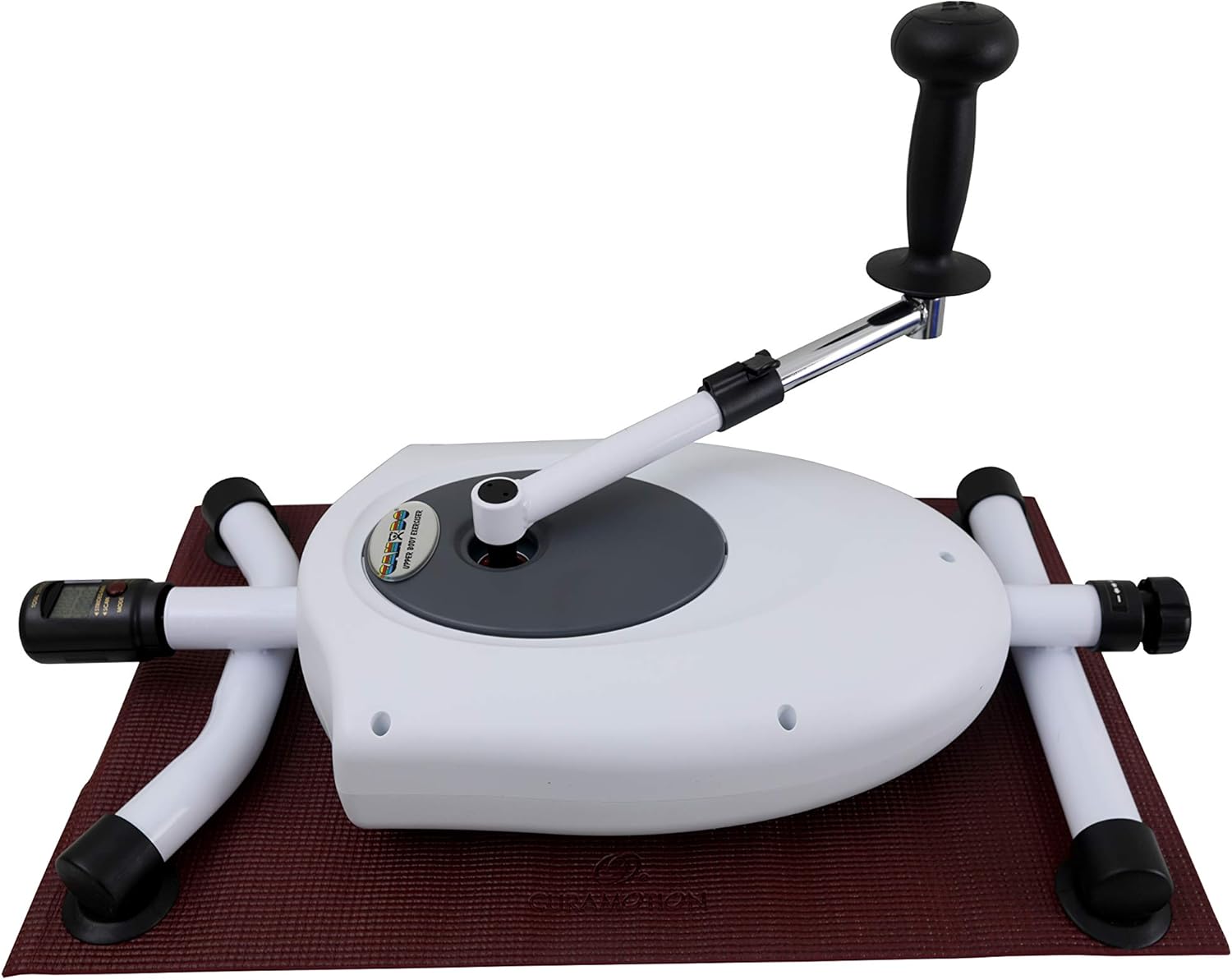
Image 2: Overview of the CanDo Magneciser, highlighting the main components including the resistance knob and digital display.
- Begin Exercise: Grip the ergonomic handle firmly. Begin rotating the arm in a smooth, controlled motion. The bi-directional resistance allows for both forward and backward rotation.
- Monitor Progress: The 5-function digital LCD display will show:
- Speed: Current rotation speed.
- Elapsed Time: Duration of your exercise session.
- Calories: Estimated calories burned.
- Distance: Equivalent distance traveled (for cycling-like motion).
- Scan: Automatically cycles through all functions.
- End Exercise: When finished, slowly reduce your speed and stop. The display may automatically turn off after a period of inactivity to conserve battery life.
6. Maintenance
Regular maintenance ensures the longevity and optimal performance of your Magneciser.
- Cleaning: Wipe down the unit with a soft, damp cloth after each use to remove sweat and dust. Do not use harsh chemicals or abrasive cleaners.
- Storage: Store the Magneciser in a cool, dry place away from direct sunlight and extreme temperatures.
- Battery Replacement: If the digital display becomes dim or stops working, replace the 2 AA batteries. Open the battery compartment, remove old batteries, and insert new ones, observing correct polarity (+/-).
- Inspection: Periodically check all moving parts and connections for any signs of wear, looseness, or damage. If any issues are found, discontinue use and contact customer support.
7. Troubleshooting
| Problem | Possible Cause | Solution |
|---|---|---|
| Digital display not working. | Dead or incorrectly installed batteries. | Replace the 2 AA batteries, ensuring correct polarity. |
| No resistance or resistance too low/high. | Resistance knob not adjusted correctly. | Turn the resistance knob clockwise to increase resistance or counter-clockwise to decrease it. |
| Unit slides on table during use. | Unstable surface or non-skid feet not properly engaged. | Ensure the unit is placed on a flat, stable, and non-slip surface. Check that the non-skid feet are clean and making full contact. |
| Unusual noise during operation. | Loose component or internal issue. | Discontinue use immediately. Inspect for loose parts. If noise persists, contact customer support. |
8. Specifications
- Model Number: 10-0714
- Product Dimensions: 15 x 11 x 38 inches
- Item Weight: 24.8 Pounds
- Brand: CanDo
- Color: White
- Material: Contains Latex
- Controls Type: Knob (for resistance adjustment)
- Display: 5-function digital LCD (Speed, Elapsed Time, Calories, Distance, Scan)
- Power Source (Display): 2 x AA Batteries
- Arm Adjustment Range: 13 to 22 inches
9. Warranty and Customer Support
For warranty information or technical assistance, please contact CanDo customer support.
- Manufacturer: CanDo
- Contact Number: 1-800-431-2830
- Website: Visit the CanDo Store on Amazon (for general product information)
Please have your model number (10-0714) and purchase date available when contacting support.
