
Introduction
Welcome to the user manual for your new Gucci 114 Series Digital Watch. This timepiece combines sophisticated design with practical digital functionality. Please read this manual carefully to understand the features and proper operation of your watch.
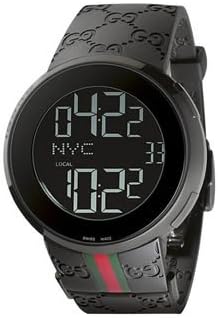
Figure 1: Front view of the Gucci 114 Series Digital Watch, showcasing its black digital display and signature black rubber strap.
The Gucci 114 Digital series features a solid stainless steel case, a black digital display dial with dual time and date features, and a beautiful scratch-resistant sapphire crystal. The watch is water resistant up to 30 meters and is fitted with a comfortable black rubber strap with a special deployment clasp.
Setup
Initial Inspection
- Carefully remove the watch from its packaging.
- Inspect the watch for any visible damage.
- Ensure all protective films are removed from the display and case back.
Setting Time and Date
Your Gucci 114 Series Digital Watch typically features multiple buttons for navigation and setting. While specific button functions may vary slightly, the general procedure for setting time and date involves:
- Pressing a designated button (often labeled 'Mode' or 'Set') to enter the setting mode.
- Using other buttons (e.g., 'Adjust', 'Forward', 'Backward') to change the flashing digits for hours, minutes, year, month, and day.
- Pressing the 'Mode' or 'Set' button again to confirm each setting and move to the next, or to exit the setting mode.
Refer to the markings on your specific watch for precise button identification.
Operating Instructions
Display Modes
The watch can display various information. Typically, a 'Mode' button allows you to cycle through:
- Current Time (main display)
- Date (Day, Month, Year)
- Dual Time (if configured)
- Other functions like stopwatch or alarm (if available on your specific model).
Using the Dual Time Feature
To set and view the dual time, navigate to the dual time display mode. Use the adjustment buttons to set the second time zone. This feature is useful for travelers or those who need to track time in two different locations simultaneously.
Care and Maintenance
Cleaning Your Watch
To maintain the appearance of your watch, wipe the case and strap regularly with a soft, dry cloth. For stubborn dirt, a slightly damp cloth can be used, followed by immediate drying. Avoid using harsh chemicals or abrasive materials.
Water Resistance
Your Gucci 114 Series Digital Watch is water resistant up to 30 meters (3 ATM). This means it is suitable for everyday use and can withstand splashes or brief immersion in water. It is not suitable for swimming, showering, or diving. Avoid operating buttons when the watch is wet.
Battery Replacement
When the display dims or stops functioning, the battery may need replacement. It is recommended to have the battery replaced by a qualified watch technician to ensure proper sealing and maintain water resistance.
Strap Care
The black rubber strap is designed for durability and comfort. To prolong its life, avoid prolonged exposure to direct sunlight, extreme temperatures, and harsh chemicals. Clean the strap with mild soap and water if necessary, and dry thoroughly.
Troubleshooting
| Problem | Possible Cause | Solution |
|---|---|---|
| Display is blank or dim | Low or dead battery | Replace battery (professional service recommended). |
| Time is incorrect | Time not set correctly; accidental button press | Refer to 'Setting Time and Date' section to reset. |
| Buttons are unresponsive | Watch may be in a locked mode; internal malfunction | Try pressing all buttons to see if it unlocks. If issue persists, seek professional service. |
Product Specifications
- Brand: Gucci
- Model: YA114207
- Case Material: Solid Stainless Steel
- Case Diameter: 44mm
- Case Thickness: 12mm
- Display Type: Digital
- Crystal: Scratch-Resistant Sapphire
- Water Resistance: 30 meters (3 ATM)
- Strap Material: Black Rubber
- Clasp Type: Special Deployment Clasp
- Origin: Made in SWITZERLAND
Warranty and Support
Your Gucci 114 Series Digital Watch is covered by a manufacturer's warranty against defects in materials and workmanship. The duration and terms of the warranty are typically provided with your purchase documentation. Please retain your proof of purchase for warranty claims.
For technical support, service, or warranty inquiries, please contact the authorized Gucci service center or the retailer from whom you purchased the watch. Contact information can usually be found on the warranty card or the official Gucci website.
