
1. Introduction and Overview
This manual provides comprehensive instructions for the operation, setup, and maintenance of your Genie D69 Plus 12-Digit Printing Calculator. Designed for professional use, this desktop calculator offers a range of advanced functions for efficient financial calculations.
Key features include a 12-digit display, two-color printing (red and black), and specialized business functions such as percentage, sign change, memory, currency conversion, control calculation, double-key, correction, mark-up, and Grand Total (GT) functions. The calculator operates at a speed of 2.7 lines per second.

2. Setup
2.1 Power Connection
Connect the calculator to a standard AC power outlet using the provided power adapter. Ensure the power switch is in the "OFF" position before connecting or disconnecting the power cord.
2.2 Installing the Paper Roll
- Open the paper roll cover located at the top rear of the calculator.
- Place a new paper roll (size IR 40 T) into the compartment, ensuring the paper feeds from the bottom of the roll.
- Feed the leading edge of the paper through the slot until it emerges above the printing mechanism.
- Close the paper roll cover. Use the FEED button to advance the paper if necessary.

2.3 Installing the Ink Roller/Ribbon
The Genie D69 Plus uses an ink roller (size IR 40 T) for two-color printing. Refer to the diagram inside the ink roller compartment for correct installation. Ensure the ribbon is properly seated to avoid printing errors.
3. Operating Instructions
3.1 Power On/Off and Display
To turn the calculator on, slide the ON/OFF switch to the "ON" position. The 12-digit display will illuminate. To turn off, slide the switch to "OFF".

3.2 Basic Arithmetic Operations
Enter numbers using the numeric keypad. Use the +, -, x (multiply), and ÷ (divide) keys for calculations. Press = to display the result. The C/CE key clears the last entry or the entire calculation.
3.3 Special Functions
- % (Percentage): Calculates percentages.
- +/- (Sign Change): Changes the sign of the displayed number.
- M+, M-, M*, M♦ (Memory Functions): Adds to memory, subtracts from memory, recalls memory, clears memory.
- GT (Grand Total): Accumulates the results of all calculations and displays the grand total.
- COST, SELL, MGN (Cost, Sell, Margin): Dedicated keys for business calculations.
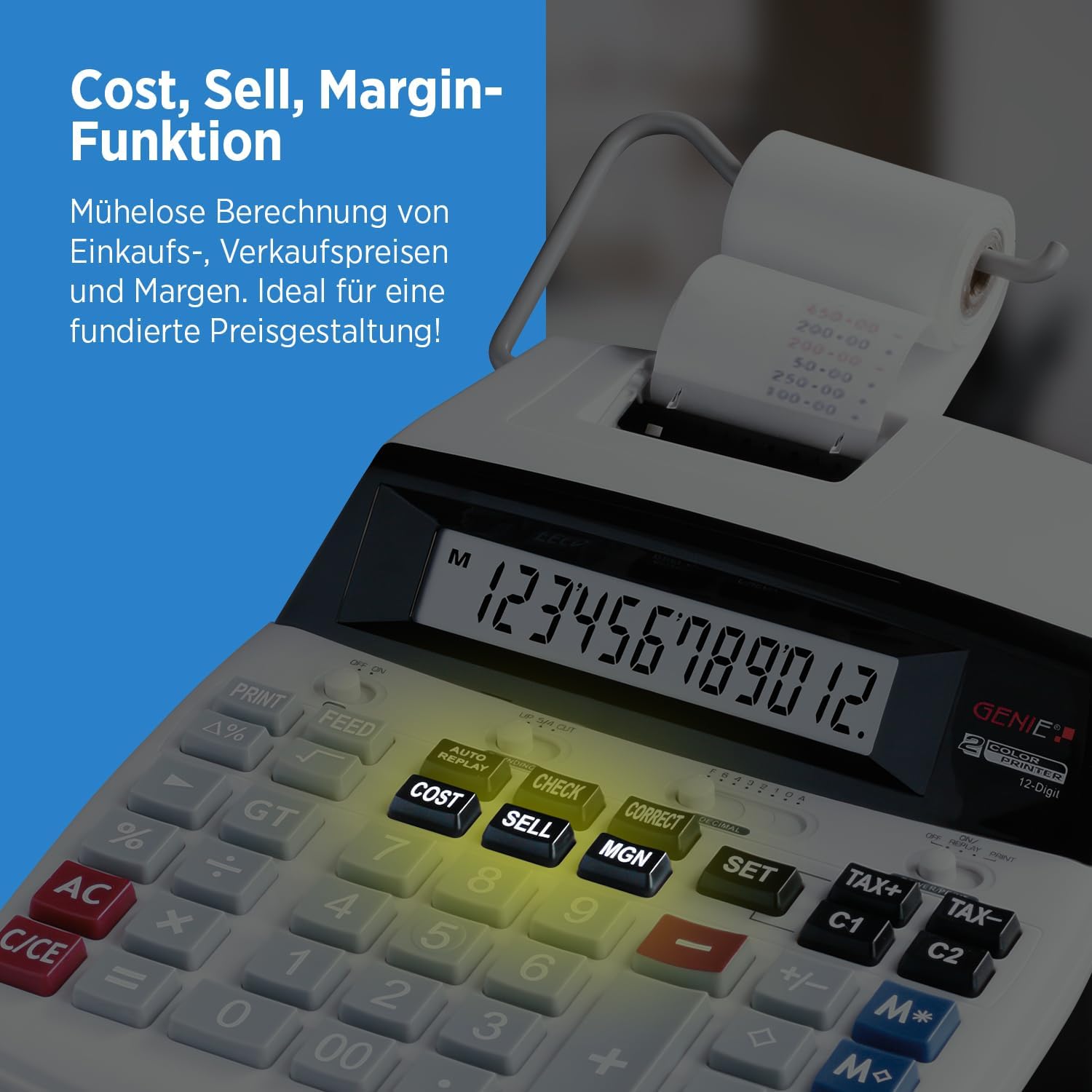
Figure 4: Highlighted Cost, Sell, and Margin keys for quick business calculations. - TAX+, TAX- (Tax Calculation): Adds or subtracts a pre-set tax rate. Use the SET button to configure the tax rate.

Figure 5: Highlighted TAX+, TAX-, and SET keys for tax and currency functions. - CHECK, CORRECT: For reviewing and correcting entries in a calculation sequence.
- Double Zero (00): For quick entry of double zeros.
3.4 Printing Function
The PRINT switch controls the printing function. Set it to "ON" to print calculations, or "OFF" to perform calculations without printing. The FEED button advances the paper roll manually.
4. Maintenance
4.1 Cleaning the Calculator
To clean the calculator, ensure it is powered off and unplugged. Use a soft, dry cloth to wipe the exterior. For stubborn dirt, a slightly damp cloth with mild detergent can be used, followed by a dry cloth. Do not use abrasive cleaners or solvents.
4.2 Replacing Paper Roll and Ink Roller
Replace the paper roll and ink roller when they run out or when print quality deteriorates. Follow the instructions in Section 2.2 and 2.3 for proper replacement. Always use compatible IR 40 T size paper rolls and ink rollers.
5. Troubleshooting
- No Power: Check if the power cord is securely connected to both the calculator and the AC outlet. Ensure the power switch is in the "ON" position.
- No Print/Faint Print: Verify that the paper roll is installed correctly and has sufficient paper. Check if the ink roller is properly installed and has ink. Replace the ink roller if necessary. Ensure the PRINT switch is "ON".
- Paper Jam: Turn off the calculator and carefully remove any jammed paper. Ensure the paper roll is installed correctly and not too tight.
- "Error" on Display: This usually indicates an invalid operation or an overflow. Press C/CE to clear the error and re-enter your calculation.
6. Specifications
| Feature | Detail |
|---|---|
| Model Number | 11891 |
| Display Digits | 12-digit |
| Printing Speed | 2.7 lines/second |
| Print Color | Red & Black (Ink Roller) |
| Ink Roller Type | IR 40 T |
| Paper Roll Type | IR 40 T (or compatible) |
| Dimensions (W x D x H) | 21 x 29 x 7 cm (approx. 8.27 x 11.42 x 2.76 inches) |
| Weight | 0.593 kg (approx. 1.31 lbs) |
| Power Source | AC Power (Adapter included/required) |
| Functions | Percentage, Sign Change, Memory, Currency, Control Calculation, Double-Key, Correction, Mark-up, GT, Cost, Sell, Margin, Tax |
7. Warranty and Support
For warranty information, please refer to the documentation included with your product packaging. For further support or inquiries, please visit the official Genie website:
Please retain your purchase receipt for warranty claims.

