
1. Introduction and Product Overview
The Poolmaster 23243 1-Ounce OTO Indicator Replacement Solution is an essential component for maintaining balanced water chemistry in your swimming pool or spa. This solution is specifically formulated to test for chlorine and bromine levels, providing critical information to ensure water safety and quality. It is designed for use with existing liquid water testing kits or test strips.
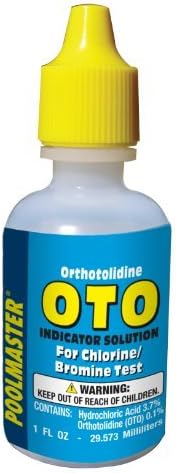
Image: A 1-ounce bottle of Poolmaster OTO Indicator Solution with a yellow cap, labeled for chlorine/bromine testing.
2. Safety Information
This product contains chemicals. Always handle with care and follow all safety precautions. Keep out of reach of children. Avoid contact with skin and eyes. In case of contact, rinse thoroughly with water and seek medical attention if irritation persists. Store in a cool, dry, dark place away from direct sunlight and heat to maintain product integrity.
3. Product Features
- Formulated for maintaining proper water chemistry.
- Tests for chlorine and bromine levels.
- Suitable for use in swimming pool water or spa water.
- Contains 1-ounce of OTO indicator solution.
4. Setup and Preparation
Before using the OTO Indicator Replacement Solution, ensure your water test kit is clean and ready. Rinse the test tubes or vials thoroughly with the water to be tested before collecting samples. This helps prevent contamination and ensures accurate readings. Always refer to the specific instructions provided with your primary water test kit for detailed setup procedures.
5. Operating Instructions
The OTO indicator solution is used to measure the free chlorine and bromine levels in your pool or spa water. Follow these general steps, but always prioritize the instructions from your specific test kit:
- Collect Water Sample: Fill the designated test vial(s) from your pool or spa with water. For best results, collect the sample from elbow-depth, away from return jets.
- Add OTO Solution: Add 5 drops of the Poolmaster OTO Indicator Solution to the test vial designated for chlorine/bromine testing.
- Mix: Securely cap the vial and invert it several times to mix the solution with the water sample. Do not shake vigorously.
- Compare Color: Immediately compare the color of the water sample in the vial to the color chart provided with your test kit. The color will indicate the chlorine or bromine level.
- Record Results: Note down the readings. The ideal range for chlorine is typically 1-4 ppm, and for bromine, it is 2-6 ppm.
Note: For accurate pH test results, chlorine must be below 5.0 ppm or for Bromine below 11.0 ppm.
6. Maintenance and Storage
To ensure the longevity and accuracy of your OTO Indicator Solution, store the bottle in a cool, dry, and dark location. Replace the cap tightly after each use. It is recommended to replace reagents at the beginning of each pool season for optimal accuracy.
7. Troubleshooting
If you encounter unexpected readings or difficulty obtaining clear results:
- Cloudy Sample: Ensure the test vial is clean and free of debris. Collect a fresh water sample.
- No Color Change: Verify that the OTO solution has not expired. Ensure the correct number of drops were added.
- Inconsistent Readings: Re-test the water sample. Ensure proper mixing and comparison under natural daylight.
- High Chlorine/Bromine: If levels are too high, allow time for them to dissipate or follow your pool care professional's advice for reduction.
- Low Chlorine/Bromine: If levels are too low, add appropriate sanitizers as per your pool or spa manufacturer's guidelines.
8. Specifications
| Product Dimensions | 1.5 x 1.5 x 3.25 inches |
| Item Weight | 1.44 ounces |
| Manufacturer | Poolmaster |
| Item Model Number | 23243 |
| Unit Count | 1.0 Fluid Ounces |
| pH Range (Ideal) | 7.2 to 7.8 |
| UPC | 085334232433 |
9. Official Product Videos
Poolmaster Water Test Strips, Kits and Chlorine Dispensers
This video from Poolmaster provides an overview of their water test strips, kits, and chlorine dispensers, demonstrating how these products contribute to effective pool and spa maintenance.
10. Warranty and Support
For specific warranty information or product support, please refer to the packaging of your Poolmaster water test kit or contact Poolmaster customer service directly. Contact details are typically available on the product packaging or the official Poolmaster website.