
1. Introduction
This instruction manual provides important information for the proper installation, operation, and maintenance of your Zodiac Polaris Bumper with Roller Kit, model R0518100. This kit is designed to replace worn or damaged bumper rollers on compatible Zodiac Polaris pool cleaner models, ensuring optimal performance and protection for your pool cleaner and pool surfaces.
2. Safety Information
- Always disconnect the pool cleaner from its power source before performing any maintenance or installation.
- Use only genuine Zodiac replacement parts to ensure compatibility and maintain product warranty.
- Keep small parts away from children.
- If you are unsure about any step, consult a qualified pool technician.
3. Package Contents
Verify that all items are present in your package:
- 2 x Bumper Rollers (Part Number R0518100)
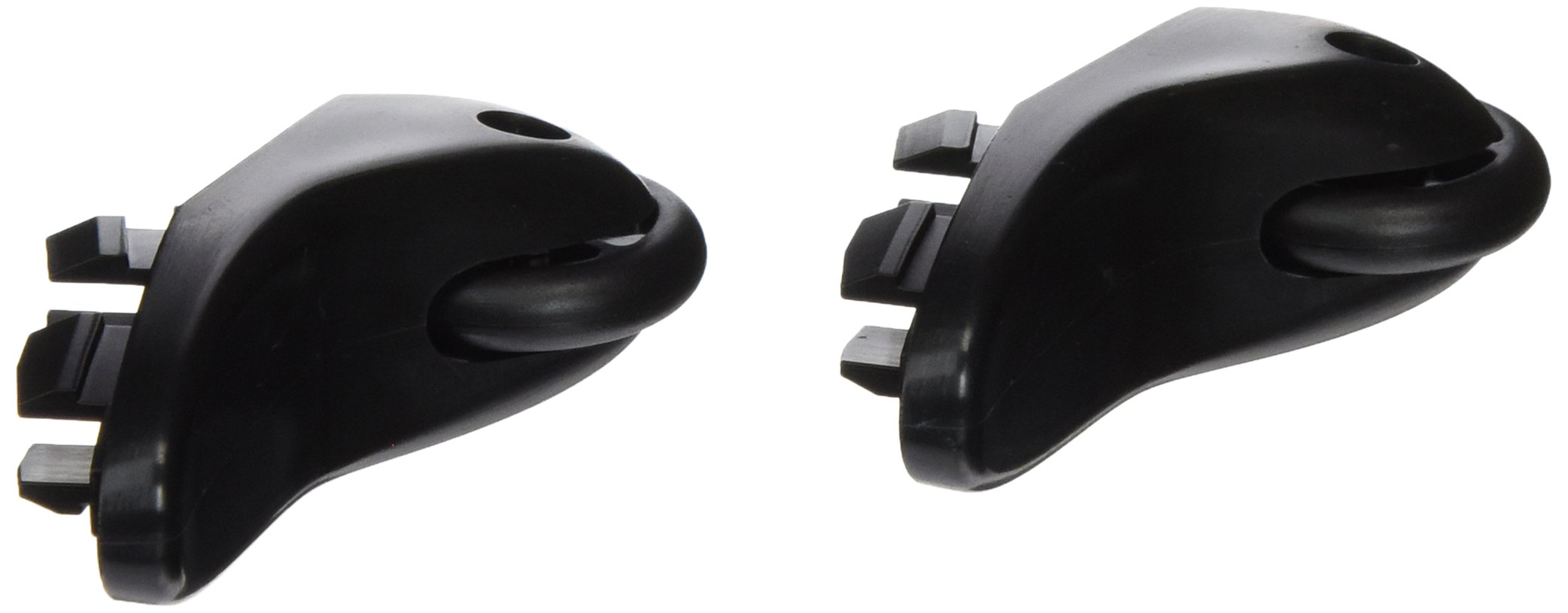
Figure 1: Contents of the Bumper with Roller Kit. The image shows two black bumper rollers, which are essential components for the pool cleaner's navigation and protection.
4. Compatibility
This Bumper with Roller Kit (R0518100) is compatible with the following Zodiac Polaris pool cleaner models:
- Zodiac Polaris 9300 Sport Robotic Pool Cleaner
- Zodiac Polaris 9300xi Sport Robotic Pool Cleaner
Ensure your pool cleaner model matches one of the listed compatible models before proceeding with installation.
5. Installation Instructions
Follow these steps to replace the bumper rollers on your Zodiac Polaris pool cleaner:
- Disconnect Power: Before beginning, ensure your pool cleaner is completely disconnected from its power source and removed from the pool.
- Locate Existing Rollers: Identify the current bumper rollers on your pool cleaner. These are typically located on the front and/or rear bumper sections of the cleaner.
- Remove Old Rollers: Carefully remove the old or damaged bumper rollers. Depending on your specific cleaner model, they may snap into place or be held by a small pin or screw. Use appropriate tools if necessary, taking care not to damage the cleaner's housing.
- Clean Mounting Area: Clean any debris or residue from the areas where the new rollers will be installed.
- Install New Rollers: Align the new R0518100 bumper rollers with the mounting points. Gently press or snap them into place until they are securely seated. Ensure they can rotate freely.
- Verify Installation: Double-check that both new rollers are firmly attached and properly aligned.
- Reconnect Power: Once installation is complete, you may reconnect your pool cleaner to its power source and return it to the pool for operation.
Note: Some users have found that applying a mild sealant can help secure the rollers more firmly, though this is not typically required for proper function.
6. Operation
Once installed, the bumper rollers operate passively as part of your pool cleaner's navigation system. They help the cleaner glide smoothly along pool surfaces and walls, preventing scratches and ensuring efficient cleaning by allowing the cleaner to maneuver effectively around obstacles.
7. Maintenance
- Regular Inspection: Periodically inspect the bumper rollers for signs of wear, cracks, or damage. Replace them if they appear worn to maintain optimal cleaner performance and prevent potential damage to your pool surfaces.
- Cleaning: Rinse the rollers with fresh water after each use to remove any accumulated debris or chemicals.
- Storage: When the pool cleaner is not in use for extended periods, store it in a cool, dry place away from direct sunlight and harsh chemicals.
8. Troubleshooting
| Problem | Possible Cause | Solution |
|---|---|---|
| Rollers fall off easily | Improper installation; worn mounting points; loose fit. | Ensure rollers are fully seated. If mounting points are worn, consider replacing the bumper assembly. A mild, pool-safe sealant can be used to secure them if they repeatedly detach. |
| Cleaner is scratching pool surfaces | Worn or missing bumper rollers. | Inspect rollers for wear. Replace any damaged or missing rollers immediately. |
| Rollers do not spin freely | Debris lodged in roller mechanism; improper installation. | Remove rollers and clean any debris. Reinstall, ensuring no obstructions. |
9. Specifications
- Model Number: R0518100
- Brand: Zodiac
- Material: Metal
- Color: Black
- Weight: Approximately 1 pound (for the kit)
- Quantity: 2 per pack
- UPC: 738919070110
10. Warranty and Support
For warranty information or technical support, please refer to the documentation provided with your original Zodiac Polaris pool cleaner or visit the official Zodiac website. Always use genuine Zodiac replacement parts to ensure compatibility and maintain your product's warranty.
Zodiac Official Website: www.zodiac.com