
Introduction
Thank you for choosing the Fagor 6H-175Bx Built-in Electric Oven with Grill. This manual provides essential information for the safe and efficient use, installation, and maintenance of your appliance. Please read these instructions carefully before using the oven and keep them for future reference.
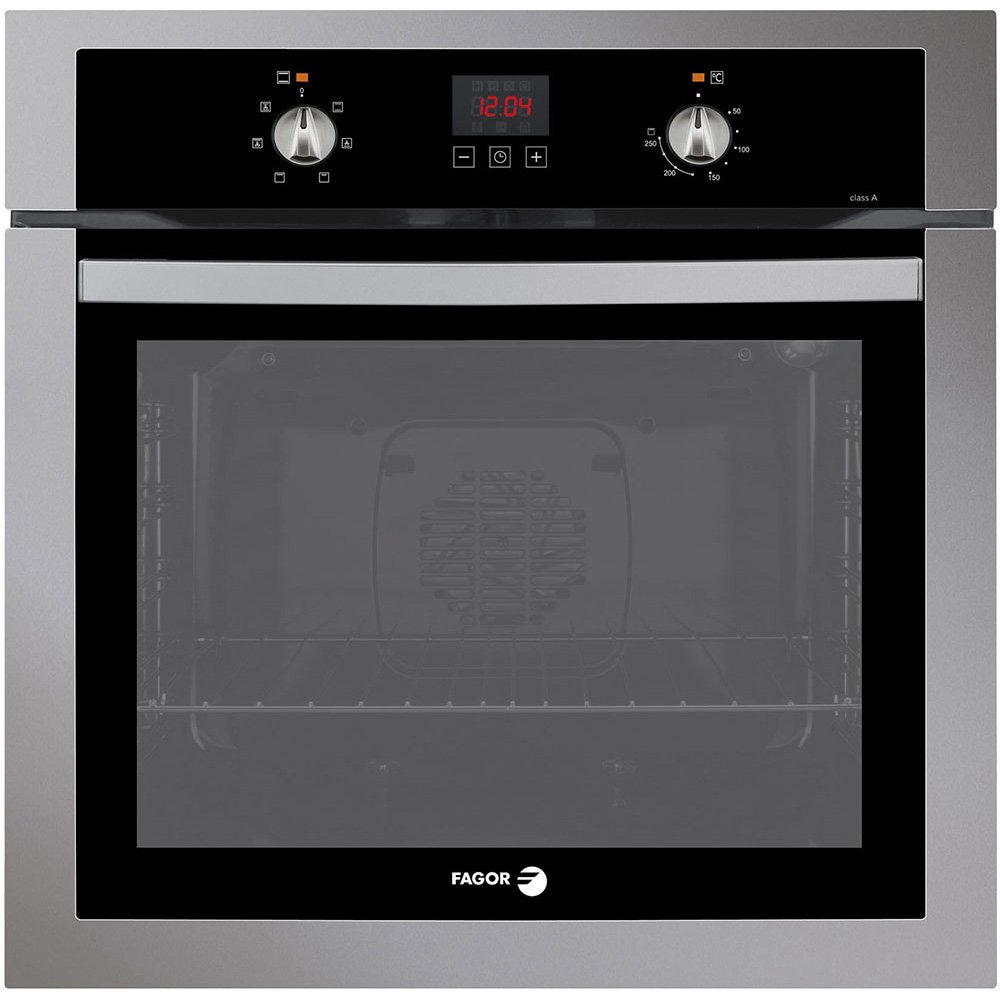
Image: Front view of the Fagor 6H-175Bx Built-in Electric Oven with Grill, showcasing its sleek silver finish and digital display.
Important Safety Instructions
Always follow basic safety precautions when using electrical appliances to reduce the risk of fire, electric shock, and injury to persons.
- Read all instructions before using the appliance.
- Ensure the oven is properly installed and grounded by a qualified technician.
- Do not touch hot surfaces. Use oven mitts or pot holders.
- Never use the oven for heating a room.
- Keep children away from the oven during operation.
- Do not store flammable materials in or near the oven.
- Disconnect power before servicing or cleaning.
Setup and Installation
This section provides guidelines for the proper installation of your Fagor 6H-175Bx oven. Professional installation is recommended.
Unpacking
- Carefully remove all packaging materials.
- Inspect the oven for any damage. If damaged, do not install and contact your retailer.
- Keep packaging materials away from children.
Electrical Connection
- Ensure the electrical supply matches the voltage and frequency specified on the rating plate.
- The oven must be properly grounded.
- Do not use extension cords or adapters.
Mounting the Oven
The Fagor 6H-175Bx is designed for built-in installation. Ensure the cabinet opening dimensions are appropriate for the oven. Secure the oven using the provided screws and mounting brackets.
Operating Instructions
Your Fagor 6H-175Bx oven features a digital display and multiple cooking functions for versatile meal preparation.
Control Panel Overview
The control panel includes a digital display for time and settings, and various knobs/buttons for function selection and temperature control.
Setting the Time
Upon first use or after a power outage, the clock will need to be set. Refer to the specific instructions in your full manual for detailed steps on setting the digital clock.
Cooking Functions (6 Multi-Cooking Programs)
The oven offers 6 traditional cooking programs. Rotate the function selector knob to choose your desired cooking mode. Common modes include:
- Conventional Cooking: Top and bottom heating elements for general baking and roasting.
- Grill: For browning and toasting.
- Bottom Heat: For crisping bases.
- Defrost: Gentle air circulation for thawing food.
- (Other programs may include Fan-assisted cooking, etc. Consult the full manual for details.)
Setting Temperature and Time
- Select the desired cooking function.
- Rotate the temperature knob to set the desired temperature.
- Use the programmable start/stop button to set cooking duration or delayed start. The digital display will show the set time.
- The oven will begin heating. An indicator light will typically show when the oven is preheating and when it reaches the set temperature.
Using the Grill
Place food on the deep enamel tray, ideal for grilling, or on the chrome side racks. Position the tray at the appropriate level using the pull-out system. Ensure the oven door is sealed during grilling unless otherwise specified by the function.
Care and Maintenance
Regular cleaning and maintenance will ensure the longevity and optimal performance of your Fagor 6H-175Bx oven.
Cleaning the Oven Interior
The oven features an AquaSliding easy-clean enamel coating, making manual cleaning easier. For best results:
- Allow the oven to cool completely before cleaning.
- Remove the removable chrome side racks and the deep enamel tray for separate cleaning.
- Wipe the interior surfaces with a damp cloth and mild detergent. Avoid abrasive cleaners.
- For stubborn stains, use a specialized oven cleaner suitable for enamel surfaces, following the product instructions.
- The top surface is also designed for easy cleaning.
Cleaning the Oven Exterior
Wipe the exterior surfaces with a soft, damp cloth. For stainless steel or polished finishes, use a non-abrasive cleaner specifically designed for these materials.
Replacing the Oven Light
Ensure the oven is disconnected from the power supply before attempting to replace the oven light bulb. Refer to the full manual for specific instructions on accessing and replacing the bulb.
Troubleshooting Guide
Before contacting customer service, please consult this section for common issues and their solutions.
| Problem | Possible Cause | Solution |
|---|---|---|
| Oven does not heat. | No power supply; incorrect settings; tripped circuit breaker. | Check power connection; ensure oven is plugged in; verify circuit breaker; check function and temperature settings. |
| Food not cooking evenly. | Incorrect rack position; oven door not sealed properly; temperature calibration issue. | Adjust rack position; ensure door is fully closed; contact service if problem persists. |
| Digital display not working. | Power interruption; internal fault. | Check power supply; reset oven by turning off and on at the main switch; if issue persists, contact service. |
| Excessive smoke during cooking. | Food spills; excessive fat/grease; incorrect temperature. | Clean oven interior thoroughly; reduce fat content; adjust cooking temperature. |
If the problem persists after attempting these solutions, please contact Fagor customer support.
Product Specifications
| Feature | Detail |
|---|---|
| Brand | Fagor |
| Model Number | 6H-175Bx |
| Color | Silver |
| Finish Type | Polished |
| Fuel Type | Electric |
| Installation Type | Built-in |
| Special Features | Programmable |
| Capacity | 60 Liters |
| Manufacturer | Fagor |
| GTIN | 08413880204871 |
| ASIN | B006GM734M |
Warranty and Support
Fagor provides a manufacturer's warranty for this product. Please refer to the warranty card included with your purchase for specific terms and conditions, including warranty period and coverage details.
Customer Support
For technical assistance, service requests, or to inquire about replacement parts, please contact Fagor customer support. Contact information can typically be found on the Fagor official website or in the documentation provided with your appliance.
When contacting support, please have your model number (6H-175Bx) and purchase date readily available.


