
1. Introduction
This manual provides instructions for the assembly, operation, and maintenance of the Supereyes Z001 Adjustable Stand. This stand is designed to provide stable support and adjustable positioning for compatible handheld digital microscopes and similar devices, enhancing precision during observation and work.
2. Safety Information
- Ensure all components are securely fastened before use to prevent accidental tipping or damage to attached devices.
- Do not overtighten screws, as this may damage the stand or its components.
- Keep the stand on a stable, level surface during operation.
- This product is not a toy. Keep out of reach of children.
- Handle with care to avoid pinching fingers during adjustment.
3. Package Contents
Verify that all the following components are present in your package:
- Base Plate
- Vertical Support Rod
- Microscope Holder (Adjustable Clamp)
- Mounting Screw
- Small Hook (for cable management or hanging)

Figure 3.1: All components of the Supereyes Z001 Adjustable Stand, including the base plate, vertical rod, microscope holder, mounting screw, and small hook.
4. Setup and Assembly
Follow these steps to assemble your Supereyes Z001 Adjustable Stand:
- Attach the Vertical Support Rod to the Base Plate:
Locate the threaded hole on the base plate and the bottom of the vertical support rod. Insert the mounting screw through the hole in the base plate and screw it into the bottom of the vertical rod. Tighten securely with a screwdriver (not included) until the rod is stable, but do not overtighten.
- Attach the Microscope Holder:
Slide the microscope holder onto the vertical support rod. The holder has a knob on the side that allows it to be tightened at various heights along the rod. Position it at a suitable height for initial use.
- Attach the Small Hook (Optional):
The small hook can be inserted into the top of the vertical support rod. This hook can be used for cable management or to hang small accessories.

Figure 4.1: The Supereyes Z001 Stand fully assembled, showing the base, vertical rod, and microscope holder.
5. Operating Instructions
This section details how to use the Supereyes Z001 Adjustable Stand with your compatible digital microscope.
- Mounting the Microscope:
Open the adjustable clamp on the microscope holder. Carefully insert your handheld digital microscope into the clamp. Ensure the microscope is centered and stable within the clamp. Tighten the knob on the clamp to secure the microscope firmly in place. Do not overtighten.
- Adjusting Height:
To adjust the height of the microscope, loosen the knob on the side of the microscope holder. Slide the holder up or down the vertical support rod to the desired position. Once the desired height is achieved, tighten the knob to lock the holder in place.
- Positioning the Object:
Place the object you wish to observe directly beneath the microscope's lens on the base plate or a separate work surface. Adjust the microscope's height and focus as needed for clear viewing.

Figure 5.1: The Supereyes Z001 Stand holding a device, demonstrating its use for stable observation.
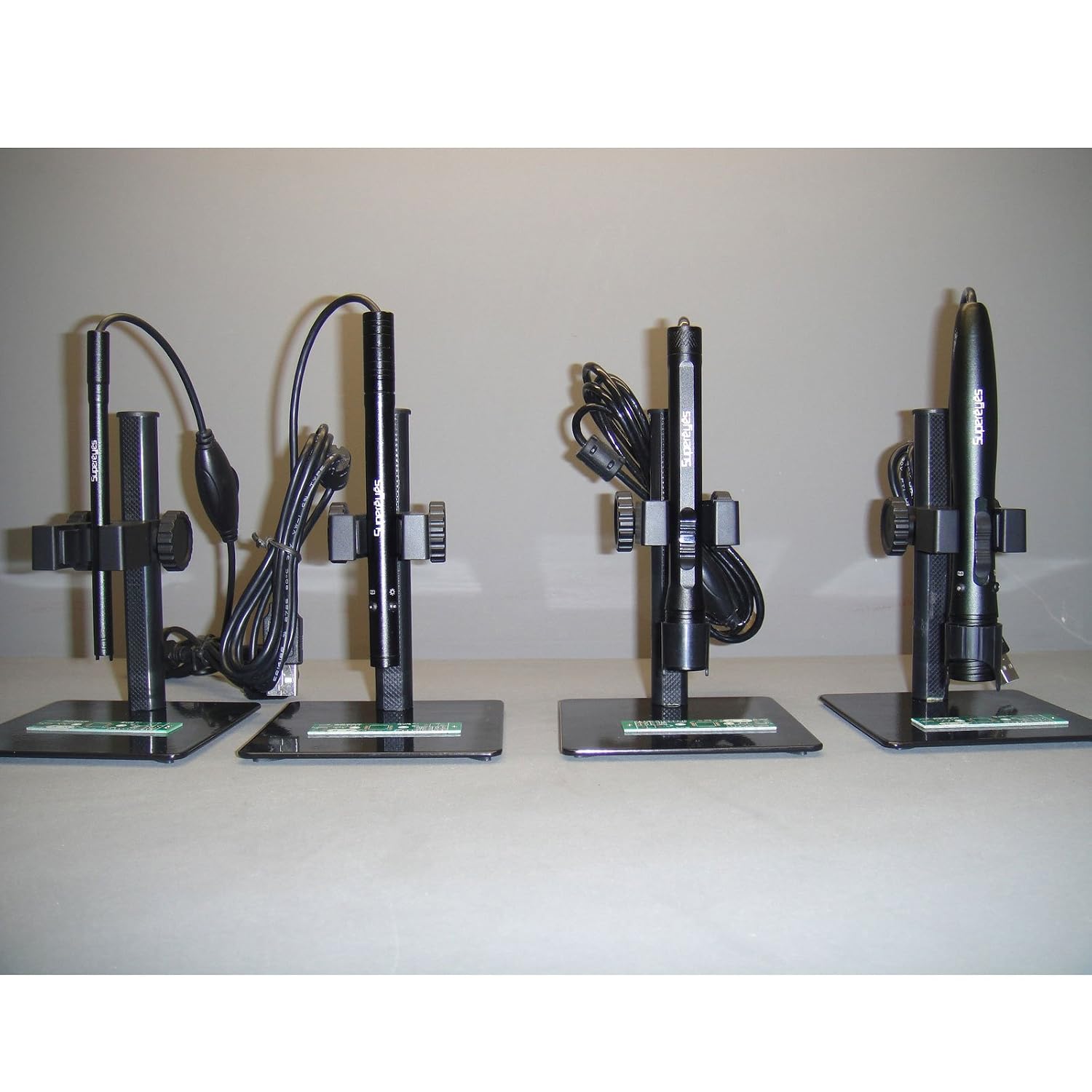
Figure 5.2: Examples of Supereyes stands in use with different models of digital microscopes, illustrating compatibility.
6. Maintenance
- Clean the stand regularly with a soft, dry cloth.
- Avoid using abrasive cleaners or solvents, as these may damage the finish.
- Periodically check all screws and knobs for tightness and re-tighten if necessary.
- Store the stand in a dry environment when not in use.
7. Troubleshooting
- Issue: The stand feels unstable after assembly.
Solution: Ensure the mounting screw connecting the vertical support rod to the base plate is fully tightened. Check that the stand is placed on a flat, stable surface.
- Issue: The microscope holder does not securely grip the microscope.
Solution: Verify that the microscope's diameter is compatible with the holder's adjustable clamp. Ensure the tightening knob on the holder is fully engaged and tightened. If the microscope is too small, additional padding (not included) may be required for a snug fit.
- Issue: The microscope holder slides down the vertical rod.
Solution: Ensure the height adjustment knob on the microscope holder is tightened sufficiently to secure it in place. If the knob is stripped or damaged, contact customer support.
- Issue: The mounting screw does not fit into the post.
Solution: Verify you are using the correct screw provided with the stand. Ensure the screw is aligned properly with the threaded hole. Do not force the screw, as this may strip the threads. If the screw is defective or incompatible, contact customer support.
8. Specifications
| Model Name | Supereyes adjustable stand Z001 |
| Item Model Number | Stand |
| Product Dimensions | 4 x 3.5 x 6 inches; 8.8 ounces |
| Material | Alloy |
| Color | Black (also available in Multicolor, Off-White, Silver) |
| Manufacturer | Supereyes |
| UPC | 045635335868, 661799383585 |

Figure 8.1: Dimensional diagram illustrating the height and base measurements of the Supereyes Z001 Stand and similar models.
9. Warranty and Support
This product is manufactured by Supereyes. For warranty information, technical support, or to inquire about replacement parts, please refer to the retailer's return policy or visit the official Supereyes store online.
You can find more information and contact details at the Supereyes Store.
