1. Introduction
This instruction manual provides comprehensive guidance for the Sanyo VPC-E2100BK 14MP Digital Camera. It covers essential information regarding the camera's setup, operation, maintenance, and troubleshooting. Please read this manual thoroughly to ensure proper use and to maximize the camera's capabilities.
2. Product Overview
The Sanyo VPC-E2100BK is a 14-megapixel digital camera featuring a powerful 21x optical zoom lens, a 3-inch LCD display, and CCD Sensor Shift image stabilization. It is capable of recording 720p HD video and includes intelligent scene modes for various shooting conditions.
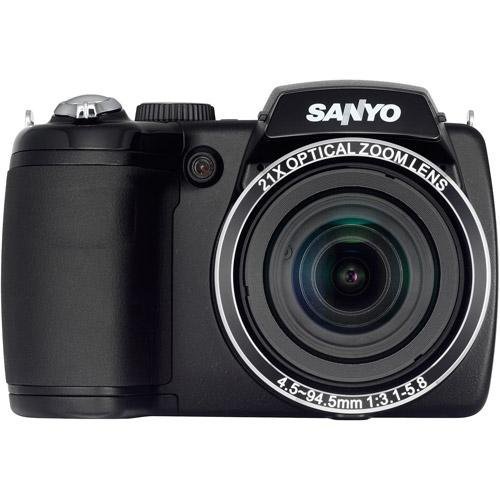
Figure 2.1: Front view of the Sanyo VPC-E2100BK Digital Camera. This image displays the camera from the front, highlighting the large optical zoom lens, the built-in flash, and the ergonomic grip on the left side. The SANYO brand name is prominently displayed above the lens.
3. Setup
3.1. Battery Installation
- Locate the battery compartment cover on the bottom of the camera.
- Slide the cover latch to open the compartment.
- Insert two AA batteries, ensuring correct polarity (+/-) as indicated inside the compartment.
- Close the battery compartment cover securely until it latches.
3.2. Memory Card Insertion
- Open the memory card slot cover, typically located on the side or bottom of the camera.
- Insert a compatible SD/SDHC memory card into the slot with the metal contacts facing the correct direction, usually towards the front of the camera. Push until it clicks into place.
- Close the memory card slot cover securely.
3.3. Initial Power On
- Press the Power button, usually located on the top panel of the camera.
- The LCD screen will illuminate, and the lens will extend.
- Follow any on-screen prompts for initial setup, such as setting the date and time.
4. Operating the Camera
4.1. Taking Still Photos
- Turn on the camera.
- Frame your shot using the LCD screen.
- Press the shutter button halfway down to allow the camera to focus. A green frame or beep indicates focus lock.
- Press the shutter button fully down to capture the image.
4.2. Video Recording
- Ensure the camera is in video recording mode (if applicable, often indicated by a dedicated button or mode dial setting).
- Press the dedicated video record button to start recording.
- Press the video record button again to stop recording.
4.3. Zoom Function
Use the zoom lever, typically located around the shutter button, to adjust the optical zoom. Push the lever towards 'W' for wide-angle and 'T' for telephoto to zoom in or out.
4.4. Image Stabilization
The camera features CCD Sensor Shift image stabilization to reduce blur caused by camera shake, especially in low light or when using the telephoto zoom. This function operates automatically.
4.5. Scene Modes
The Sanyo VPC-E2100BK includes various scene modes, such as Intelligent Scene Mode, to optimize settings for different shooting environments. Access these modes via the camera's menu or mode dial to select the most appropriate setting for your subject (e.g., Portrait, Landscape, Night Scene).
4.6. Playback
- Press the Playback button (often marked with a triangle icon).
- Use the directional pad or control buttons to navigate through your captured photos and videos.
- Press the Playback button again or the Shutter button to return to shooting mode.
5. Maintenance
5.1. Cleaning
- Lens: Use a soft, lint-free cloth or a lens brush to gently remove dust. For smudges, use a specialized lens cleaning solution applied to a cloth, not directly to the lens.
- LCD Screen: Wipe with a soft, dry cloth. Avoid harsh chemicals.
- Camera Body: Use a dry, soft cloth to wipe the camera body. Do not use solvents or abrasive cleaners.
5.2. Battery Care
- Remove batteries if the camera will not be used for an extended period.
- Use high-quality AA alkaline or rechargeable NiMH batteries.
- Store batteries in a cool, dry place.
5.3. Storage
Store the camera in a dry, dust-free environment, away from extreme temperatures and direct sunlight. Consider using a camera bag for protection during transport.
6. Troubleshooting
- Camera does not power on: Check battery installation and ensure batteries have sufficient charge.
- Images are blurry: Ensure the lens is clean. Check if image stabilization is active. Ensure the camera has focused correctly before fully pressing the shutter button.
- Memory card error: Reinsert the memory card. Ensure the card is not full or corrupted. Try formatting the card (this will erase all data).
- Flash does not fire: Check flash settings in the menu. Ensure the flash is not set to 'Off' or 'Red-eye Reduction' in bright conditions where it may not be needed.
7. Specifications
| Feature | Specification |
|---|---|
| Model Name | VPC-E2100BK |
| Photo Sensor Resolution | 14 MP |
| Optical Zoom | 21x |
| Video Resolution | 720p |
| Image Stabilization | CCD Sensor-shift, Digital, Optical |
| Screen Size | 3 Inches |
| Display Type | LCD |
| Supported File Format | JPEG, RAW |
| Power Source | 2 AA batteries |
| Auto Focus Technology | Contrast Detection |
| Continuous Shooting | 30 FPS |
| Expanded ISO Maximum | 3200 |
8. Warranty and Support
For warranty information and technical support, please refer to the documentation provided at the time of purchase or visit the official Sanyo support website. Keep your proof of purchase for warranty claims.


