
1. Introduction
The Futaba BB0117 Stylus Pen is a specialized tool engineered for the precise and safe removal of input components and switches from the Futaba 14 MZ LCD panel. This manual provides detailed instructions for the proper use and care of your BB0117 tool.
2. Package Contents
Please verify that all items listed below are present in your package:
- 1x Futaba BB0117 Stylus Pen Tool
- 1x Protective Cap for Stylus Tip
- 2x Hex Wrenches (various sizes for adjustment/assembly)
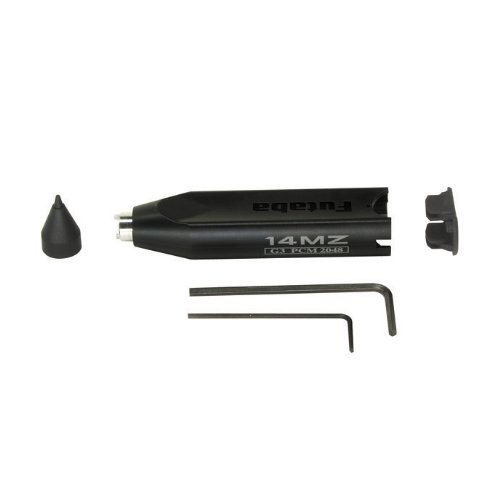
Figure 1: Contents of the Futaba BB0117 package, showing the main stylus tool, its protective cap, and two hex wrenches.
3. Setup and Operating Instructions
The Futaba BB0117 Stylus Pen is designed for specific maintenance tasks on the Futaba 14 MZ LCD panel. Follow these steps carefully to ensure proper operation and prevent damage.
- Preparation: Ensure the Futaba 14 MZ unit is powered off and disconnected from any power source before beginning any maintenance.
- Identify Components: Locate the specific input components or switches on the 14 MZ LCD panel that require removal. Refer to the 14 MZ service manual for detailed diagrams if necessary.
- Tool Application: Carefully position the tip of the BB0117 Stylus Pen over the component to be removed. The tool is designed to engage with the specific mechanism for safe detachment.
- Removal Process: Apply gentle, steady pressure and follow the specific removal procedure outlined in the Futaba 14 MZ service manual for the component in question. The BB0117 acts as a dedicated jig to facilitate this process. Avoid excessive force.
- Post-Removal: Once the component is removed, store it safely. Clean any debris from the area before reassembly or further maintenance.
Note: This tool is intended for use by experienced technicians or individuals familiar with the Futaba 14 MZ radio system and its maintenance procedures. Improper use may result in damage to the device.
4. Maintenance
To ensure the longevity and proper function of your Futaba BB0117 Stylus Pen:
- After each use, wipe the tool clean with a soft, dry cloth to remove any residue.
- Store the tool with its protective cap in place to prevent damage to the tip.
- Keep the tool in a dry environment, away from extreme temperatures and corrosive substances.
- The hex wrenches should be stored with the tool to ensure they are available for any necessary adjustments.
5. Troubleshooting
The BB0117 is a simple mechanical tool. Most issues arise from improper application rather than tool malfunction.
- Component not detaching: Ensure the tool is correctly aligned with the component's removal mechanism. Do not apply excessive force; consult the 14 MZ service manual for the specific component's removal procedure.
- Tool tip appears damaged: Inspect the tip for wear or bending. If damaged, the tool may need replacement to prevent damage to the 14 MZ LCD panel.
6. Specifications
| Model Number | BB0117 |
| Product Dimensions | 6.46 x 3.58 x 0.71 inches (16.4 x 9.1 x 1.8 cm) |
| Item Weight | 0.64 ounces (18.1 grams) |
| Manufacturer | Futaba Denshi |
7. Warranty and Support
For warranty information or technical support regarding your Futaba BB0117 Stylus Pen, please contact Futaba customer service directly. Refer to the official Futaba website or your product packaging for the most current contact details.
Futaba Official Website: www.futabarc.com (Example link, please verify official support channels)