
1. Introduction
This manual provides essential information regarding the AED DEA A6564 Rear Engine Mount. It covers product overview, compatibility, safety guidelines, installation considerations, maintenance, and troubleshooting. Please read this manual thoroughly before installation or use to ensure proper function and safety.
2. Product Overview and Features
The DEA A6564 Rear Engine Mount is a vital automotive component designed to secure the engine to the vehicle's chassis and absorb vibrations generated by the engine. This helps to reduce noise and harshness transmitted to the passenger cabin, contributing to a smoother driving experience.
Key Features:
- Manufactured using high-quality raw materials for durability.
- Tested to meet or exceed original equipment manufacturer (OEM) specifications.
- Produced by DEA Products, Inc., a trusted manufacturer in the aftermarket industry for over 30 years.
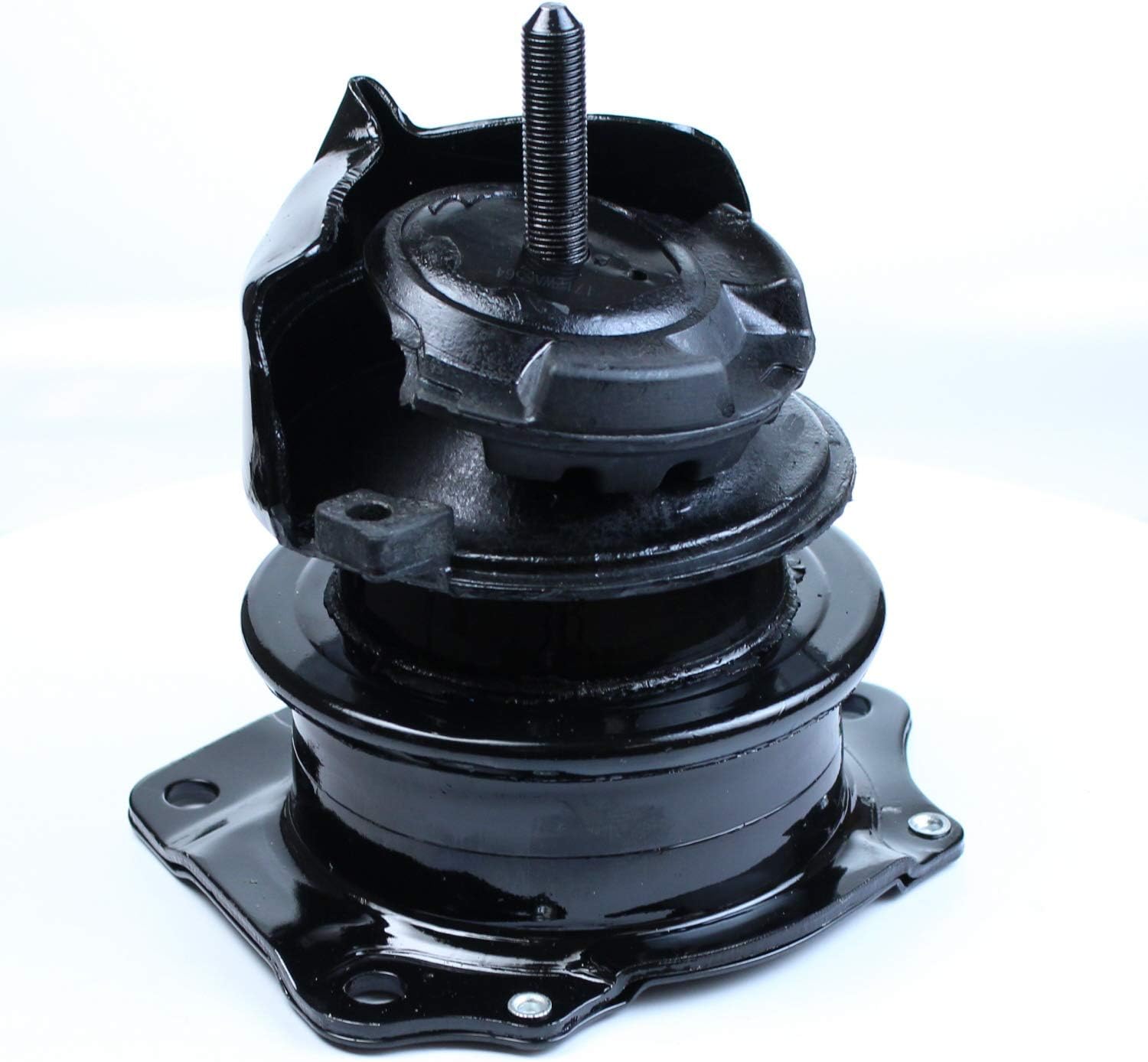
Figure 1: Front view of the DEA A6564 Rear Engine Mount, showcasing its robust construction and mounting bolt.

Figure 2: Side view of the DEA A6564 Rear Engine Mount, highlighting the rubber isolator and metal bracket.
3. Compatibility
The DEA A6564 Rear Engine Mount is designed for specific vehicle applications. It is compatible with:
- Honda Accord: 1998 - 2002 models.
Important: Always verify that this part fits your specific vehicle's make, model, and year before purchase and installation. Consult your vehicle's service manual or a qualified mechanic for precise compatibility information.
4. Safety Information
Automotive repair can be hazardous. Always prioritize safety when working on your vehicle.
- Wear appropriate personal protective equipment, including safety glasses and gloves.
- Ensure the vehicle is securely supported on jack stands on a level surface before working underneath it. Never rely solely on a jack.
- Disconnect the vehicle's battery before beginning any work to prevent accidental electrical shorts.
- Use the correct tools for the job and ensure they are in good condition.
- Refer to your vehicle's official service manual for specific procedures and torque specifications.
- Proposition 65 Warning: This product may contain chemicals known to the State of California to cause cancer and birth defects or other reproductive harm. Wash hands after handling.
5. Setup and Installation
Installation of an engine mount requires mechanical knowledge and specific tools. If you are not confident in your ability to perform this installation, it is highly recommended to seek professional assistance from a certified mechanic.
General Installation Steps (Consult Vehicle Service Manual for Details):
- Prepare the vehicle: Park on a level surface, engage the parking brake, and disconnect the negative battery terminal.
- Safely lift and support the vehicle using jack stands.
- Support the engine: Use an engine hoist or a jack with a wooden block under the oil pan to support the engine's weight. Ensure the engine is adequately supported to prevent it from dropping when the old mount is removed.
- Locate and remove the old rear engine mount. Note the orientation of the old mount for correct installation of the new one.
- Install the new DEA A6564 Rear Engine Mount, ensuring all bolts are properly aligned and hand-tightened.
- Tighten all bolts to the vehicle manufacturer's specified torque settings. Refer to your vehicle's service manual for these values.
- Carefully lower the engine onto the new mount.
- Remove the engine support and lower the vehicle.
- Reconnect the battery terminal.
- Test drive the vehicle to ensure proper operation and check for any unusual vibrations or noises.
6. Operating Principles
The DEA A6564 Rear Engine Mount functions as a critical interface between the engine and the vehicle's frame. Its primary role is to:
- Support the Engine: It bears the weight of the engine and transmission, keeping them securely in place.
- Dampen Vibrations: The rubber components within the mount absorb engine vibrations and shocks, preventing them from being transferred to the vehicle's chassis and cabin. This ensures a quieter and more comfortable ride.
- Control Engine Movement: It limits excessive engine movement during acceleration, braking, and cornering, which helps maintain drivetrain alignment and prevents damage to other components.
7. Maintenance
Regular inspection of engine mounts can help identify potential issues before they become severe. While engine mounts generally do not require routine maintenance, periodic visual checks are recommended.
Inspection Guidelines:
- Visually inspect the rubber components for cracks, tears, or excessive compression.
- Check for any signs of fluid leakage, which may indicate a failed hydraulic mount (if applicable).
- Ensure all mounting bolts are securely tightened.
- Look for any signs of corrosion or damage to the metal brackets.
If any signs of wear or damage are observed, consider replacing the engine mount to maintain vehicle performance and comfort.
8. Troubleshooting
If you experience issues after installing or while using the DEA A6564 Rear Engine Mount, consider the following common problems and solutions:
Common Symptoms of a Failing or Improperly Installed Engine Mount:
- Increased Vibration: Noticeable vibrations felt through the steering wheel, floor, or seats, especially during acceleration or at idle. One user reported "Noticeable greater vibration under acceleration in comparison to honda oem part" with this specific product. This could indicate an issue with the mount or its installation.
- Loud Clunking or Banging Noises: Sounds coming from the engine bay, particularly when shifting gears, accelerating, or going over bumps.
- Engine Movement: Visible or excessive engine movement when the vehicle is in gear and the brake is applied, or during acceleration.
Troubleshooting Steps:
- Re-check Installation: Ensure all bolts are tightened to the correct torque specifications as per the vehicle's service manual. An improperly torqued bolt can lead to vibrations or noise.
- Inspect for Damage: Visually inspect the new mount for any signs of damage that might have occurred during shipping or installation.
- Verify Compatibility: Double-check that the A6564 mount is indeed the correct part for your specific Honda Accord model year.
- Compare with OEM: If possible, compare the new mount's characteristics (e.g., rubber hardness, design) with the original OEM part, especially if experiencing increased vibration.
- Professional Diagnosis: If issues persist, consult a qualified mechanic for a professional diagnosis. They can assess the installation and the mount's performance.
9. Specifications
| Specification | Detail |
|---|---|
| Model Number | A6564 |
| Brand | AED |
| Manufacturer | DEA Products |
| Item Weight | 1 pound |
| Product Dimensions (L x W x H) | 11.99 x 10.93 x 5.42 inches |
| UPC | 139861220101 |
| First Available Date | October 10, 2007 |
10. Warranty and Support
While specific warranty details are not provided in this manual, DEA Products, Inc. is a manufacturer with over 30 years of experience in the aftermarket industry, known for producing parts that meet or exceed original specifications.
For any questions regarding product performance, compatibility, or potential warranty claims, please contact the retailer where the product was purchased or reach out directly to DEA Products, Inc. customer support.