
Sachtler OB 2000 Heavy Duty Aluminum Tripod Instruction Manual
Model: OB 2000 (6481)
1. Product Overview
The Sachtler OB 2000 is a robust 2-section heavy-duty aluminum tripod designed for professional videographers and cinematographers. It provides stable support for heavy camera setups in various environments, including outside broadcasting and studio operations. Its construction ensures durability and facilitates precise leveling and seamless operation.
Key features include:
- Ultimate Stability: Crafted from robust aluminum, supporting camera setups up to 309 lbs, minimizing vibrations.
- Versatile Height Range: Adjustable from 26 to 48.8 inches for diverse shooting angles.
- Heavy-Duty Performance: Built for demanding professional use with broadcast and cinematic equipment.
- Quick & Secure Setup: Features a user-friendly flip lock system for rapid deployment and secure height adjustments.
- Compact Transport: Collapses to 33.1 inches for convenient transport and storage.
2. Safety Information
Please read and understand all safety instructions before using the Sachtler OB 2000 tripod. Failure to follow these instructions may result in equipment damage or personal injury.
- Always ensure all leg locks are securely fastened before mounting equipment.
- Do not exceed the maximum load capacity of 309 lbs (140 kg).
- Distribute the weight of your equipment evenly on the tripod head.
- Avoid placing the tripod on unstable or uneven surfaces without proper stabilization.
- Keep hands and fingers clear of moving parts during adjustment.
- Transport the tripod in its collapsed state to prevent damage.
3. Package Contents
Verify that all items are present in the package:
- Sachtler OB 2000 Tripod Legs
- Integrated Stabilizer
- Documentation (this manual)
- (Optional: Hand crank column, if purchased separately)
4. Setup
Follow these steps to set up your Sachtler OB 2000 tripod:
- Unpack the Tripod: Carefully remove the tripod from its packaging.
- Extend the Legs: Release the flip lock systems on each leg section. Extend the legs to the desired height. Ensure each section is fully extended or retracted to a stable position before locking. Securely fasten all flip locks.
- Adjust Leg Spread: Position the tripod legs to achieve the desired footprint and stability. The integrated stabilizer will help maintain the leg spread.
- Level the Tripod: Use the built-in bubble level located on the tripod's base to ensure the top plate is perfectly horizontal. Adjust leg lengths as necessary.
- Attach Tripod Head: The OB 2000 features a flat base compatible with common flat-base heads, including Mitchell video fittings. Secure your compatible tripod head (sold separately) to the flat base.
- Surface Adaptation: The rotating rubber feet enhance grip on various surfaces. Adjust their position as needed for optimal stability on smooth studio floors or rugged outdoor terrains.
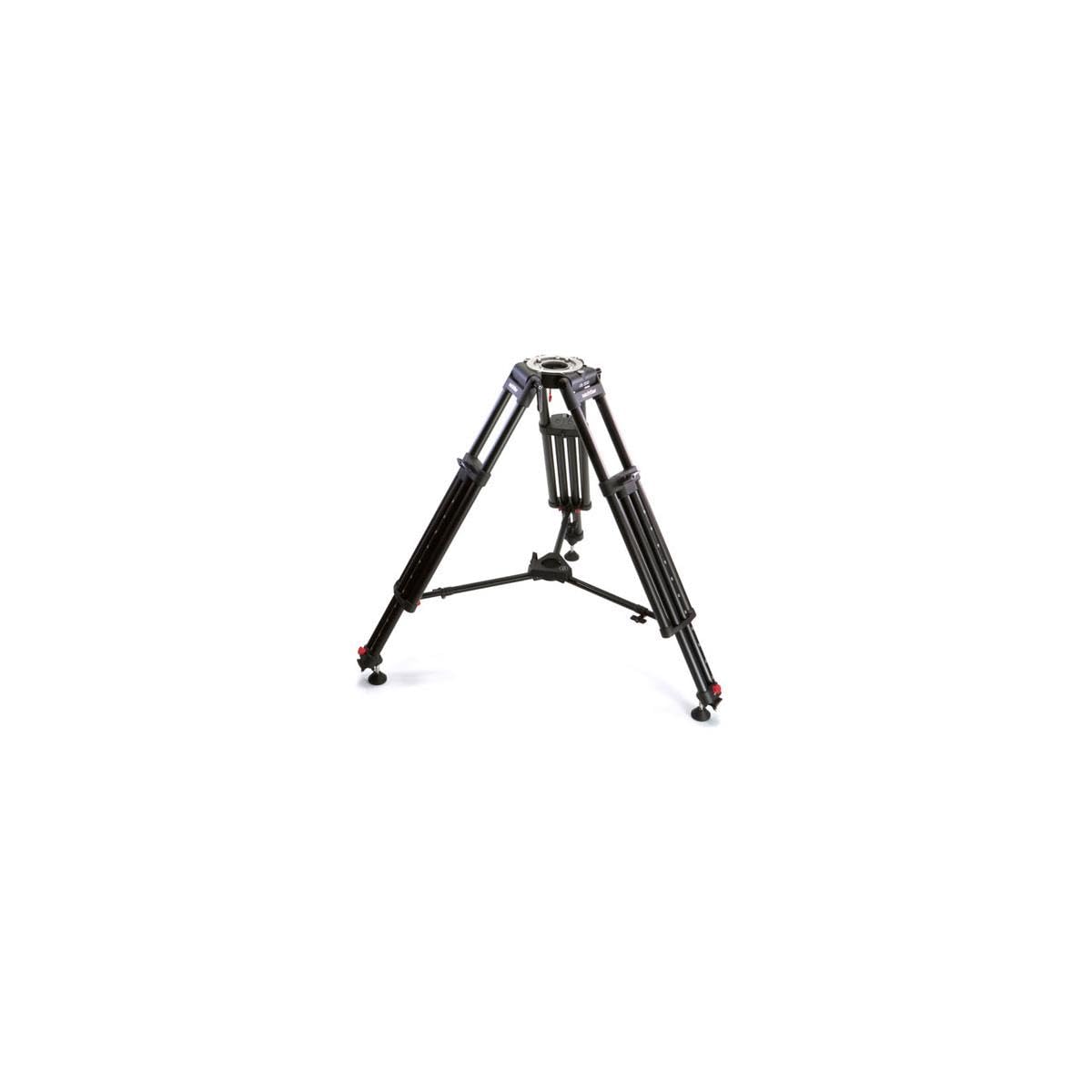
Figure 1: The Sachtler OB 2000 tripod in an extended position, showcasing its robust aluminum construction, two-section legs, and flat base for mounting a camera head. The integrated spreader and rotating rubber feet are also visible.
5. Operating the Tripod
Once set up, the OB 2000 tripod offers flexible operation for various shooting requirements.
- Height Adjustment: The 2-section legs allow for quick height adjustments between 26 and 48.8 inches. Always loosen the flip locks completely before adjusting and secure them firmly afterward.
- Integrated Stabilizer: The integrated stabilizer provides a solid foundation. For additional height and stability, a hand crank column (if available and attached) can be securely locked into place.
- Leveling: Regularly check the built-in bubble level to ensure your camera platform remains perfectly level, especially after moving the tripod or adjusting its height.
- Camera Head Compatibility: The flat base is designed for universal compatibility with various professional flat-base camera heads, including those with Mitchell video fittings. Ensure your camera head is securely attached before mounting your camera.
6. Maintenance
Proper maintenance ensures the longevity and reliable performance of your Sachtler OB 2000 tripod.
- Cleaning: Wipe down the tripod with a soft, damp cloth after each use, especially if used outdoors. Avoid abrasive cleaners or solvents.
- Inspection: Periodically inspect all leg locks, joints, and rubber feet for wear or damage. Ensure all screws and fasteners are tight.
- Lubrication: Moving parts generally do not require lubrication. If any part feels stiff, consult Sachtler customer support.
- Storage: Store the tripod in a clean, dry environment, preferably in its collapsed state, to protect it from dust and moisture.
7. Troubleshooting
This section addresses common issues you might encounter with your tripod.
- Tripod is unstable:
- Ensure all leg sections are fully extended and their flip locks are securely fastened.
- Verify the tripod is on a flat, stable surface. Adjust leg lengths to compensate for uneven ground.
- Check that the camera head is properly mounted and secured to the flat base.
- Difficulty adjusting leg height:
- Ensure the flip locks are fully disengaged before attempting to adjust leg sections.
- Clean any dirt or debris from the leg sections and locking mechanisms.
- Bubble level not accurate:
- Ensure the tripod is on a truly level surface for calibration.
- If persistent, the bubble level may require recalibration or replacement by a qualified technician.
8. Specifications
| Feature | Detail |
|---|---|
| Product Dimensions | 36.75 x 12 x 11.6 inches |
| Item Weight | 26.9 pounds (12.2 kg) |
| ASIN | B0067HRTZY |
| Item Model Number | 6481 |
| Manufacturer | Sachtler |
| Brand | Sachtler |
| Compatible Devices | Camera (with compatible flat-base head) |
| Material | Aluminum, Rubber |
| Tripod Head Type | Pan Heads (compatible with flat base) |
| Maximum Load Capacity | 309 lbs (140 kg) |
| Adjustable Height Range | 26 to 48.8 inches |
| Collapsed Length | 33.1 inches |
9. Warranty and Support
Sachtler products are manufactured to high standards. For warranty information, technical support, or service inquiries, please refer to the official Sachtler website or contact their customer service department directly. Keep your purchase receipt as proof of purchase.
Sachtler Official Website: www.sachtler.com

