
1. Introduction
Thank you for purchasing the Transformers Masterpiece MP11 Starscream action figure. This highly detailed collectible figure allows for transformation between its iconic robot mode and an F-15 Eagle fighter jet mode. This manual provides essential information for the proper handling, assembly, transformation, and care of your figure, including the special coronation set accessories.
2. Safety Information
- Age Recommendation: This product is intended for collectors aged 15 years and older. It is not a toy for young children.
- Small Parts: The figure contains small parts which may pose a choking hazard. Keep out of reach of children under 3 years of age.
- Handling: Handle the figure with care. Avoid excessive force during transformation or posing to prevent damage to joints or plastic components.
- Sharp Edges: Some parts may have pointed edges. Exercise caution during handling.
3. Package Contents
Verify that all components are present upon opening the package:
- MP11 Starscream Main Figure
- Coronation Crown
- Shoulder Armor (2 pieces)
- Mantle (Cape)
- Hologram Pilot Figure
- Blaster Weapons (2 pieces)
4. Setup and Assembly
4.1 Initial Unboxing
Carefully remove the figure and all accessories from their packaging. Retain the packaging for future storage or transport.
4.2 Attaching Coronation Accessories
To equip Starscream with his coronation gear:
- Ensure Starscream is in robot mode.
- Gently place the Coronation Crown onto Starscream's head. It should fit snugly.
- Attach the Shoulder Armor pieces to the designated slots on Starscream's shoulders. Ensure they click into place securely.
- Drape the Mantle (cape) over Starscream's back, aligning the attachment points with the figure's back.

Figure 1: Starscream in robot mode with full coronation set.

Figure 2: Front view of Starscream with coronation gear.
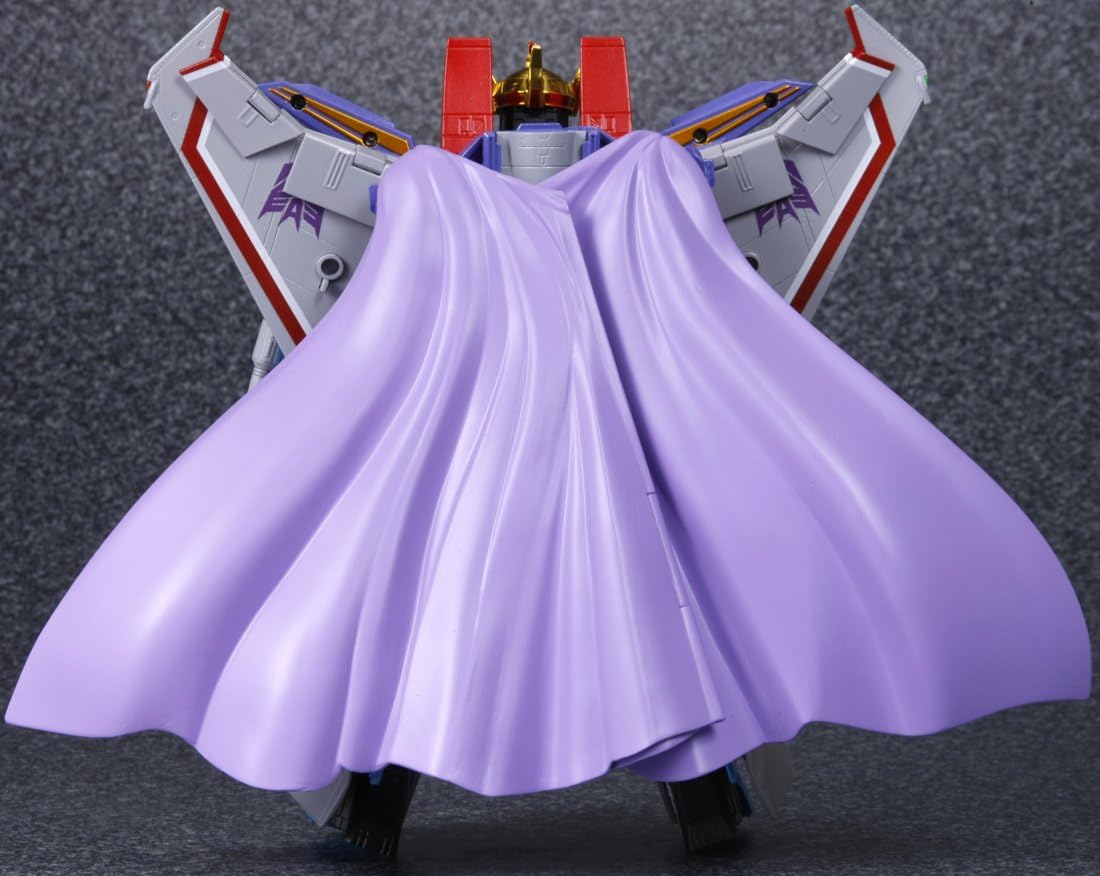
Figure 3: Back view of Starscream with coronation gear.
4.3 Hologram Pilot Placement
The included hologram pilot figure can be placed inside the cockpit when Starscream is in F-15 Eagle fighter jet mode.
5. Operating Instructions: Transformation
The MP11 Starscream figure transforms between robot mode and F-15 Eagle fighter jet mode. Refer to the detailed transformation steps provided in the original product packaging or official online guides for a complete visual walkthrough. The following provides a general overview.
5.1 Robot Mode Overview
In robot mode, Starscream stands as a formidable warrior. Ensure all panels are aligned and joints are securely locked for stability. The blaster weapons can be held in his hands or stored on his forearms.

Figure 4: Starscream in robot mode without coronation gear.

Figure 5: Starscream in a dynamic robot pose.
5.2 Transformation to F-15 Eagle Fighter Jet Mode
To transform Starscream into his F-15 Eagle fighter jet mode, carefully follow these general steps:
- Remove all coronation accessories (crown, shoulder armor, mantle) if attached.
- Fold the robot's arms and legs into the jet's fuselage and wings.
- Rotate and collapse the chest and back panels to form the jet's body.
- Extend the nosecone and deploy the landing gear.
- Open the cockpit canopy and place the hologram pilot figure inside, then close the canopy.
- Ensure all panels are securely tabbed and aligned to form a cohesive jet mode.

Figure 6: Starscream in F-15 Eagle jet mode.
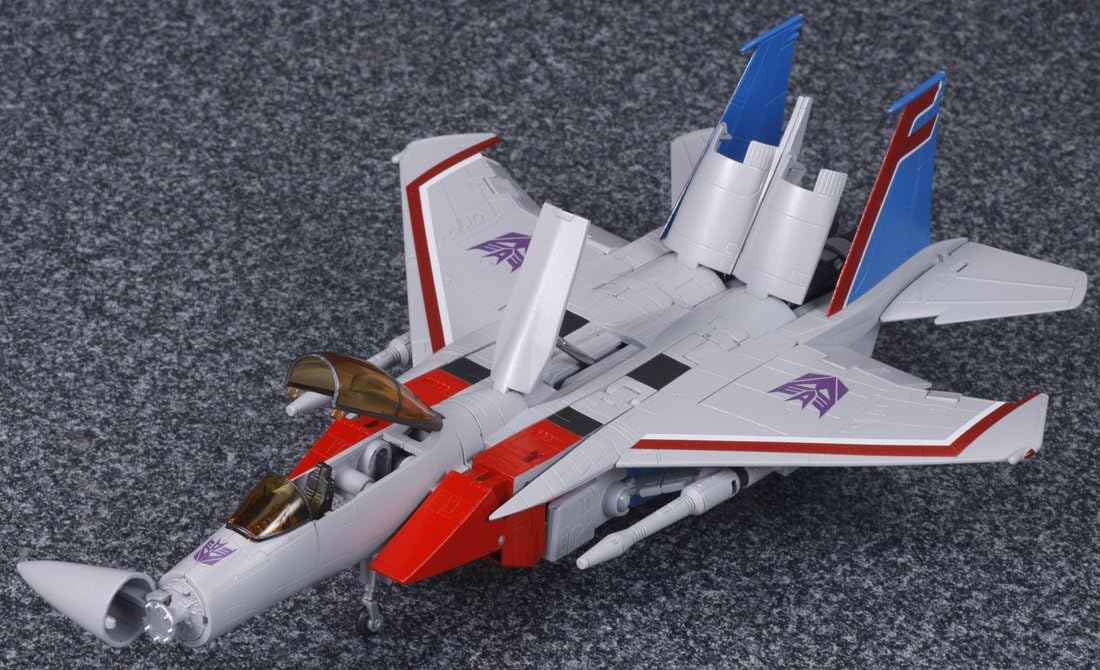
Figure 7: Starscream in F-15 Eagle jet mode with open cockpit.
5.3 Transformation to Robot Mode
To transform Starscream back into robot mode, reverse the steps outlined above. Carefully unlock panels, extend limbs, and reconfigure the fuselage to form the robot body. Pay attention to joint articulation and panel alignment.
6. Maintenance
- Cleaning: Use a soft, dry cloth to gently wipe dust from the figure. For stubborn dirt, a slightly damp cloth can be used, but avoid harsh chemicals or abrasive materials.
- Storage: Store the figure in a cool, dry place away from direct sunlight and extreme temperatures to prevent discoloration or material degradation. Keep it in its original packaging or a display case to protect it from dust and damage.
- Joint Care: If joints become stiff, apply a small amount of silicone shock oil (specifically designed for plastic models) to the joint. Do not use petroleum-based lubricants.
7. Troubleshooting
- Difficulty Transforming: If you encounter resistance during transformation, do not force parts. Re-examine the instructions or consult online transformation guides. Ensure all previous steps are correctly executed and panels are unlocked.
- Loose Joints: Over time, some joints may become loose. This is common with articulated figures. For minor looseness, clear nail polish or a specialized joint-tightening fluid can be applied sparingly to the joint, allowed to dry, and then reassembled.
- Missing or Damaged Parts: If any parts are missing or damaged upon receipt, contact the retailer or manufacturer's customer support immediately.
8. Specifications
| Feature | Detail |
|---|---|
| Model Name | Masterpiece MP11 Starscream - Coronation Set |
| Model Number | MP-11 |
| Brand | Transformers |
| Manufacturer | Takara Tomy |
| Material Type | Plastic and Die-cast |
| Item Dimensions (L x W x H) | 16" x 12" x 5" (approximate) |
| Item Weight | 898 Grams (approximate) |
| Recommended Age | 15 years and up |
| Transformation Mode | Robot to F-15 Eagle Fighter Jet |
9. Warranty and Support
This product is covered by the manufacturer's standard warranty against defects in materials and workmanship. For warranty claims, technical support, or inquiries regarding replacement parts, please contact Takara Tomy customer service or the retailer from whom the product was purchased. Please retain your proof of purchase.
