
1. Introduction
This manual provides detailed instructions for the installation, operation, and maintenance of your Seco-Larm Enforcer HDMI Repeater (MVR-HH01Q). Please read this manual thoroughly before using the device to ensure proper functionality and to prevent damage. Keep this manual for future reference.
2. Product Overview
The Seco-Larm Enforcer HDMI Repeater (MVR-HH01Q) is designed to extend high-definition video and digital audio signals over longer distances than standard HDMI cables typically allow. It supports resolutions up to 1080p and is compliant with HDCP and HDMI 1.3b standards, making it suitable for various home theater and professional AV applications.
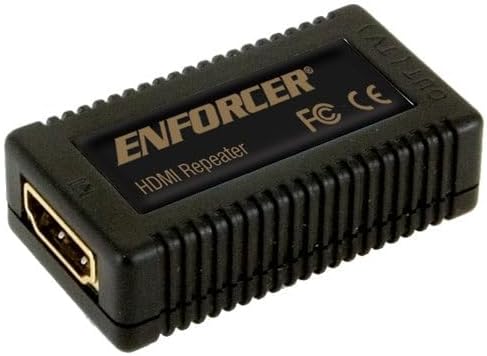
Figure 2.1: The Seco-Larm Enforcer HDMI Repeater (MVR-HH01Q) unit, showing its compact design and HDMI ports.
3. Key Features
- Extended Range: Allows HDMI cables to be linked together, extending signal transmission distances up to 115 feet (35 meters).
- High Resolution Support: Supports video resolutions up to 1080p, ensuring clear and crisp image quality.
- HDCP and HDMI 1.3b Compliant: Ensures compatibility with a wide range of modern HDMI devices and content protection standards.
- Gold-Plated Connectors: Provides reliable signal transmission and corrosion resistance for enhanced durability.
- Compact Design: Small form factor for easy integration into existing setups.
4. Setup Instructions
Follow these steps to properly install your HDMI Repeater:
- Power Off Devices: Ensure all source devices (e.g., Blu-ray player, gaming console) and display devices (e.g., TV, projector) are powered off before making any connections.
- Connect Input HDMI Cable: Connect an HDMI cable from your source device to the HDMI input port on the Seco-Larm Enforcer HDMI Repeater.
- Connect Output HDMI Cable: Connect another HDMI cable from the HDMI output port on the repeater to your display device.
- Power On Devices: Once all connections are secure, power on your display device first, then your source device.
- Verify Signal: Check your display device to ensure the video and audio signals are being transmitted correctly.
Note: For optimal performance, use high-quality HDMI cables. The total length of the HDMI cables (input + output) should not exceed 115 feet (35 meters) for 1080p resolution.
5. Operating Instructions
The Seco-Larm Enforcer HDMI Repeater operates automatically once connected. It does not require any manual configuration or software installation. Its primary function is to regenerate and boost the HDMI signal, allowing it to travel longer distances without degradation.
- Ensure all connected devices are powered on and functioning correctly.
- The repeater will automatically detect the incoming HDMI signal and retransmit it to the output.
- No external power supply is typically required as the unit draws power from the HDMI source, though performance may vary with cable quality and length.
6. Troubleshooting
If you encounter issues with your HDMI Repeater, refer to the following common problems and solutions:
- No Picture or Sound:
- Ensure all HDMI cables are securely connected to both the repeater and the source/display devices.
- Verify that the source device is powered on and outputting an HDMI signal.
- Check that the display device is set to the correct HDMI input.
- Try using shorter HDMI cables to test if the issue is related to cable length or quality.
- Test the HDMI cables directly between the source and display without the repeater to confirm they are functional.
- Intermittent Signal or Flickering:
- This can indicate signal degradation. Ensure the total cable length does not exceed the recommended maximum.
- Replace lower quality HDMI cables with higher quality, shielded cables.
- Ensure there are no strong electromagnetic interference sources near the cables or repeater.
- Resolution Issues:
- Confirm that both your source and display devices support the desired resolution.
- The repeater supports up to 1080p. If you are attempting higher resolutions, it will not function correctly.
7. Specifications
| Feature | Specification |
|---|---|
| Model | MVR-HH01Q |
| HDMI Version | 1.3b |
| HDCP Compliant | Yes |
| Supported Resolutions | Up to 1080p |
| Maximum Extension Distance | 115 feet (35 meters) |
| Connectors | Gold-plated HDMI Type A |
| Power Supply | HDMI Bus Powered (no external power adapter typically required) |
| Package Dimensions | 8 x 5.5 x 1.75 inches |
| Item Weight | 8 ounces |
8. Maintenance
The Seco-Larm Enforcer HDMI Repeater requires minimal maintenance. Follow these guidelines to ensure its longevity:
- Cleaning: Use a soft, dry cloth to clean the exterior of the unit. Do not use liquid cleaners or aerosols, as they may damage the device.
- Environment: Keep the repeater in a cool, dry place, away from direct sunlight, excessive heat, and moisture.
- Handling: Avoid dropping or subjecting the unit to strong impacts.
- Connections: Periodically check that all HDMI cables are securely connected.
9. Warranty and Support
For warranty information and technical support, please refer to the documentation provided with your purchase or visit the official Seco-Larm website. Keep your proof of purchase for warranty claims.
Manufacturer: Seco-Larm
Website: www.seco-larm.com (Please check for the most current contact information)


