
1. Introduction
Thank you for choosing the Matrix Audio DX3000D.1 Mono Block Class D Amplifier. This manual provides essential information for the proper installation, operation, and maintenance of your amplifier. Please read this manual thoroughly before attempting to install or operate the unit to ensure optimal performance and safety.
2. Safety Instructions
Always observe the following safety precautions when installing and operating your amplifier:
- Power Source: Ensure the vehicle's electrical system is compatible with the amplifier's power requirements. Incorrect voltage can damage the unit and vehicle.
- Wiring: Use appropriate gauge wiring for power, ground, and speaker connections. Improper wiring can lead to overheating and fire hazards.
- Mounting: Mount the amplifier securely in a dry, well-ventilated area, away from direct sunlight, heat sources, and moisture. Ensure it does not obstruct vehicle controls or airbags.
- Grounding: Always connect the ground terminal directly to the vehicle's chassis using the shortest possible path. A poor ground connection can cause noise or malfunction.
- Professional Installation: If you are unsure about any aspect of installation, consult a qualified car audio professional.
- Disconnect Battery: Before making any electrical connections, disconnect the vehicle's negative battery terminal to prevent electrical shorts.
3. Setup and Installation
3.1 Unpacking
Carefully remove the amplifier from its packaging. Inspect the unit for any signs of damage. If damage is found, contact your dealer immediately.
3.2 Mounting
Select a mounting location that provides adequate ventilation and protection from moisture. The amplifier dimensions are approximately 13.5 inches (L) x 9.7 inches (W) x 2 inches (H). Ensure there is sufficient space around the unit for air circulation. Use the provided mounting hardware to secure the amplifier firmly to a solid surface in your vehicle.
3.3 Wiring Connections
Refer to the diagram below for proper wiring connections. Ensure all connections are secure and insulated to prevent short circuits.
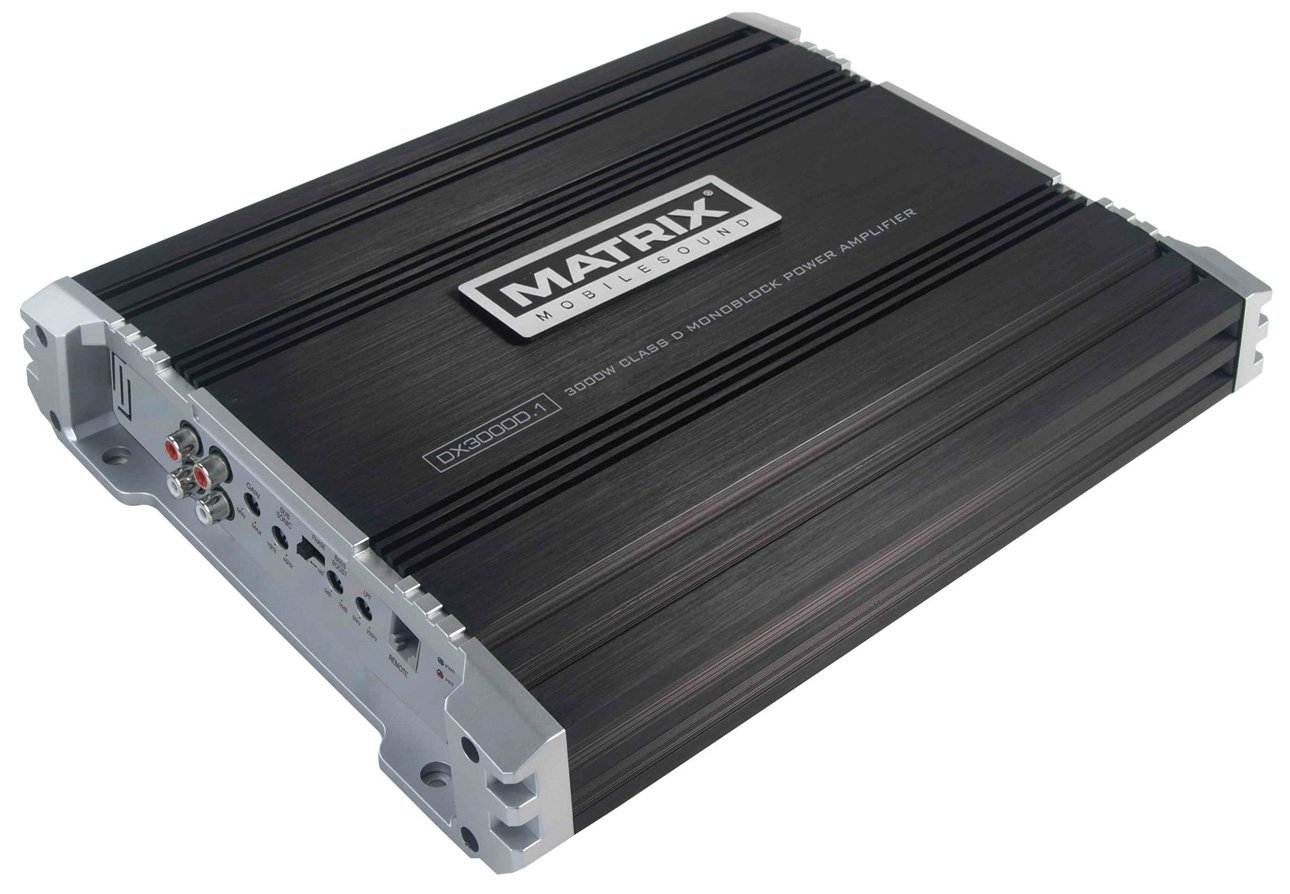
This image displays the Matrix Audio DX3000D.1 amplifier, showcasing its compact design and the various input/output terminals on its sides, including power, ground, remote, RCA inputs, and speaker outputs.
- Power (B+): Connect to the positive (+) terminal of the vehicle's battery using a fuse holder with an appropriate fuse (not included) as close to the battery as possible.
- Ground (GND): Connect to a clean, unpainted metal surface of the vehicle's chassis. Ensure a good electrical connection.
- Remote (REM): Connect to the remote turn-on output of your head unit. This wire turns the amplifier on and off with your car stereo.
- RCA Input: Connect the RCA cables from your head unit's pre-out to the amplifier's RCA input terminals.
- Speaker Output: Connect your subwoofer(s) to the speaker output terminals. This amplifier is 1 OHM stable. Ensure your speaker impedance matches the amplifier's capabilities.
4. Operating Instructions
4.1 Initial Power-On
After all connections are made and verified, reconnect the vehicle's negative battery terminal. Turn on your car stereo. The amplifier's LED Power indicator should illuminate, signifying it is operational.
4.2 Adjusting Controls
- Gain Control: This control matches the amplifier's input sensitivity to the output level of your head unit. Start with the gain at minimum and slowly increase it until you achieve a clear, undistorted sound at your desired volume level. Avoid setting the gain too high, as this can cause distortion and damage to speakers.
- Variable Low Pass Filter (LPF): The LPF allows frequencies below the set point (50Hz - 250Hz) to pass through to the subwoofer. Adjust this to blend the subwoofer's output seamlessly with your main speakers.
- Variable Bass Boost Control: This control (0 ~ +18dB) allows you to enhance the bass output at a specific frequency. Use sparingly to avoid distortion.
4.3 LED Indicators
The amplifier features LED indicators for Power and Protection. The Power LED illuminates when the amplifier is receiving power and operating normally. The Protection LED will illuminate if the amplifier detects a fault (e.g., short circuit, overheating, low voltage) and will temporarily shut down to prevent damage.
5. Maintenance
The Matrix Audio DX3000D.1 amplifier requires minimal maintenance. Keep the unit clean and free from dust and debris. Periodically check all wiring connections to ensure they are secure. Do not use harsh chemicals or abrasive cleaners on the amplifier's surface.
6. Troubleshooting
If you experience issues with your amplifier, refer to the following common problems and solutions:
| Problem | Possible Cause | Solution |
|---|---|---|
| No Power / Power LED Off | Blown fuse, poor power/ground connection, no remote signal. | Check inline fuse, verify power and ground connections, ensure remote wire is connected and receiving 12V. |
| Protection LED On | Short circuit in speaker wiring, overheating, low voltage. | Check speaker wiring for shorts, ensure adequate ventilation, verify vehicle's battery voltage. Allow amplifier to cool down. |
| No Sound Output | No input signal, incorrect gain setting, speaker wires disconnected. | Check RCA connections, adjust gain, verify speaker wire connections. |
| Distorted Sound | Gain set too high, incorrect LPF setting, poor ground. | Reduce gain, adjust LPF, check ground connection. |
If the problem persists after attempting these solutions, contact Matrix Audio customer support or a qualified service technician.
7. Specifications
| Feature | Specification |
|---|---|
| Model | DX3000D.1 |
| Amplifier Type | Mono Block Class D |
| Peak Power Handling | 3000 Watts x 1 Channel @ 1 OHM |
| RMS Power (1 OHM) | 1500 Watts x 1 Channel |
| RMS Power (2 OHM) | 800 Watts x 1 Channel |
| RMS Power (4 OHM) | 500 Watts x 1 Channel |
| Input/Output | Line In / Line Out Preamp RCA |
| Power Supply | PWM Controlled DC to DC Switching |
| Protection Circuits | Speaker Short and Thermal Protection |
| Stability | 1 OHM Stable |
| Indicators | LED Power and Protection Indicators |
| Turn-on Feature | Remote turn-on with "soft start" muting |
| Bass Boost Control | Variable, 0 ~ +18dB |
| Total Harmonic Distortion (THD) | Less than 0.1% (4 OHM) |
| Low Pass Filter (LPF) | Variable, 50Hz - 250Hz |
| Signal to Noise Ratio (SNR) | Greater than 95dB |
| Dimensions (W x H x L) | 9.7" x 2.0" x 13.5" (24.6 cm x 5.1 cm x 34.3 cm) |
| Weight | 9 Pounds (4.08 kg) |
8. Warranty and Support
8.1 Warranty Information
The Matrix Audio DX3000D.1 amplifier comes with a 1 Year Warranty from the date of purchase. This warranty covers manufacturing defects and faulty workmanship under normal use. It does not cover damage caused by improper installation, accident, misuse, abuse, neglect, unauthorized modification, or normal wear and tear.
8.2 Customer Support
For technical assistance, warranty claims, or further information, please contact your authorized Matrix Audio dealer or visit the official Matrix Audio website for support resources.