Introduction
This manual provides essential information for the proper installation, operation, and maintenance of your Delta 590T1151TR Commercial Faucet. Please read these instructions thoroughly before beginning installation or use to ensure optimal performance and longevity of the product. Retain this manual for future reference.
Important Safety Information
- Always turn off the water supply at the main shut-off valves before installing or servicing the faucet.
- Wear appropriate personal protective equipment, such as safety glasses, during installation.
- If you are unsure about any part of the installation process, consult a qualified plumber.
- Ensure all local plumbing and building codes are followed during installation.
- This product is designed for commercial use.
Product Overview
The Delta 590T1151TR is a commercial-grade, single-hole, deck-mount faucet featuring electronic sensor operation. It is designed for efficiency and hygiene in commercial environments. This faucet is ADA Compliant, CalGreen Compliant, and Watersense Qualified, ensuring water conservation with a flow rate of 0.5 GPM.

Figure 1: The Delta 590T1151TR Commercial Faucet. This image displays the chrome-finished faucet body with the integrated sensor at the base.
Setup and Installation
Important Note: The Delta 590T1151TR is a trim kit only. A separate Rough-In Kit is required for complete installation and functionality. The rough-in kit typically includes the necessary control box, power source (e.g., battery pack or AC adapter), and other components for water supply and electronic connections. Ensure you have the correct rough-in kit before proceeding with installation.
Components Included (Trim Kit)

Figure 2: Exploded view of the Delta 590T1151TR trim kit components. This image shows the faucet spout, mounting hardware, and various seals and connectors that are part of the trim kit.
General Installation Steps (Requires Rough-In Kit)
- Prepare the Installation Area: Ensure the mounting surface is clean and clear. Turn off the water supply.
- Install Rough-In Kit: Follow the instructions provided with your specific Delta rough-in kit to install the control box, power source, and water supply lines. This typically involves mounting the control box under the sink and connecting the hot and cold water lines.
- Mount the Faucet: Place the faucet body through the single hole on the deck. Secure it from underneath with the provided mounting hardware.
- Connect Water Lines: Connect the flexible supply lines from the faucet to the corresponding outlets on the rough-in kit's control box.
- Connect Electronic Cables: Connect the sensor cable from the faucet to the control box. Ensure all electrical connections are secure.
- Test Operation: Turn on the water supply and check for leaks. Activate the sensor to ensure proper water flow.
Operating Instructions
The Delta 590T1151TR faucet operates using an integrated electronic sensor, providing touchless activation for enhanced hygiene.
Sensor Activation
- To Activate Water Flow: Place your hands within the detection range of the sensor located at the base of the faucet spout. Water will begin to flow automatically.
- To Stop Water Flow: Remove your hands from the sensor's detection range. The water flow will cease automatically after a brief delay.
- Adjusting Water Temperature: Water temperature is typically controlled by a mixing valve within the rough-in kit or external thermostatic mixing valve, which is set during installation. This faucet does not have an integrated temperature adjustment handle.
Maintenance
Regular maintenance ensures the longevity and optimal performance of your Delta faucet.
Cleaning the Faucet
- Finish Care: Clean the chrome finish with a soft, damp cloth. Avoid abrasive cleaners, harsh chemicals, or scouring pads, as these can damage the finish.
- Sensor Cleaning: Gently wipe the sensor window with a soft, lint-free cloth to ensure it remains clear and responsive. Do not use harsh chemicals on the sensor.
Aerator Maintenance
- Periodically unscrew the aerator from the spout tip and rinse it under running water to remove any debris or mineral buildup. This helps maintain consistent water flow.
- Reinstall the aerator securely, ensuring it is hand-tightened to prevent leaks.
Power Source (Rough-In Kit Dependent)
- If your rough-in kit uses batteries, monitor the battery indicator (if present) or replace batteries as recommended by the rough-in kit's instructions to ensure continuous operation.
- If using an AC adapter, ensure the power connection is secure and free from damage.
Troubleshooting
Before contacting support, review the following common issues and solutions.
| Problem | Possible Cause | Solution |
|---|---|---|
| No water flow | Water supply off; Power issue (batteries/AC); Clogged aerator; Sensor obstruction | Check main water supply; Verify power to control box; Clean aerator; Ensure sensor is clear. |
| Low water flow | Clogged aerator; Debris in supply lines; Low water pressure | Clean aerator; Flush supply lines (consult plumber); Check building water pressure. |
| Sensor not responding | Sensor dirty/obstructed; Power issue; Sensor malfunction | Clean sensor window; Check power supply; If problem persists, contact support. |
| Constant water flow | Sensor malfunction; Debris in valve | Remove any objects from sensor range; Turn off water supply and contact support. |
Specifications
| Feature | Detail |
|---|---|
| Brand | DELTA |
| Model Number | 590T1151TR |
| Finish Type | Chrome |
| Material | Brass |
| Mounting Type | Deck Mount |
| Installation Type | Single Hole |
| Handle Type | Sensor (Electronic) |
| Flow Rate | 0.5 GPM |
| ADA Compliant | Yes |
| CalGreen Compliant | Yes |
| Watersense Qualified | Yes |
| Item Weight | 1 Pounds |
| Product Dimensions | 1 x 1 x 1 inches (Faucet body only) |
| UPC | 055870374461 |
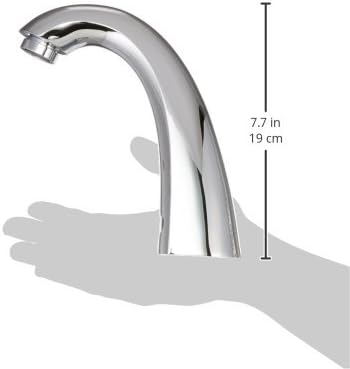
Figure 3: Side view of the Delta 590T1151TR faucet with approximate height measurement of 7.7 inches (19 cm).
Warranty Information
Specific warranty details for the Delta 590T1151TR Commercial Faucet are typically provided with the complete product package, including the rough-in kit. For the most current and detailed warranty information, please refer to the documentation included with your purchase or visit the official Delta Faucet website.
Support Information
For technical assistance, replacement parts, or further inquiries regarding your Delta 590T1151TR Commercial Faucet, please contact Delta Faucet customer service. Contact information and support resources can be found on the official Delta Faucet website:


