Introduction
This manual provides comprehensive instructions for the safe and efficient operation, maintenance, and troubleshooting of your Janome 3128 Sewing Machine. Please read this manual thoroughly before using the machine to ensure proper function and to prevent damage.

Figure 1: The Janome 3128 Sewing Machine, a compact and versatile model designed for various sewing projects.
Setup
1. Unpacking and Placement
- Carefully remove the machine from its packaging.
- Place the machine on a stable, flat surface with adequate lighting.
- Ensure there is enough space around the machine for fabric handling.
2. Power Connection
- Connect the power cord to the machine's power input and then to a suitable electrical outlet.
- Turn on the power switch, usually located on the side or back of the machine.
3. Bobbin Winding
- Place a spool of thread on the spool pin.
- Guide the thread through the tension disc for bobbin winding.
- Place an empty bobbin onto the bobbin winder spindle.
- Push the bobbin winder spindle to the right.
- Press the foot controller gently to wind the thread onto the bobbin. Stop when the bobbin is full.
- Cut the thread and remove the wound bobbin.
4. Bobbin Insertion
- Open the bobbin cover plate, typically located on the needle plate area.
- Insert the wound bobbin into the bobbin case, ensuring the thread unwinds in the correct direction (refer to markings on the bobbin case).
- Pull the thread through the tension spring of the bobbin case.
- Replace the bobbin cover plate.
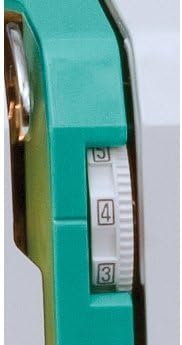
Figure 2: Close-up view of the needle plate and bobbin area, showing where the bobbin is inserted and the fabric rests during sewing.
5. Upper Threading
- Raise the presser foot lever.
- Place a spool of thread on the spool pin.
- Guide the thread through the upper thread guide.
- Follow the numbered threading path down to the tension assembly, around the take-up lever, and down to the needle.
- Thread the needle from front to back.
- Pull the bobbin thread up through the needle plate hole by turning the handwheel towards you to lower and raise the needle once.
- Pull both threads (upper and bobbin) under the presser foot and towards the back of the machine.
6. Needle Installation
- Ensure the machine is turned off.
- Loosen the needle clamp screw.
- Remove the old needle (if applicable).
- Insert the new needle with the flat side facing the back of the machine, pushing it up as far as it will go.
- Tighten the needle clamp screw securely.
7. Presser Foot Attachment
- Raise the presser foot lever.
- Align the presser foot with the presser foot holder.
- Lower the presser foot lever to snap the foot into place.
Operating the Machine
1. Stitch Selection
The Janome 3128 offers a variety of stitches. To select a stitch, turn the pattern selector dial to the desired letter (A-J) corresponding to the stitch type. The stitch chart on the machine body provides a visual guide.
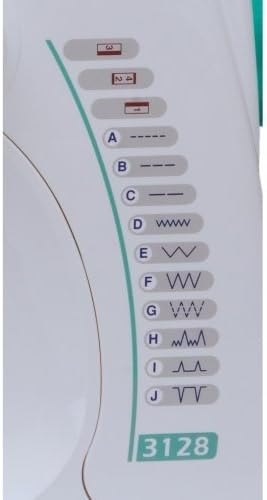
Figure 3: The stitch selection chart on the machine, displaying various stitch patterns labeled A through J.
2. Stitch Length and Width Adjustment
Adjust stitch length and width using the corresponding dials. For most utility stitches, a length of 2.5 is standard. Experiment with different settings on scrap fabric to achieve the desired result for your project.

Figure 4: Close-up of the stitch length and tension adjustment dials, allowing precise control over stitch appearance.
3. Thread Tension Adjustment
Correct thread tension is crucial for balanced stitches. The tension dial typically ranges from 0 to 9. A setting of 3-5 is common for general sewing. If stitches are looping on the top, increase the tension. If looping on the bottom, decrease the tension.
4. Starting to Sew
- Place the fabric under the presser foot.
- Lower the presser foot lever.
- Turn the handwheel slightly towards you to bring the needle down into the fabric.
- Gently press the foot controller to begin sewing. Guide the fabric smoothly without pulling or pushing.
5. Reverse Stitching
To secure the beginning and end of a seam, use the reverse stitch lever or button. Hold it down to sew backward a few stitches, then release to continue sewing forward.
Maintenance
Regular maintenance ensures the longevity and optimal performance of your sewing machine.
1. Cleaning
- Lint Removal: Regularly remove the needle plate and bobbin case to clean out lint and thread scraps using a small brush. Accumulated lint can affect stitch quality and machine operation.
- Exterior Cleaning: Wipe the exterior of the machine with a soft, dry cloth. Avoid using harsh chemicals.
2. Needle Replacement
Replace the needle frequently, especially after 8-10 hours of sewing or if it becomes bent or dull. A dull needle can cause skipped stitches, fabric damage, or needle breakage.
3. Bobbin Case Cleaning
Periodically remove the bobbin case and clean any lint or debris from the area. This helps prevent thread jams and ensures smooth bobbin thread delivery.
Troubleshooting
Refer to the following table for common issues and their solutions.
| Problem | Possible Cause | Solution |
|---|---|---|
| Thread breaks | Incorrect threading, tension too high, dull needle, wrong needle size. | Re-thread machine, adjust tension, replace needle, use correct needle for fabric. |
| Skipped stitches | Bent or dull needle, incorrect needle insertion, wrong needle type. | Replace needle, ensure needle is fully inserted with flat side to the back, use appropriate needle. |
| Uneven stitches / Looping | Incorrect thread tension, improper bobbin winding or insertion. | Adjust tension dial, re-wind and re-insert bobbin correctly. |
| Machine jams | Thread tangled in bobbin area, lint accumulation. | Turn off machine, remove needle plate and bobbin, clear all tangled threads and lint. |
Specifications
- Brand: Janome
- Model: 3128
- Product Dimensions: 9 x 15 x 12 inches
- Item Weight: 12 pounds
- Manufacturer: Janome
- UPC: 732212231032
- Batteries Required: No
Warranty and Support
For warranty information, service, or technical support, please refer to the warranty card included with your purchase or visit the official Janome website. Contacting Janome directly will provide the most accurate and up-to-date support information.
You can find more information and contact details on the Janome Store on Amazon.


