
1. Introduction
This manual provides essential information for the safe and effective installation, operation, and maintenance of the Omron MY4N AC220/240 General Purpose Relay. Please read this manual thoroughly before using the product to ensure proper functionality and to prevent potential hazards.
2. Safety Information
WARNING: Electrical shock hazard. Always disconnect power before installing, servicing, or removing the relay.
- Ensure all wiring is performed by qualified personnel in accordance with local and national electrical codes.
- Do not exceed the specified voltage and current ratings.
- Verify correct terminal connections before applying power.
- Avoid touching live terminals.
- Use appropriate personal protective equipment (PPE) when working with electrical systems.
3. Product Overview and Features
The Omron MY4N AC220/240 is a general-purpose relay designed for various industrial control applications. It features a compact design and reliable performance.
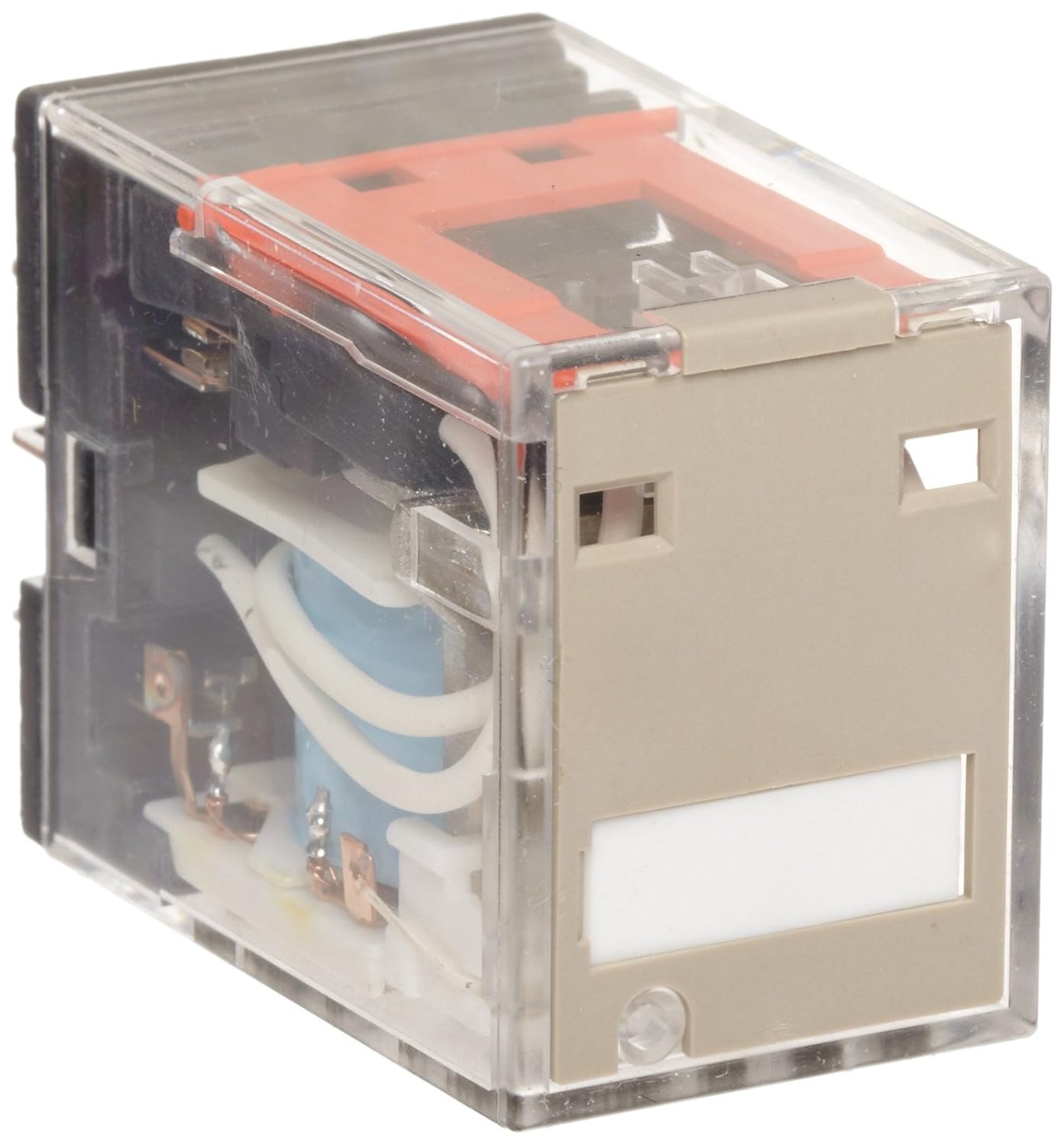
Figure 1: Omron MY4N AC220/240 General Purpose Relay. This image displays the Omron MY4N AC220/240 General Purpose Relay. The relay features a transparent housing, allowing visibility of the internal coil, contacts, and wiring. A beige-colored front panel includes a white label area and an LED indicator window. The relay is designed for plug-in socket or solder terminal connections.
Key Features:
- Contact Form: Quadruple Pole Double Throw (4PDT)
- Coil Voltage: 220 to 240 VAC
- Contact Rating: 5A @ 250VAC/30VDC
- Indicator: LED for status indication
- Terminals: Plug-In Socket / Solder Terminals
- Environmental: RoHS Compliant, Cadmium Free Contacts
- Certifications: UL Listed, CSA Certified, CE Marked, VDE, SEV
4. Specifications
| Specification | Value |
|---|---|
| Model Number | MY4N AC220/240 |
| Coil Voltage | 220 to 240 VAC |
| Rated Load Current (50 Hz) | 4.8 to 5.3 mA |
| Rated Load Current (60 Hz) | 4.2 to 4.6 mA |
| Contact Form | 4PDT (Quadruple Pole Double Throw) |
| Contact Rating | 5A @ 250VAC/30VDC |
| Contact Material | Silver Nickel / Silver Alloy |
| Pins | 14 |
| Connector Type | Plug-In, Solder |
| Status Indicator | LED |
| Mounting Type | Pole (typically used with a compatible socket) |
| Product Dimensions | 1.1 x 0.85 x 1.42 inches |
| Weight | Approximately 0.01 ounces |
| Standards | UL Listed, CSA Certified, CE Marked, VDE, SEV |
| Environmental Attribute | RoHS Compliant, Cadmium Free Contacts |
5. Setup and Installation
The MY4N AC220/240 relay is designed for plug-in installation into a compatible socket (e.g., Omron Mfr. No. PYF14AE) or for direct soldering. Follow these general steps for installation:
- Power Disconnection: Ensure all power to the circuit is disconnected before beginning installation.
- Socket Installation (if applicable): Mount the appropriate 14-pin relay socket securely in the desired location.
- Wiring: Connect the control circuit wiring to the coil terminals and the load circuit wiring to the contact terminals of the socket or directly to the relay pins if soldering. Refer to the circuit diagram for correct pin assignments.
- Relay Insertion: Carefully align the relay pins with the socket holes and gently push the relay into the socket until it is fully seated. Ensure all pins are correctly engaged. If soldering, ensure proper heat management to avoid damage.
- Verification: Double-check all connections for correctness and security.
- Power Restoration: Restore power to the circuit.
6. Operation
Once installed and powered, the Omron MY4N AC220/240 relay operates based on the control signal applied to its coil.
- Coil Energization: When the specified AC voltage (220-240 VAC) is applied to the coil terminals, the coil energizes, creating a magnetic field.
- Contact Switching: The magnetic field causes the internal contacts to switch their state. For a 4PDT relay, this means four sets of contacts will change from their normally closed (NC) to normally open (NO) positions, or vice-versa.
- LED Indicator: The integrated LED will illuminate when the coil is energized, providing a visual indication of the relay's operational status.
- Manual Push-to-Test: Some versions of this relay may include a manual push-to-test button, allowing for manual activation of the contacts without energizing the coil, useful for testing purposes.
7. Maintenance
The Omron MY4N AC220/240 relay is designed for long-term reliability with minimal maintenance. However, periodic inspection is recommended.
- Visual Inspection: Regularly inspect the relay and its socket for any signs of physical damage, discoloration, or loose connections.
- Cleaning: Keep the relay and surrounding area free from dust and debris. Use a dry, soft cloth for cleaning. Do not use solvents or abrasive cleaners.
- Contact Wear: While not typically user-serviceable, excessive switching cycles or overcurrent conditions can lead to contact wear. If erratic operation or contact welding is suspected, replace the relay.
- Environmental Conditions: Ensure the relay operates within its specified environmental conditions (temperature, humidity) to prevent premature failure.
8. Troubleshooting
If the relay is not functioning as expected, consider the following troubleshooting steps:
- Relay Not Activating (LED Off):
- Check if the correct coil voltage (220-240 VAC) is being applied to the coil terminals.
- Verify that the power supply to the control circuit is active.
- Inspect for loose or incorrect wiring connections to the coil.
- Ensure the relay is fully seated in its socket.
- Relay Not Switching Load (LED On):
- Check the load circuit for power, continuity, and correct wiring.
- Verify that the load current does not exceed the relay's contact rating (5A).
- Inspect the relay contacts for signs of damage or welding (though this typically requires relay removal and inspection).
- Intermittent Operation:
- Check for unstable control voltage or power supply fluctuations.
- Ensure secure connections for both control and load circuits.
- Environmental factors like excessive vibration or temperature changes might affect performance.
If issues persist after troubleshooting, consider replacing the relay or consulting a qualified electrician.
9. Warranty and Support
Omron products are manufactured to high-quality standards. For specific warranty information, please refer to the documentation provided at the time of purchase or contact Omron customer support. Technical assistance and further product information can be obtained through authorized Omron distributors or the official Omron website.


