
Introduction
The Schwaiger NG1000USB 011 is a versatile universal power supply designed to provide power for a wide range of portable electronic devices. It features a stabilized output voltage and an integrated fuse for overheating protection, ensuring safe and consistent power delivery. The operating status is clearly indicated by an LED on the unit's top surface. The output voltage can be easily adjusted from 3V to 12V using a rotary switch located on the rear of the device. This power supply is energy-efficient, complying with EuP standards, and includes a 2-meter connection cable along with 9 different interchangeable connectors for broad compatibility.
Setup
Follow these steps to set up your universal power supply:
- Select the Correct Voltage: Locate the rotary switch on the rear of the power supply unit. Adjust it to the required voltage (3V, 4.5V, 5V, 6V, 7.5V, 9V, or 12V) for your specific device. Always refer to your device's specifications to determine the correct voltage to prevent damage.
- Choose the Appropriate Connector: From the 9 included interchangeable connectors, select the one that physically matches your device's power input port. Ensure the connector fits snugly and securely.
- Connect the Power Supply to Your Device: Attach the selected connector tip to the end of the power supply's output cable. Then, carefully plug the connector into your device's power input port.
- Plug into Power Outlet: Insert the power supply's main plug into a standard wall socket. The LED indicator on the top surface of the unit will illuminate, confirming that the unit is receiving power and is operational.
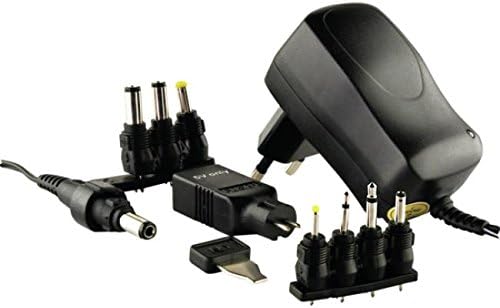
This image displays the black Schwaiger NG1000USB 011 universal power supply unit, featuring a standard UK/EU plug. Alongside the main unit, a variety of interchangeable DC barrel connector tips are shown, highlighting the product's versatility for different electronic devices. A 2-meter output cable is also visible, connecting to one of the barrel tips.
Operating Instructions
Once the power supply is correctly connected to your device and plugged into a wall outlet, it will begin to deliver power. The LED indicator on the top of the unit will be lit, signifying active operation. The stabilized output voltage ensures a consistent and reliable power flow to your connected device.
Maintenance
To ensure the longevity and optimal performance of your Schwaiger NG1000USB 011 power supply, please adhere to the following maintenance guidelines:
- Keep the unit clean and free from dust. Use a dry, soft cloth for cleaning.
- Avoid exposing the power supply to moisture, liquids, or extreme temperatures.
- Do not attempt to open, disassemble, or repair the unit yourself. Any servicing should be performed by qualified personnel.
- Store the power supply and its interchangeable connectors in a dry, safe environment when not in use.
Troubleshooting
If you encounter issues with your Schwaiger NG1000USB 011 power supply, consider the following troubleshooting steps:
No Power / LED Not Lit
- Ensure the power supply is securely plugged into a functional wall outlet. Test the outlet with another device if necessary.
- Verify that the selected voltage on the rotary switch matches your device's power requirements.
- Check that the connector tip is firmly attached to both the power supply cable and your device's input port.
- If the unit has overheated, the integrated fuse may have temporarily shut it down. Disconnect the power supply from both the wall outlet and your device, allow it to cool down for a period, and then attempt to reconnect.
Device Not Charging / Operating
- Confirm that the voltage setting on the power supply is precisely correct for your device. Using an incorrect voltage can prevent operation or potentially damage your device.
- Ensure the chosen connector tip is fully compatible with your device and is making proper electrical contact.
- If possible, test the power supply with another compatible device to help determine if the issue lies with the power supply unit or the device being powered.
Specifications
| Brand | SCHWAIGER |
| Model Number | NG1000USB 1000MA |
| Color | Black |
| Input Voltage | 100-240V AC (Standard for universal wall adapters) |
| Output Voltage | Switchable (3V, 4.5V, 5V, 6V, 7.5V, 9V, 12V) |
| Power | 16.5 Watts |
| Special Features | Switchable output voltage, Overheating protection |
| Compatible Devices | Portable electronic devices (e.g., mobile phones) |
| Connectors | 9 interchangeable tips |
| Cable Length | 2 meters |
| Energy Efficiency | EuP compliant |
| Material | Plastic, Metal |
| Country of Origin | Germany |
Warranty and Support
For detailed warranty information or technical support regarding your Schwaiger NG1000USB 011 universal power supply, please contact your original retailer or the manufacturer, SCHWAIGER, directly. Information regarding the availability of spare parts and guaranteed software updates is not provided for this product.