
Introduction
This manual provides essential instructions for the safe and effective operation of your Pittsburgh 3-In-1 Electronic LED Stud Finder, Metal Detector, and Voltage Detector. This device is designed to assist in locating studs, joists, metal conduit, and live AC current-carrying wires behind walls, ceilings, and floors. Please read this manual thoroughly before first use and retain it for future reference.
Safety Information
- Always exercise caution: Before drilling, cutting, or performing any work on a wall, always verify the absence of electrical wires, gas pipes, or water pipes using this detector or other appropriate methods.
- Battery Safety: Use only a 9V alkaline battery. Do not mix old and new batteries. Remove the battery if the device will not be used for an extended period to prevent leakage.
- Environmental Conditions: Do not expose the device to extreme temperatures, humidity, or direct sunlight. Operate in dry conditions.
- Not a Toy: Keep out of reach of children.
- Limitations: The device's accuracy can be affected by wall material, moisture content, and other environmental factors. Always confirm findings with other methods if critical.
Product Overview
The Pittsburgh 3-In-1 detector features an ergonomic design for comfortable handling and an LED display for clear indications. Key components include the sensor area, mode selector switch, power/scan button, and LED indicators.
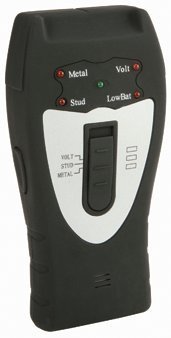
Image: Front view of the Pittsburgh 3-In-1 Electronic LED Stud Finder. The device is black with a red power button and an LED display panel. It shows the sensor area at the bottom and the mode switch on the side.
Setup
Battery Installation
- Locate the battery compartment cover on the back of the device.
- Slide or unclip the cover to open the compartment.
- Insert one new 9V alkaline battery, ensuring correct polarity (+ and - terminals match the markings inside the compartment).
- Replace the battery compartment cover, ensuring it is securely closed.
Note: A 9V battery is not included with the device and must be purchased separately.
Operating Instructions
General Operation and Calibration
- Select Mode: Use the slide switch on the side of the device to select the desired detection mode: STUD, METAL, or AC VOLTAGE.
- Position Device: Place the device flat against the wall surface where you intend to scan. Ensure your hand is not covering the sensor area.
- Power On and Calibrate: Press and hold the power/scan button. The device will emit a short beep and the LEDs may light up briefly. Keep the device still against the wall until the calibration process is complete (usually a few seconds). The LEDs should then turn off or indicate a clear signal. If the device indicates an object immediately, try calibrating in a different spot on the wall.
- Scan: While holding the power/scan button, slowly slide the device horizontally across the surface.
Stud Finder Mode
This mode is used to locate the edges and center of wood or metal studs and joists.
- Select "STUD" mode.
- Calibrate the device against the wall in an area where you are certain there are no studs.
- Slowly slide the device horizontally. As the device approaches a stud, the LED indicators will progressively light up.
- The center of the stud is indicated when the maximum number of LEDs light up, or a specific "center" indicator illuminates (if available on your model). Mark this spot.
- Continue past the stud to find the other edge, then repeat the scan from the opposite direction to confirm the location.
Metal Detector Mode
This mode detects ferrous and non-ferrous metals, such as pipes, conduit, and rebar.
- Select "METAL" mode.
- Calibrate the device in an area free of metal.
- Slowly slide the device across the surface. The LEDs will illuminate and intensify as metal is detected.
- The strongest signal indicates the center of the metal object.
Voltage Detector Mode (AC Live Wire Detection)
This mode detects live, unshielded AC current-carrying wires (110-220V, 50-60Hz).
- Select "AC VOLTAGE" mode.
- Calibrate the device in an area away from known live wires.
- Slowly slide the device across the surface. The LEDs will illuminate and may flash, and an audible alarm may sound, indicating the presence of a live AC wire.
- Important: This mode detects unshielded live wires. Shielded wires or wires not carrying current may not be detected. Always turn off power at the circuit breaker before working on walls where electrical wiring may be present.
Maintenance
- Cleaning: Wipe the device with a soft, damp cloth. Do not use abrasive cleaners or solvents.
- Storage: Store the device in a dry, dust-free environment, away from extreme temperatures. Remove the battery if storing for extended periods.
- Battery Replacement: Replace the 9V battery when the low battery indicator appears or if the device's performance degrades.
Troubleshooting
| Problem | Possible Cause | Solution |
|---|---|---|
| Device does not turn on or respond. | Dead or incorrectly installed battery. | Check battery polarity. Replace with a new 9V alkaline battery. |
| Inaccurate or inconsistent readings. | Improper calibration; wall material too dense/wet; interference. | Recalibrate on a clear section of the wall. Ensure the wall is dry. Avoid scanning near large metal objects or strong electromagnetic fields. |
| Device indicates an object immediately upon power-on. | Calibrated over an object. | Move the device to a different, clear section of the wall and recalibrate. |
| AC Voltage detection is inconsistent. | Wires are shielded or not carrying current. | Ensure the circuit is live. Note that detection may be limited for shielded wires. |
Specifications
- Model: 67801
- Power Source: 1 x 9V Battery (not included)
- Display Type: LED
- Functions: Stud Finder, Metal Detector, AC Voltage Detector
- International Protection Rating: IP54 (Dust protected, splash proof)
- Weight: Approximately 0.5 lbs (without battery)
- Recommended Uses: Metal Detection, Construction Site Scanning
Warranty and Support
For warranty information or technical support, please refer to the documentation provided at the point of purchase or contact Pittsburgh customer service directly. Keep your purchase receipt as proof of purchase for any warranty claims.
Manufacturer: Pittsburgh
UPC: 792363678018