
Blue Ocean SPA392M
Blue Ocean 52" Aluminum SPA392M Shower Panel Tower System User Manual
Model: SPA392M
Product Overview
The Blue Ocean 52" Aluminum SPA392M Shower Panel Tower System is designed to provide a luxurious and revitalizing shower experience. Crafted from premium aluminum alloy, this system integrates multiple functions including a rainfall shower head, adjustable massage jets, and a multi-functional handheld shower, all controlled independently for optimal water pressure. Its dimensions are approximately 52"H x 10"W x 3.5"D (132 x 26 x 9cm).

Figure 1: The Blue Ocean SPA392M Shower Panel Tower System in silver finish.
Safety Information
Please read all instructions carefully before installation and use. Failure to follow these instructions may result in property damage, personal injury, or death. Retain this manual for future reference.
- Ensure all plumbing connections are secure and watertight to prevent leaks.
- Verify water temperature before stepping into the shower to avoid scalding.
- Do not use abrasive cleaners or harsh chemicals on the panel surface, as this may damage the finish.
- Professional installation is recommended to ensure proper function and to maintain warranty status.
Package Contents
Verify that all components are present before beginning installation:
- 1 x Blue Ocean SPA392M Shower Panel Unit
- 1 x Rainfall Shower Head
- 1 x Multi-functional Handheld Shower with Hose
- Mounting Brackets and Hardware
- Installation Manual
Setup and Installation
This shower panel is designed for wall-mount installation. Due to the nature of plumbing and potential wall modifications, professional installation is highly recommended.
- Preparation: Turn off the main water supply. Ensure the installation area is clean and free of debris.
- Mounting: Secure the mounting brackets to the wall using appropriate hardware. Ensure the brackets are level and spaced correctly according to the panel's dimensions.
- Plumbing Connections: Connect the hot and cold water lines to the corresponding inlets on the back of the shower panel. Ensure all connections are tightly sealed to prevent leaks.
- Panel Mounting: Carefully hang the shower panel onto the secured wall brackets.
- Handheld Shower Installation: Connect the handheld shower hose to its designated outlet on the panel.
- Battery Installation (for LED Display): The LED temperature display requires batteries (typically AA, not included). Access the battery compartment, usually located on the back of the panel, and insert the batteries.
- Final Check: Turn on the water supply and check for any leaks. Test all functions of the shower panel.
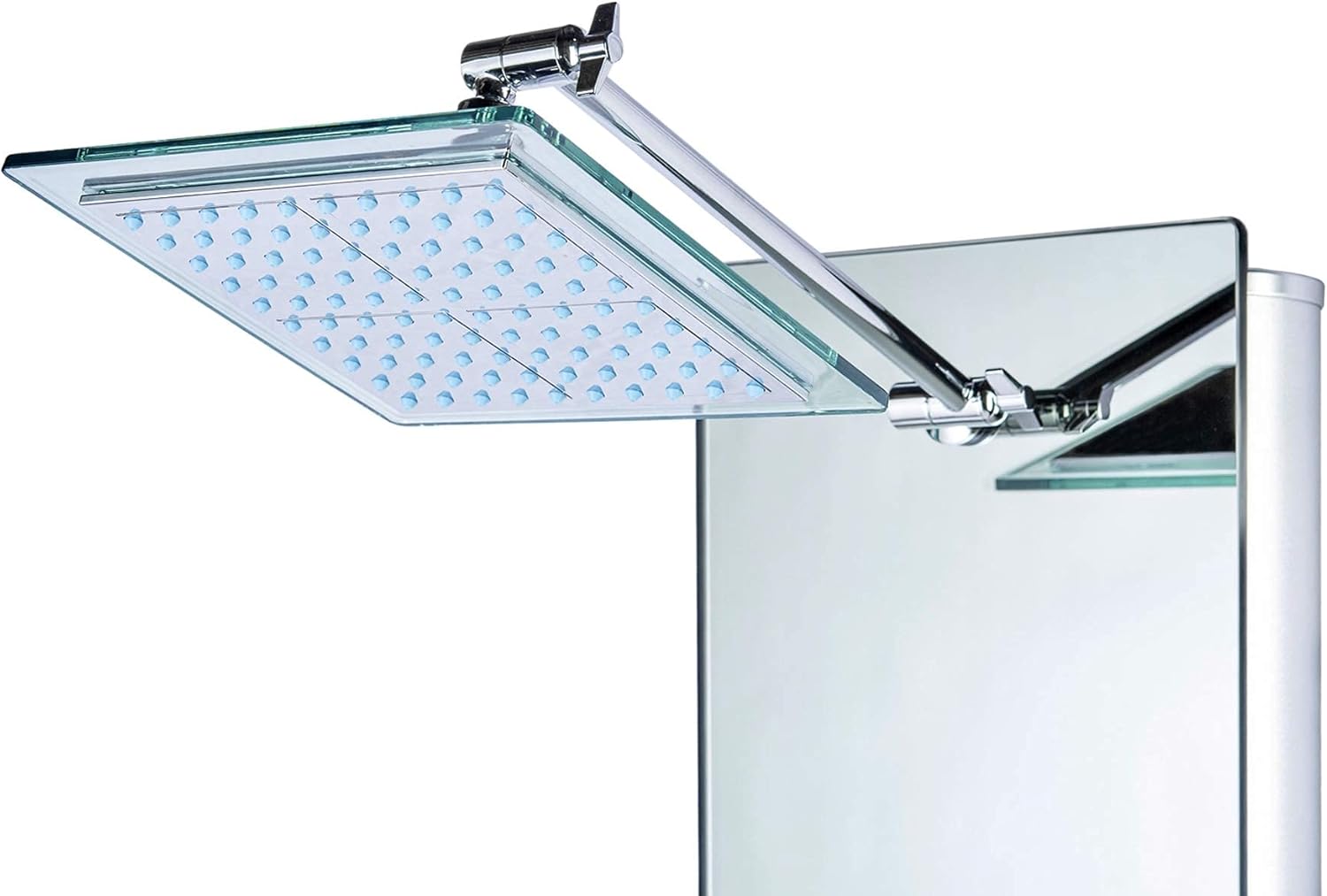
Figure 2: Detailed dimensions for installation planning.
Operating Instructions
The Blue Ocean SPA392M Shower Panel offers multiple water outlets and controls for a customized shower experience.
- Temperature Control: Use the main handle to adjust the water temperature. The integrated LED display will show the water temperature in Celsius.
- Function Selector: Rotate the selector knob to switch between the different water outlets:
- Rainfall Shower Head: Provides a wide, gentle rain-like spray from above. This head is adjustable for angle.
- Massage Jets: Eight adjustable body jets deliver a powerful water massage. These can be set to a "jet" or "mist" setting.
- Handheld Shower: A flexible handheld shower for targeted rinsing. It offers different spray patterns.
- Bottom Spout: A lower spout for filling buckets or for foot rinsing.
Note: All functions work independently to maintain proper water pressure.
- LED Temperature Display: The digital display shows the current water temperature. A button below the screen may allow for cycling through display modes or settings, though the primary temperature unit is Celsius.


Figure 3: Close-up of the control knobs and the LED temperature display.


Figure 4: The adjustable rainfall shower head and the multi-functional handheld shower.


Figure 5: The 8 adjustable massage jets and a close-up of a single jet.

Figure 6: The integrated bottom spout for additional utility.
Maintenance
Regular cleaning and maintenance will ensure the longevity and optimal performance of your shower panel.
- Cleaning: Wipe down the panel surface after each use, especially in areas with hard water, to prevent mineral deposits and maintain its polished finish. Use a soft cloth and mild, non-abrasive cleaning solutions.
- Jet Maintenance: Periodically check the massage jets and rainfall shower head for any mineral buildup that might affect water flow. Clean nozzles as needed.
- Hose Inspection: Inspect the handheld shower hose for any signs of wear or damage. Replace if necessary.
Troubleshooting
| Problem | Possible Cause | Solution |
|---|---|---|
| Low Water Pressure | Mineral buildup in jets/shower head; house plumbing issues; water flow restrictor. | Clean jets and shower head. Consult a plumber for house plumbing issues. Check for and remove any water flow restrictors if desired (may affect water consumption). |
| LED Display Not Working | Dead batteries; loose battery connection. | Replace batteries (AA). Ensure batteries are inserted correctly. |
| Shower Head/Pipe is Loose | Mounting nut behind the panel is loose. | This may require removing the panel to access and tighten the nut. Professional assistance is recommended. |
| Temperature Display in Celsius Only | Default setting; no Fahrenheit conversion option. | The unit's display is primarily in Celsius. Familiarize yourself with Celsius temperature ranges for showering. |
Specifications
| Feature | Detail |
|---|---|
| Brand | Blue Ocean |
| Model Number | SPA392M |
| Color | Silver |
| Material | Aluminum (Panel), Brass (Handle) |
| Finish Type | Polished |
| Number of Handles | 1 |
| Mounting Type | Wall Mount |
| Included Components | Hose |
| Maximum Pressure | 72 Pound per Square Inch |
| Item Weight | 30.9 pounds |
| Product Dimensions | 54 x 13 x 7 inches |
Warranty and Support
Blue Ocean provides seamless support from knowledgeable shower experts, available by phone or email, to ensure your complete satisfaction. For specific warranty details and support inquiries, please refer to the contact information provided with your product packaging or visit the official Blue Ocean website.
Note: Professional installation is recommended to ensure proper function and to maintain warranty status.
Related documentsSPA392M


Ask a question about this manual
Ask about setup, troubleshooting, compatibility, parts, safety, or missing instructions. Manuals+ will review the question and use this page’s manual context to help answer it.