
Introduction
This manual provides comprehensive instructions for the safe and effective operation, maintenance, and troubleshooting of your iGaging Premium IP54 0-4" EZ CAL Fractional Digital Caliper. Designed for precision measurement, this tool offers versatility and durability for various applications.

The iGaging Premium IP54 0-4" EZ CAL Fractional Digital Caliper, showcasing its main features and display.
Product Features
- Large, Easy to Read Display: The extra-large LCD screen ensures effortless reading with three measuring modes: Metric, Inch (decimal), and Fractional Inch.
- IP54 Rated: Provides protection against splashwater, oil, and dust, making it suitable for various working environments.
- Thumbwheel for Smooth Adjustment: Features a convenient thumbwheel for precise and quick adjustments of the measuring jaws.
- Locking Knob: A knurled knob allows you to lock the caliper jaws in place after taking a measurement, ensuring accuracy when transferring readings.
- No Jaw Gaps: Engineered to ensure accurate internal and external measurements without gaps.
- Auto-Off Feature: Helps conserve battery life by automatically powering down when not in use.
- Smooth Sliding Mechanism: Designed to minimize wear and tear, extending the lifespan of the caliper.
- Superior Build Quality: Constructed from stainless steel for repetitive and reliable use.

The large LCD display clearly shows measurements in metric, decimal inches, and fractional inches.

The IP54 rating ensures durability and reliability in challenging conditions.
What's in the Box
Your iGaging Premium IP54 EZ CAL Fractional Digital Caliper package includes:
- 1 x EZ CAL Digital Caliper
- 1 x Fitted Protective Case
- 1 x Comprehensive Instructions Manual
- 1 x 3V CR2032 Battery (additional spare battery may be included)
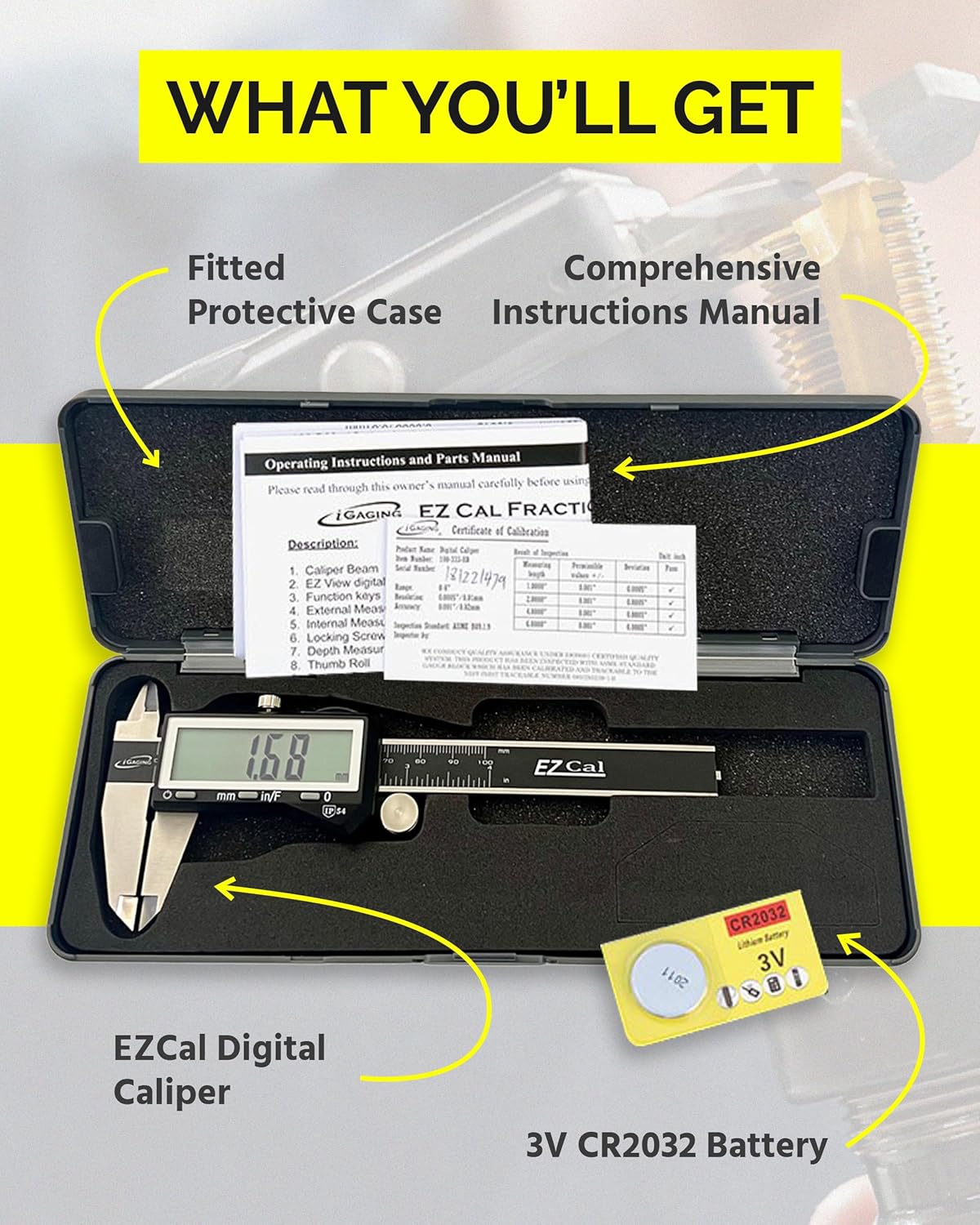
The complete package, including the caliper, protective case, manual, and battery.
Setup
- Battery Installation:
Locate the battery compartment on the digital display unit. Open the compartment cover and insert the CR2032 battery with the positive (+) side facing up. Close the cover securely.
- Initial Cleaning:
Before first use, gently wipe the display screen and measuring surfaces with a clean, dry cloth to remove any manufacturing residue. Avoid using liquids on the display.
Operating Instructions
- Power On/Off:
Press the "ON/OFF" button to turn the caliper on. The display will show "0.000" or a previous reading. To turn off, press and hold the "ON/OFF" button, or the caliper will automatically power off after a period of inactivity.
- Zeroing the Caliper:
Close the measuring jaws completely and firmly. Press the "ZERO" button. The display should now read "0.000". This sets the reference point for your measurements.
- Selecting Units:
Press the "mm/in/F" button to cycle through the measurement units: millimeters (mm), decimal inches (in), and fractional inches (in/F).
- Taking Measurements:
- External Measurement: Place the object between the outside jaws. Use the thumbwheel to gently close the jaws until they make firm contact with the object. Read the measurement on the display.
- Internal Measurement: Place the inside jaws into the opening of the object. Open the jaws until they make firm contact with the inner surfaces. Read the measurement on the display.
- Depth Measurement: Place the end of the main beam on the top surface of the object. Extend the depth rod into the hole or recess until it touches the bottom. Read the measurement on the display.
- Step Measurement: Use the step measuring face at the end of the sliding jaw to measure the height of a step or shoulder on an object.

Demonstration of using the caliper for precise measurements.
- Locking a Measurement:
After taking a measurement, tighten the knurled locking knob to secure the jaws in position. This allows you to transfer the measurement or read it more conveniently.
Maintenance
- Cleaning: Regularly clean the measuring surfaces and the main beam with a clean, dry, lint-free cloth. Avoid using solvents or harsh chemicals, as they may damage the display or the caliper's finish. Do not immerse the caliper in any liquid.
- Storage: When not in use, store the caliper in its protective case to prevent damage from dust, debris, and impacts. It is recommended to close the jaws and lock the slider firmly but not overtighten when storing for extended periods.
- Battery Replacement: Replace the CR2032 battery when the display becomes dim or erratic. Always use a fresh, high-quality battery.
Troubleshooting
| Problem | Possible Cause | Solution |
|---|---|---|
| Display is blank or dim. | Low or dead battery. | Replace the CR2032 battery. |
| Inaccurate or inconsistent readings. |
|
|
| Jaws do not slide smoothly. | Accumulation of dirt or lack of lubrication. | Clean the main beam and apply a very thin layer of light machine oil if necessary (avoiding the display area). |
Specifications
| Attribute | Detail |
|---|---|
| Brand | iGaging |
| Model Number | 4" |
| Material | Stainless Steel |
| Range | 0-4 Inches / 0-100 mm |
| Measurement Accuracy | +/-0.001 inches |
| Protection Rating | IP54 (Splashwater, Oil, and Dust Resistant) |
| Batteries Required | 2 x CR2032 |
| Product Dimensions | 4"L x 4"W (approx. 4 x 4 x 0.1 inches) |
Warranty and Support
For warranty information, technical support, or service inquiries regarding your iGaging Premium IP54 EZ CAL Fractional Digital Caliper, please contact iGaging directly through their official website or the retailer from whom you purchased the product. Please retain your proof of purchase for warranty claims.
For more information, visit the iGaging Store on Amazon.


