
1. Introduction
The AmScope LED-80S is an intensity-adjustable 80-LED ring light designed to provide cool, even, intense, and focused shadow-free illumination for microscopes. This manual provides detailed instructions for the setup, operation, maintenance, and troubleshooting of your LED-80S ring light.
Key Features:
- 80 bright white LED bulbs
- Estimated 100,000 hours of life
- Intense and focused shadow-free illumination
- Variable intensity control
- Wide power input compatibility: 90-265V, 50-60HZ, auto switching
2. Package Contents
Please verify that all items listed below are present in your package:
- One (1) AmScope LED-80S 80-LED Ring Light
- One (1) 48mm Ring Adapter

Figure 2.1: Contents of the AmScope LED-80S package, showing the 80-LED ring light unit with its power cord and the included 48mm ring adapter.
3. Setup
Follow these steps to properly set up your AmScope LED-80S ring light:
- Identify Mounting Area: The LED-80S ring light is designed to fit microscope objectives or other components with a mounting size up to 2-1/2 inches (65mm) in diameter.
- Attach Ring Adapter (if needed): If your microscope objective or mounting point is 1-7/8 inches (48mm) in diameter, use the provided 48mm ring adapter. Place the adapter into the inner ring of the LED-80S light.
- Mount the Ring Light: Carefully slide the LED-80S ring light (with or without the adapter, as appropriate) onto the objective lens or the designated mounting area of your microscope. Ensure it is securely seated.
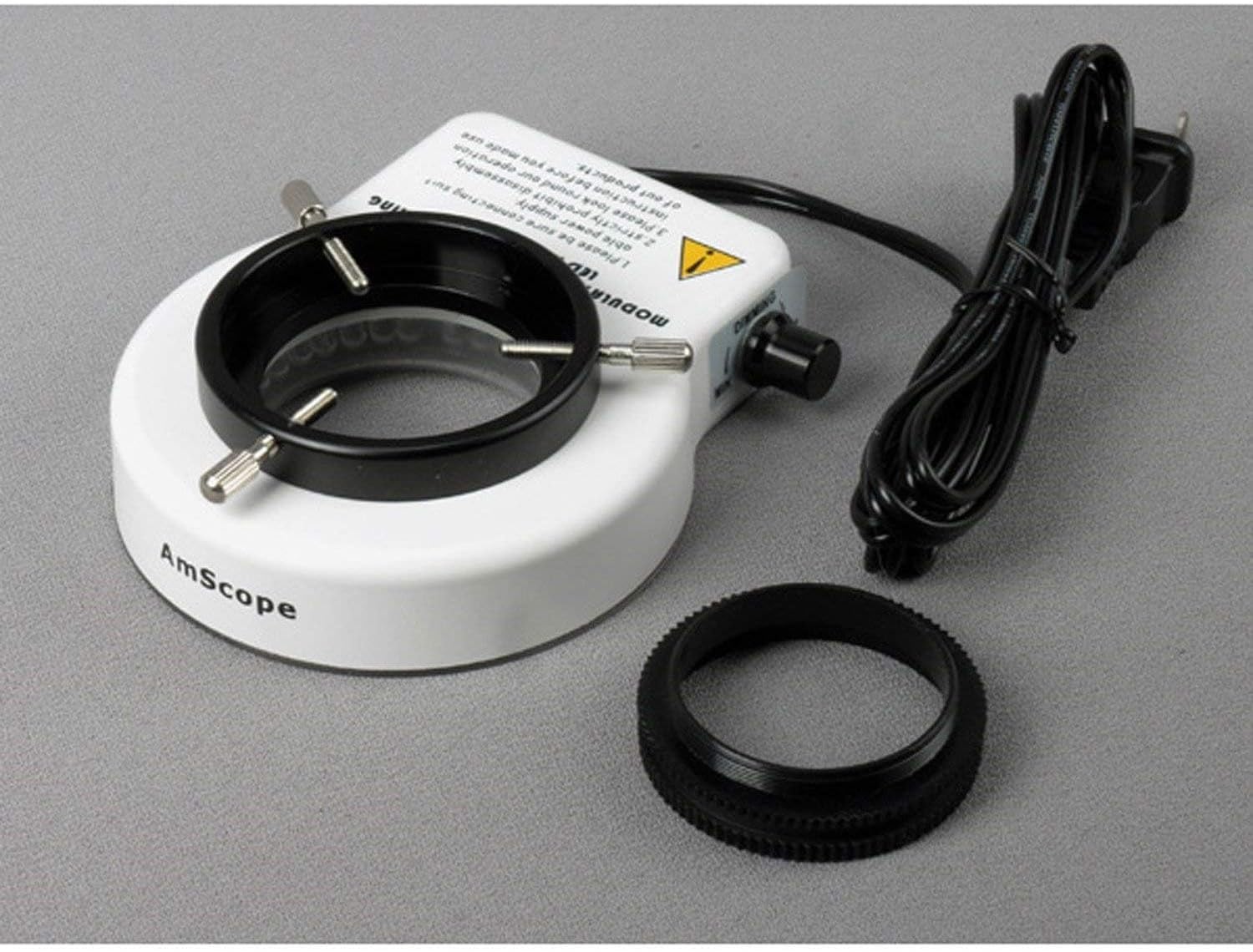
Figure 3.1: The AmScope LED-80S ring light showing its underside, including the mounting screws and the 48mm ring adapter, ready for installation.

Figure 3.2: The LED-80S ring light securely mounted on a microscope, demonstrating its compact fit and illuminated state.
4. Operating Instructions
Operating the AmScope LED-80S is straightforward:
- Connect Power: Plug the power cord of the LED-80S into a standard electrical outlet. The unit is compatible with power supplies ranging from 90V to 265V (50-60Hz), automatically adjusting to the local voltage.
- Turn On/Off: Locate the power switch on the side of the ring light unit. Flip the switch to the 'ON' position to illuminate the LEDs. Flip it to 'OFF' to turn the light off.
- Adjust Intensity: Use the built-in dimmer knob, typically located near the power switch, to adjust the brightness of the LED illumination. Rotate the knob clockwise to increase intensity and counter-clockwise to decrease it.

Figure 4.1: A complete microscope setup featuring the AmScope LED-80S ring light, demonstrating its effective illumination of the specimen area.
5. Maintenance
Proper maintenance will ensure the longevity and optimal performance of your LED-80S ring light:
- Cleaning: Disconnect the power before cleaning. Use a soft, dry cloth to wipe the exterior of the unit. For stubborn dirt, a slightly damp cloth can be used, followed by a dry cloth. Avoid using harsh chemicals or abrasive cleaners, as they may damage the finish or optical components.
- Storage: When not in use for extended periods, store the ring light in a clean, dry environment, away from direct sunlight and extreme temperatures.
- LED Life: The LEDs are designed for a long operational life (approximately 100,000 hours) and typically do not require replacement under normal use.
6. Troubleshooting
If you encounter issues with your AmScope LED-80S, refer to the following common problems and solutions:
| Problem | Possible Cause | Solution |
|---|---|---|
| Light does not turn on. |
|
|
| Light is too dim or too bright. | Dimmer setting is incorrect. | Adjust the dimmer knob to achieve the desired brightness level. |
| Light flickers. | Loose connection or power fluctuation. |
|
If the problem persists after attempting these solutions, please contact AmScope customer support for further assistance.
7. Specifications
| Feature | Detail |
|---|---|
| Model Number | LED-80S |
| Number of LEDs | 80 bright white LED bulbs |
| LED Life Expectancy | 100,000 hours |
| Illumination Type | Intense, focused, shadow-free |
| Intensity Control | Variable dimmer control |
| Power Input | 90-265V, 50-60HZ (auto switching) |
| Mounting Size Compatibility | Up to 2-1/2" (65mm) diameter |
| Ring Light Inside Diameter | 2" (51mm) |
| Ring Light Outside Diameter | 4" (100mm) |
| Included Adapter | 1-7/8" (48mm) ring adapter |
| Product Dimensions | 10.4 x 8.5 x 2.6 inches |
| Item Weight | 10.4 ounces |
| Manufacturer | United Scope LLC. |
| Country of Origin | China |
8. Warranty Information
The AmScope LED-80S 80 LED Microscope Compact Ring Light comes with a one-year warranty against manufacturing defects. This warranty covers defects in materials and workmanship under normal use. Please retain your proof of purchase for warranty claims.
For warranty service or inquiries, please contact AmScope customer support.
9. Customer Support
For technical assistance, troubleshooting beyond this manual, or warranty claims, please contact AmScope customer support. You can find contact information on the official AmScope website or through your retailer.
When contacting support, please have your product model (LED-80S) and purchase details ready.