
Product Overview
This document provides instructions for the proper installation, maintenance, and care of the Royal Dirt Devil Foam Filter, part number #1KQ0106000 (also known as RO-KQ0106). This genuine replacement foam filter is designed for use with specific Dirt Devil canister vacuum models, including the SD4000 Canister Vac, SD40000 Vision Pet Canister Vac, and SD40010 EZ Lite Canister Vac. Regular filter maintenance is crucial for maintaining optimal vacuum performance and air quality.
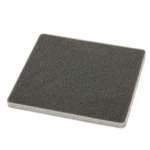
Image of the Royal Dirt Devil Foam Filter, part number #1KQ0106000, designed for specific Dirt Devil canister vacuum models.
Setup and Installation
- Power Off and Unplug: Before attempting any installation or maintenance, ensure your Dirt Devil vacuum cleaner is turned off and unplugged from the electrical outlet. This prevents accidental startup and potential injury.
- Locate Filter Compartment: Refer to your vacuum cleaner's original user manual to locate the foam filter compartment. This is typically found near the dustbin or motor housing.
- Remove Old Filter: Carefully open the filter compartment and remove the old, dirty foam filter. Dispose of the old filter responsibly.
- Insert New Filter: Place the new Royal Dirt Devil Foam Filter (#1KQ0106000) into the designated compartment. Ensure it is seated correctly and securely to create a proper seal. An improper fit can lead to reduced suction and dust leakage.
- Close Compartment: Close the filter compartment securely. Ensure all latches or covers are properly fastened.
- Test Vacuum: Plug in your vacuum cleaner and perform a brief test to ensure it operates normally and suction is restored.
Operating Considerations
Once installed, the foam filter works continuously to capture dust and debris during vacuum operation. For optimal performance:
- Ensure the filter is always clean and dry before each use.
- Avoid vacuuming liquids or excessively wet debris, as this can damage the foam filter and the vacuum motor.
- If you notice a significant decrease in suction power, check the filter for excessive dirt or blockages.
Maintenance
Regular cleaning and timely replacement of the foam filter are essential for maintaining your vacuum's efficiency and extending its lifespan.
Cleaning the Foam Filter:
- Remove Filter: Turn off and unplug the vacuum. Remove the foam filter as described in the "Setup and Installation" section.
- Rinse: Rinse the foam filter under cool, running water until the water runs clear. Gently squeeze the filter to remove excess water and dislodge trapped dirt. Do not twist or wring forcefully, as this can damage the foam.
- Dry Completely: Allow the filter to air dry completely for at least 24 hours before reinstallation. Do not use a dryer or any heat source, as this can deform or damage the foam. Ensure the filter is absolutely dry to prevent mold growth and damage to the vacuum motor.
- Reinstall: Once completely dry, reinstall the filter into your vacuum cleaner.
Note: The frequency of cleaning depends on usage. For average household use, cleaning every 1-3 months is recommended.
Filter Replacement:
It is recommended to replace the foam filter every 6-12 months, or sooner if you notice signs of wear, tear, or if cleaning no longer restores its original performance. A worn-out filter can compromise suction and air filtration.
Troubleshooting
| Problem | Possible Cause | Solution |
|---|---|---|
| Reduced Suction Power | Clogged or dirty foam filter. | Clean the foam filter thoroughly. Ensure it is completely dry before reinstallation. If suction does not improve, consider replacing the filter. |
| Dust Escaping Vacuum | Filter not properly seated or damaged. | Check that the filter is correctly installed and the compartment is securely closed. Inspect the filter for any tears or damage; replace if necessary. |
| Unusual Odor from Vacuum | Damp or moldy filter. | Ensure the filter is completely dry after cleaning. If odor persists, replace the filter. |
Specifications
- Part Number: #1KQ0106000 (RO-KQ0106)
- Material: Foam
- Compatible Devices: Dirt Devil SD4000 Canister Vac, Dirt Devil SD40000 Vision Pet Canister Vac, Dirt Devil SD40010 EZ Lite Canister Vac
- Number of Pieces: 1
- Reusability: Washable and reusable (after proper drying)
Warranty and Support
Information regarding specific warranty terms for the Royal Dirt Devil Foam Filter #1KQ0106000 is not provided in this document. For warranty details, please refer to the original product packaging or contact Royal/Dirt Devil customer support directly. You may also visit the official Royal or Dirt Devil website for further assistance and product information.
For additional support or inquiries, please consult the manufacturer's official website or your product's main user manual.


