
Introduction
Welcome to the JOYO JF-15 California Sound Effects Pedal. This pedal is designed to simulate the sound of a modern high-gain amplifier, offering a wide range of tonal possibilities for guitarists. It features a unique voice control and a 3-band EQ for precise sound shaping, allowing you to achieve diverse tones from classic rock to modern metal.
Safety Information
- Use only a regulated 9V DC power adapter (center negative) or a 9V battery. Using an incorrect power supply may damage the unit and void the warranty.
- Do not expose the pedal to extreme temperatures, humidity, or direct sunlight.
- Do not attempt to disassemble or modify the pedal. Refer all servicing to qualified personnel.
- Keep out of reach of children.
- Always disconnect power before cleaning or when the unit is not in use for extended periods.
Product Overview
The JOYO JF-15 California Sound pedal features six control knobs and a footswitch for intuitive tone shaping.

Image description: A top-down view of the JOYO JF-15 California Sound pedal, showing the six control knobs (Low, Mid, High, Level, Voice, Drive) and the footswitch. The input and output jacks are visible on the sides, along with the DC 9V power input.
Controls
- LOW: Adjusts the low-frequency response of your tone. Turn clockwise to boost bass, counter-clockwise to cut.
- MID: Adjusts the mid-frequency response. This knob significantly impacts the pedal's character and presence.
- HIGH: Adjusts the high-frequency response. Turn clockwise for more treble, counter-clockwise for a warmer sound.
- LEVEL: Controls the overall output volume of the effect. Use this to balance the effect volume with your bypassed signal.
- VOICE: Shapes the mid-range and presence, influencing the amp's character and adding an 'airy' quality. This control is key to dialing in different amp voicings.
- DRIVE: Adjusts the amount of gain and distortion. Turn clockwise for more saturation and sustain.
- FOOTSWITCH: Toggles the effect on/off. This pedal features true bypass, ensuring your signal remains unaffected when the pedal is off. The LED indicator illuminates when the effect is active.

Image description: An angled view of the JOYO JF-15 California Sound pedal, highlighting the input (IN) and output (OUT) jacks on the sides, and the DC 9V power input.
Setup
- Power Connection: Connect a 9V DC power adapter (center negative) to the DC 9V input jack on the side of the pedal, or install a 9V battery inside the pedal (see Maintenance section for battery installation).
- Input Connection: Connect your guitar or the output of a preceding effect pedal to the "IN" jack on the right side of the JF-15 using a standard 1/4-inch instrument cable.
- Output Connection: Connect the "OUT" jack on the left side of the JF-15 to your amplifier's input or the input of the next effect pedal in your chain using a standard 1/4-inch instrument cable.
- Activation: Press the footswitch to engage or bypass the effect. The LED indicator will illuminate when the effect is active.
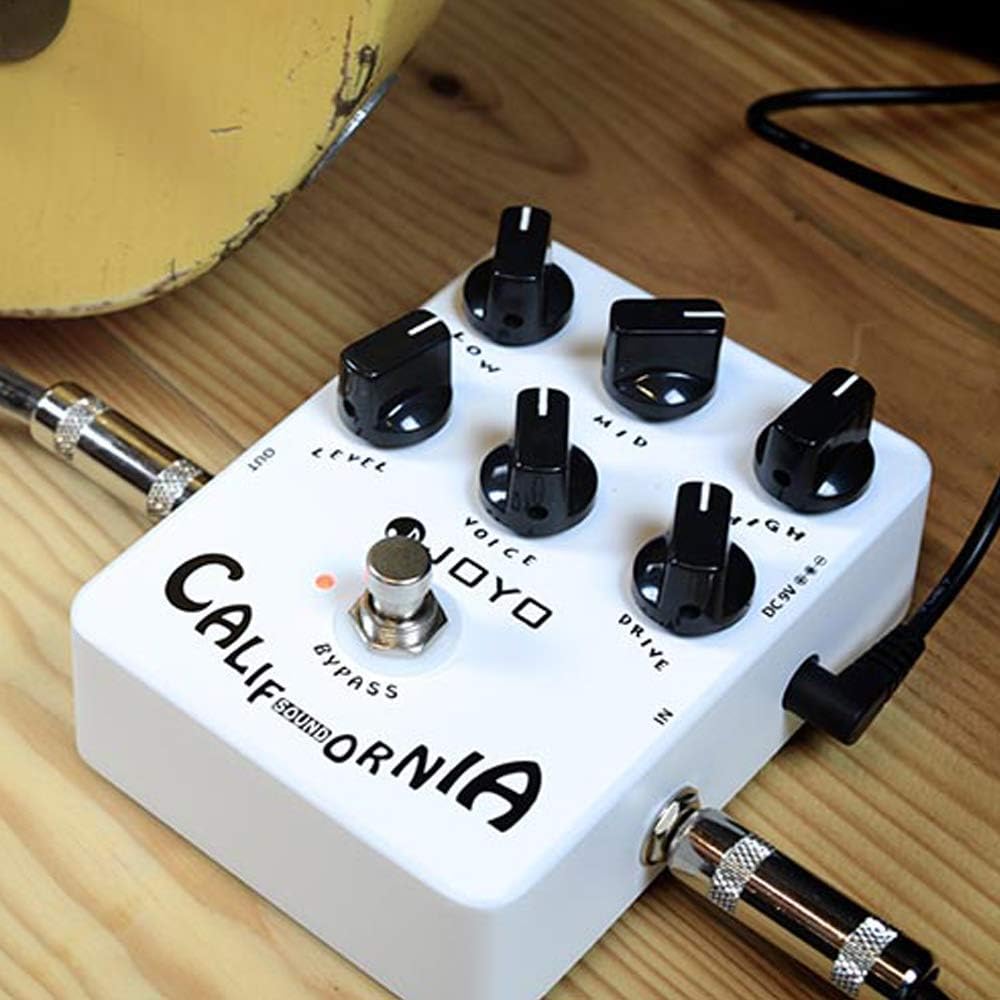
Image description: The JOYO JF-15 California Sound pedal connected to a guitar cable (IN) and an output cable (OUT), demonstrating typical setup.
Operating Instructions
The JF-15 California Sound pedal is designed to emulate the characteristics of a high-gain amplifier. Experiment with the controls to find your desired tone.
- Gain Adjustment: Start with the DRIVE knob at a lower setting and gradually increase it to achieve more distortion and sustain.
- Tone Shaping: Use the LOW, MID, and HIGH knobs to sculpt your sound. Cutting the mids can create a "scooped" metal tone, while boosting them can add presence and cut for lead playing.
- Voice Control: The VOICE knob is crucial for defining the amp's character. Adjust it to fine-tune the mid-range and overall feel of the simulated amplifier. Higher settings can add more gain and an "airy" quality, mimicking different amplifier designs.
- Volume Control: The LEVEL knob controls the output volume. Adjust it to match the volume of your bypassed signal or to boost your signal for solos.
- Direct Recording: This pedal features inbuilt cabinet emulation, allowing direct connection to a mixing desk, Digital Audio Workstation (DAW), or audio interface for recording without an amplifier. Connect the "OUT" jack directly to your recording device.

Image description: The JOYO JF-15 California Sound pedal positioned on a guitar's pickguard, illustrating its compact size and typical use in a guitar setup.
Maintenance
Battery Replacement
The JF-15 can be powered by a 9V battery. To replace the battery:
- Unscrew the four screws on the bottom plate of the pedal.
- Carefully remove the bottom plate.
- Disconnect the old 9V battery from its clip and replace it with a new one, ensuring correct polarity.
- Reattach the bottom plate and secure the screws.
Cleaning
Wipe the pedal with a soft, dry cloth. Do not use abrasive cleaners or solvents, as these may damage the finish or internal components.
Troubleshooting
- No Sound: Check all cable connections (input, output, power). Ensure the power supply is working and correctly connected, or the 9V battery is fresh and properly installed. Verify your guitar and amplifier are functioning correctly.
- Weak or Unintended Distorted Sound: Check battery level if using battery power. Ensure all cables are fully inserted. Test with different cables to rule out faulty connections.
- Excessive Noise: Ensure you are using a regulated 9V DC power supply. Try isolating the pedal from other power sources or pedals to identify potential interference. Ground loops can cause hum; try a different power outlet or power supply.
- Effect Not Engaging: Ensure the footswitch is pressed firmly and the LED indicator illuminates when the effect is active.
If problems persist after following these steps, please contact JOYO customer support or your local dealer for further assistance.
Specifications
| Feature | Detail |
|---|---|
| Model | JF-15 |
| Power Requirement | 9V DC (center negative) or 9V Battery |
| Dimensions (L x W x H) | 4.72 x 3.82 x 2.17 inches (120 x 97 x 55 mm) |
| Weight | 13.8 ounces (390 grams) |
| Signal Format | Analog |
| Hardware Interface | 1/4-inch Audio Jack |
Warranty and Support
For detailed warranty information, technical support, or service inquiries, please refer to the official JOYO website or contact your authorized JOYO dealer. Please retain your purchase receipt as proof of purchase for warranty claims.


