
1. Product Overview
This manual provides instructions for the safe installation, operation, and maintenance of your Quorum 2854-18-86 Bryant Collection Three-Light Dual Mount Fixture. This traditional style lighting fixture features a durable bronze finish and an elegant glass shade, designed for indoor use. It offers a dual mount option, allowing for installation as either a semi-flush mount or a pendant light, adapting to various ceiling heights and aesthetic preferences.
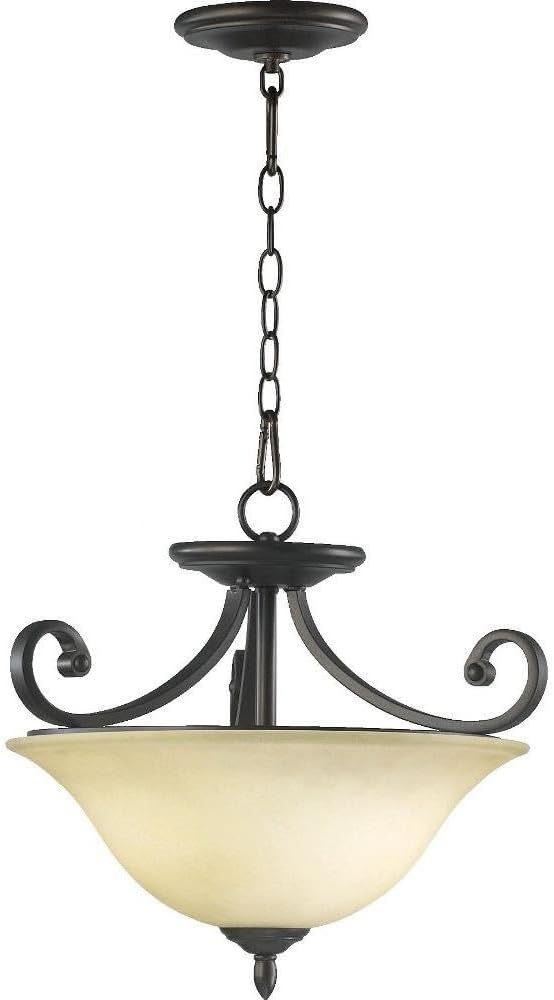
Image 1.1: The Quorum 2854-18-86 Three-Light Dual Mount Fixture, showcasing its bronze finish and glass shade.
2. Safety Information
WARNING: To avoid electric shock, always disconnect power at the main circuit breaker or fuse box before beginning installation, servicing, or cleaning the fixture. Failure to do so can result in serious injury or death.
- Read all instructions carefully before proceeding with installation.
- Consult a qualified electrician if you are unsure about the installation process or have questions regarding electrical connections.
- Ensure all wiring connections are secure and comply with local electrical codes and ordinances.
- This fixture is rated for dry locations only. Do not install in damp or wet environments.
- Use only the specified bulb type and wattage to prevent overheating and potential fire hazards.
- Do not attempt to modify the fixture in any way.
3. Package Contents
Verify that all components are present and undamaged before beginning installation. If any parts are missing or damaged, do not proceed with installation and contact customer service.
- Fixture Body (1)
- Glass Shade (1)
- Mounting Hardware Kit (1 set) - Includes mounting strap, screws, wire nuts, chain (for pendant mount), canopy, etc.
- Instruction Manual (1)
4. Installation Instructions (Setup)
Tools Required: Screwdriver, Wire Strippers, Pliers, Electrical Tape, Ladder (not included).
- Turn Off Power: Locate the circuit breaker controlling the light fixture's location and switch it to the OFF position. Verify power is off using a voltage tester.
- Prepare Mounting: Attach the mounting strap (included in hardware kit) to the electrical junction box in the ceiling using the provided screws. Ensure it is securely fastened.
- Determine Mounting Style:
- For Pendant Mount: Adjust the chain length to your desired height. Thread the fixture wires through the chain and canopy.
- For Semi-Flush Mount: The fixture will mount directly to the ceiling canopy without the use of the chain.
- Wire Connections: Connect the electrical wires from the fixture to the corresponding wires from the junction box using wire nuts. Match colors: Black to Black (Hot), White to White (Neutral), and Green or bare copper to Green or bare copper (Ground). Ensure all connections are tight and secure.
- Secure Fixture: Carefully lift the fixture and attach it to the mounting strap or canopy, securing it with the provided screws or nuts. Ensure the fixture is stable and flush against the ceiling.
- Install Glass Shade: Carefully place the glass shade onto the fixture according to the design. Secure it using any retaining rings or screws provided.
- Install Bulbs: Screw three E26 Medium base halogen bulbs (not included) into the sockets. Do not exceed the maximum wattage of 75 watts per bulb.
- Restore Power: Once installation is complete and all components are secure, return to the circuit breaker and switch the power to the ON position. Test the fixture.

Image 4.1: The Quorum 2854-18-86 fixture installed as a pendant light in a residential setting.
5. Operating Instructions
The Quorum 2854-18-86 fixture is designed for simple operation via a standard wall switch (not included). Once properly installed and powered, toggle the wall switch to turn the light fixture ON or OFF.
- Ensure the correct type and wattage of bulbs are installed for optimal performance and safety.
- Avoid frequently switching the light on and off, as this can reduce bulb lifespan.
6. Maintenance
Regular maintenance will help preserve the appearance and functionality of your light fixture.
- Cleaning: Always turn off power to the fixture and allow it to cool before cleaning. Wipe the fixture body and glass shade with a soft, dry, or slightly damp cloth. Do not use abrasive cleaners, solvents, or polishes, as these can damage the finish or glass.
- Bulb Replacement: Ensure the power is OFF at the circuit breaker and the bulbs have cooled completely before attempting to replace them. Unscrew old bulbs and screw in new E26 Medium base halogen bulbs, ensuring they do not exceed 75 watts each.
- Inspection: Periodically check for any loose wiring or damaged components. If any issues are found, disconnect power and consult a qualified electrician.
7. Troubleshooting
If you encounter issues with your fixture, refer to the following troubleshooting guide:
| Problem | Possible Cause | Solution |
|---|---|---|
| Light does not turn on. | No power to the fixture. Bulb is faulty or loose. Incorrect wiring. | Check circuit breaker and wall switch. Replace bulb or tighten it securely. Verify wiring connections (consult electrician if unsure). |
| Light flickers. | Loose bulb. Loose wiring connection. Incompatible dimmer switch (if applicable). | Tighten bulb. Turn off power and check wiring connections. Ensure dimmer switch is compatible with halogen bulbs. |
| Fixture hums. | Loose components. Incompatible dimmer switch. | Turn off power and check for loose parts. Tighten as needed. Replace dimmer with a compatible one. |
If these steps do not resolve the issue, contact Quorum International customer support.
8. Specifications
| Feature | Detail |
|---|---|
| Brand | Quorum International |
| Model Number | 2854-18-86 |
| Collection | Bryant Collection |
| Dimensions (L x W x H) | 17.5" x 17.5" x 16.5" |
| Item Weight | 12 pounds |
| Material | Glass |
| Finish | Bronze |
| Style | Traditional |
| Light Source Type | Halogen |
| Number of Light Sources | 3 |
| Voltage | 120 Volts |
| Max Wattage per Bulb | 75 watts |
| Bulb Base | E26 Medium |
| Installation Type | Semi Flush Mount / Dual Mount |
| Safety Rating | Dry Location |
| Assembly Required | Yes |
9. Warranty and Support
This Quorum International product comes with a Limited Warranty. For specific details regarding warranty coverage, terms, and conditions, please refer to the warranty documentation included with your purchase or contact Quorum International directly.
For technical assistance, missing parts, or any questions not covered in this manual, please contact Quorum International customer service. Contact information can typically be found on the product packaging or the manufacturer's official website.
