
Introduction
The Bose Bluetooth Headset Series 2 is engineered for clear communication while on the move. It features exclusive Bose technologies that automatically adapt to changing noise levels, ensuring you hear calls better. An advanced noise-rejecting microphone system helps your caller hear you clearly, even in windy or noisy environments. This headset is designed to be compact, lightweight, and well-balanced, with a curved design and soft StayHear silicone tips for a comfortable and secure fit in the right ear.
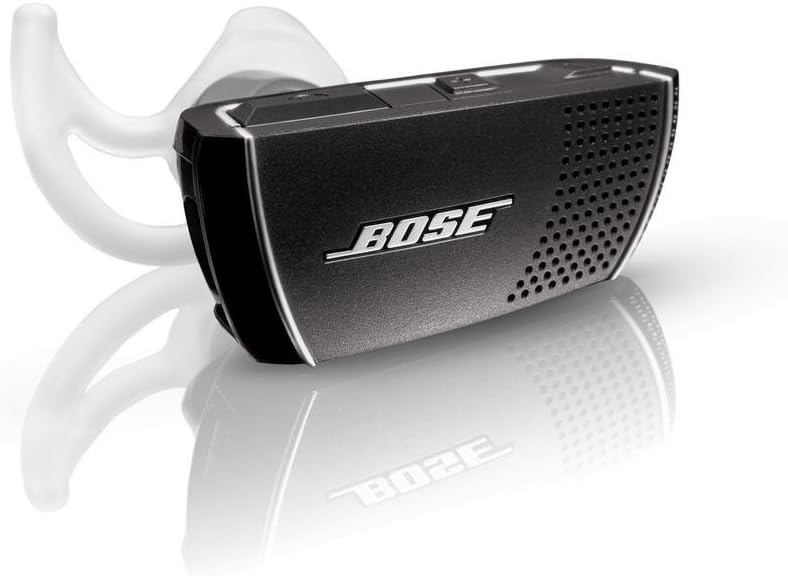
Image: The Bose Bluetooth Headset Series 2, a compact black earpiece with silver accents, designed for the right ear.
Video: An overview of the Bose Bluetooth Headset Series 2, highlighting its design and key features for ease of use and clear communication.
What's in the Box
- Bose Bluetooth Headset Series 2 (Right Ear)
- Wall charger
- USB cable
- Three sizes of StayHear tips (small, medium, and large)
- Carrying case
- Operating instructions
Setup
1. Charging the Headset
Before initial use, fully charge your headset. The rechargeable lithium-ion battery provides up to 4.5 hours of talk time. A complete recharge typically takes three hours. Use the provided wall charger or USB cable to charge the headset.
2. Pairing with Your Phone
To pair the headset with your Bluetooth-enabled phone:
- Ensure your headset is charged.
- Turn on the headset using the power slider switch.
- Activate Bluetooth on your phone and search for new devices.
- Select 'Bose BT Headset' from the list of available devices.
- If prompted, enter the passcode '0000'.
- The headset will indicate successful pairing. The Bluetooth indicator light will confirm connection.
3. Wearing the Headset
The Bose Bluetooth Headset Series 2 is designed for a comfortable and secure fit in the right ear. It comes with three sizes of soft StayHear silicone tips (small, medium, large) to ensure a personalized fit without the need for an ear hook.
- Choose the StayHear tip size that feels most comfortable and secure in your ear.
- Gently insert the headset into your right ear, ensuring the curved design aligns with your facial features.
- The soft silicone tip distributes contact evenly, avoiding pressure points.

Image: A man wearing the Bose Bluetooth Headset Series 2 in his right ear while driving, demonstrating its discreet and secure fit.
Operating the Headset
1. Power On/Off
Use the power slider switch located on the headset to turn it on or off. Slide the switch to the green position for ON and red for OFF. The headset connects quickly to your phone when powered on.
Video: A demonstration of the Bose Bluetooth Headset Series 2, showing its easy-to-use power switch and quick connection.
2. Answering and Ending Calls
The headset features simple, convenient controls for managing calls. To answer or end a call, use a simple top-to-bottom pinching motion on the call button. This action is designed not to dislodge the earpiece or push it uncomfortably into your ear.
3. Volume Control
Bose advanced technology automatically senses ambient noise and adjusts the headset volume accordingly. In loud environments, the volume increases, and in quiet settings, it decreases, maintaining a consistent listening level. You can also manually adjust the volume using the dedicated volume buttons on the headset.
4. Voice Dialing
With select smartphones, the call button on the headset also enables voice dialing functionality.
5. A2DP Audio Streaming
The headset supports the A2DP Bluetooth profile, allowing you to stream mobile media content from your smartphone. This includes listening to podcasts, audiobooks, stored music, and turn-by-turn navigation directions through your headset when you are not on a call.
6. Indicators
The headset provides easy-to-see and hear indicators for its status. A battery indicator shows the charge status (green for full, amber for medium, red for low). Bluetooth connection status is also indicated, allowing you to easily know if you are connected. These indicators are designed to be discreet when the headset is in use.

Image: A close-up view of the Bose Bluetooth Headset Series 2, showing its sleek design and the perforated speaker grille.
Video: A demonstration of the Bose Bluetooth Headset Series 2's near-end audio performance, showcasing how the user hears clear sound.
Video: A demonstration of the Bose Bluetooth Headset Series 2's far-end audio performance, illustrating how the person on the other end hears clear sound despite background noise.
Maintenance
1. Cleaning
To maintain optimal performance, regularly clean your headset. Use a soft, dry cloth to wipe the exterior. For the StayHear tips, remove them from the headset and wash with mild soap and water, then rinse thoroughly and allow to air dry completely before reattaching.
2. Storage
When not in use, store the headset in its provided carrying case to protect it from dust, scratches, and damage during transport and storage.
Troubleshooting
1. No Power
- Ensure the headset is fully charged. Check the battery indicator.
- Verify the power slider switch is in the ON (green) position.
2. Cannot Pair with Phone
- Make sure the headset is in pairing mode (refer to your phone's Bluetooth settings).
- Ensure Bluetooth is enabled on your phone.
- Move the headset closer to your phone.
- Restart both the headset and your phone, then attempt pairing again.
3. Poor Sound Quality / Callers Cannot Hear Me
- Ensure the headset is securely and correctly placed in your ear.
- Check the volume settings on both the headset and your phone.
- Move away from sources of strong electromagnetic interference.
- The noise-rejecting microphone system is designed to filter out background noise, but extreme noise levels may still affect clarity.
Specifications
| Brand | Bose |
| Model Number | 347592-1110 |
| Color | Black |
| Ear Placement | Over Ear |
| Form Factor | One-Ear |
| Noise Control | Adaptive Noise Cancellation |
| Material | Plastic |
| Item Weight | 0.42 Ounces |
| Connectivity Technology | Bluetooth |
| Bluetooth Version | 5.0 |
| Bluetooth Range | 10 Meters |
| Battery Life (Talk Time) | Up to 4.5 hours |
| Recharge Time | 3 hours |
| Additional Features | Microphone Included, Volume Control, A2DP Audio Streaming |
Warranty
The Bose Bluetooth Headset Series 2 comes with a 1-Year Limited Warranty. Please retain your proof of purchase for warranty claims. For detailed terms and conditions, refer to the warranty information included with your product or visit the official Bose support website.
Support
For further assistance, product registration, or to access additional resources, please visit the official Bose support website:
You may also contact Bose customer service directly for personalized support.


