
Bulbrite LED/C9P
Bulbrite LED/C9P C9 Pink Bulbs Instruction Manual
Model: LED/C9P
1. Introduction
Thank you for choosing Bulbrite LED/C9P C9 Pink Bulbs. These energy-efficient LED bulbs are designed for long-lasting performance and vibrant illumination. This manual provides important information regarding the safe installation, operation, and maintenance of your new bulbs.
2. Safety Information
Please read and understand all safety instructions before installing or using these bulbs. Failure to follow these instructions may result in electric shock, fire, or other hazards.
- Risk of Electric Shock: Always disconnect power before installing or replacing bulbs.
- Indoor/Outdoor Use: These bulbs are suitable for both indoor and outdoor use, provided they are installed in appropriate, weather-resistant fixtures.
- Voltage: Ensure the power supply voltage matches the bulb's rated voltage (120V).
- Not Dimmable: These bulbs are not dimmable. Do not use with dimmer switches, as this may damage the bulbs or the dimmer.
- Handle with Care: Avoid dropping or subjecting bulbs to excessive force.
- Disposal: Dispose of used bulbs according to local regulations.
3. Package Contents
Your package should contain the following items:
- 25 x Bulbrite LED/C9P C9 Pink Bulbs
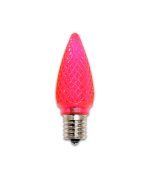
Figure 1: Bulbrite LED C9 Pink Bulbs (25-pack). This image displays the product packaging containing the 25 LED C9 pink bulbs.
4. Setup and Installation
Follow these steps to safely install your Bulbrite LED/C9P C9 Pink Bulbs:
- Power Off: Ensure the power to the fixture or string lights is completely turned off at the circuit breaker or by unplugging the power cord.
- Remove Old Bulbs: Carefully unscrew any existing bulbs from the sockets.
- Inspect Sockets: Check the sockets for any damage or corrosion. Ensure they are clean and dry.
- Install New Bulbs: Gently screw the Bulbrite LED/C9P C9 Pink Bulbs into the Intermediate (E17) base sockets. Do not overtighten.
- Restore Power: Once all bulbs are securely installed, restore power to the fixture or string lights.
- Test: Verify that all bulbs illuminate correctly.
Note: These bulbs have an Intermediate (E17) base. Ensure your fixture or string lights are compatible with this base type.
5. Operating Instructions
Operating your Bulbrite LED/C9P C9 Pink Bulbs is straightforward:
- Power On/Off: Control the bulbs by turning the power to the fixture or string lights on or off using the standard wall switch or plug.
- Non-Dimmable: As these bulbs are not dimmable, they will operate at full brightness when power is supplied. Do not attempt to use them with dimmer switches.
- Energy Saving: These LED bulbs consume only 0.35 watts, providing significant energy savings compared to traditional incandescent bulbs.
6. Maintenance
Bulbrite LED/C9P C9 Pink Bulbs require minimal maintenance due to their long lifespan.
- Cleaning: Ensure power is off before cleaning. Gently wipe the bulbs with a soft, dry cloth. Do not use liquid cleaners or abrasive materials.
- Replacement: With an average rated life of 50,000 hours, these bulbs are designed for extended use. Replace individual bulbs as needed by following the installation steps.
- Storage: If storing the bulbs or string lights, ensure they are clean, dry, and stored in a cool, dry place away from direct sunlight and extreme temperatures.
7. Troubleshooting
If you encounter issues with your Bulbrite LED/C9P C9 Pink Bulbs, refer to the following common problems and solutions:
| Problem | Possible Cause | Solution |
|---|---|---|
| Bulb does not light up. |
|
|
| Bulb flickers. |
|
|
| Bulb is dim. |
|
|
8. Specifications
Detailed specifications for the Bulbrite LED/C9P C9 Pink Bulbs:
- Model: LED/C9P
- Bulb Type: LED C9
- Color: Pink
- Quantity: 25 Bulbs per pack
- Wattage: 0.35 Watts
- Voltage: 120 Volts
- Base Type: Intermediate (E17)
- Dimmable: No (Not Dimmable)
- Average Rated Life: 50,000 Hours
- Beam Angle: 360 degrees
- UPC: 700580411141
- Manufacturer: Bulbrite
9. Warranty and Support
For warranty information and customer support, please refer to the official Bulbrite website or contact their customer service directly. Keep your purchase receipt as proof of purchase for any warranty claims.
Bulbrite Contact Information:
- Website: www.bulbrite.com (Note: This is a placeholder URL, please verify the actual Bulbrite website for support.)
- Customer Service: Refer to the website for contact numbers or email support.
Ask a question about this manual
Ask about setup, troubleshooting, compatibility, parts, safety, or missing instructions. Manuals+ will review the question and use this page’s manual context to help answer it.