
Introduction
This manual provides essential instructions for the safe and effective use of your Pro'sKit GS-210 Professional Soldering Iron and Gas Torch. This versatile tool is designed for precision soldering and various heating applications, featuring adjustable flame control and auto-ignition. Please read this manual thoroughly before operation and retain it for future reference.
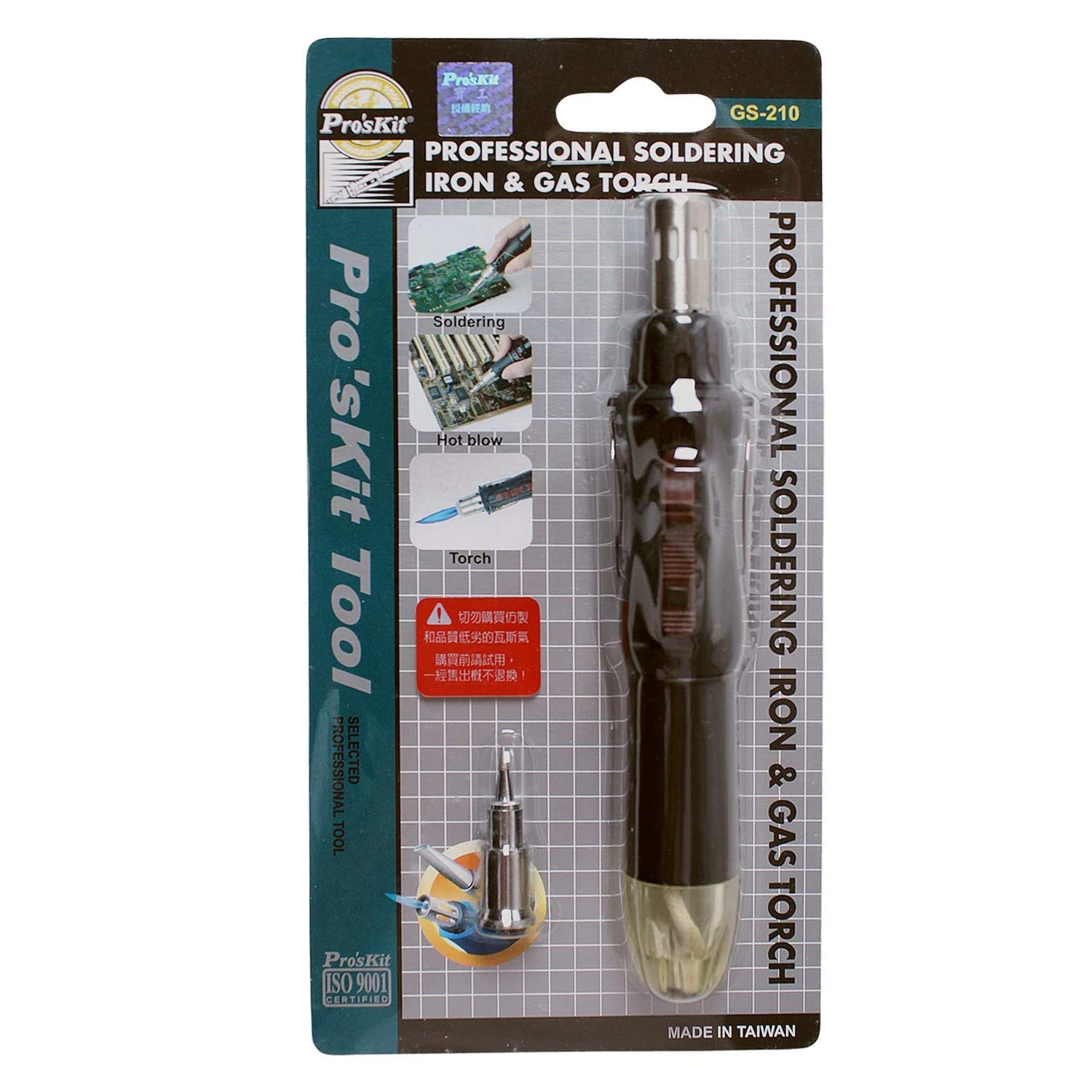
Image 1: The Pro'sKit GS-210 Professional Soldering Iron and Gas Torch. This image displays the full tool, showing its pen-like design, the transparent fuel window at the top, the ignition switch, and the soldering tip at the bottom.
Safety Information
WARNING: This product contains chemicals known to the State of California to cause cancer and birth defects or other reproductive harm. Always operate in a well-ventilated area.
- Keep out of reach of children.
- Do not touch the tip or heated parts during or immediately after use. They can reach temperatures up to 1300 °C.
- Use only butane gas for refilling. Do not use propane or other fuels.
- Ensure adequate ventilation to prevent the accumulation of hazardous fumes.
- Do not store near heat sources, open flames, or in direct sunlight.
- Always allow the tool to cool completely before storing.
- Wear appropriate personal protective equipment, including safety glasses.
Components
The Pro'sKit GS-210 Professional Soldering Iron and Gas Torch kit includes the following components:
- GS-210 Soldering Iron / Gas Torch unit
- Needle soldering tip
- Soldering head
- Built-in stand
Setup
1. Butane Refill
- Ensure the tool is completely cool and turned off.
- Hold the tool upside down.
- Insert the nozzle of a standard butane gas canister into the refill valve at the bottom of the tool.
- Press firmly for approximately 10-15 seconds. The transparent fuel window allows you to monitor the butane level.
- Wait a few minutes after refilling before ignition to allow the gas to stabilize.
Note: Use only high-quality butane gas for optimal performance and tool longevity.
Operating Instructions
1. Ignition
- Ensure the tool is adequately filled with butane.
- Adjust the flame control knob (if present) to a low setting initially.
- Press the auto-ignition button. The flame should ignite immediately.
- If the flame does not ignite, release the button, wait a few seconds, and try again.
2. Flame Adjustment
The GS-210 features adjustable flame control for precision use. Rotate the flame adjustment knob to increase or decrease the flame size and intensity as required for your application.
3. Soldering Operation
- Attach the desired soldering tip or head.
- Ignite the torch as described above.
- Allow the tip to heat up for a few moments.
- Apply the heated tip to the joint to be soldered, then apply solder to the joint, not directly to the tip.
- The built-in stand provides a safe place to rest the hot tool during work.
4. Gas Torch Operation
- Ensure the appropriate head for torch use is attached.
- Ignite the torch.
- Adjust the flame to the desired intensity.
- Direct the flame carefully towards the target.
5. Shutting Down
To turn off the tool, release the ignition button. The flame will extinguish. Ensure the tool is completely cool before storing.
Maintenance
1. Cleaning
- Always ensure the tool is cool before cleaning.
- Wipe the body of the tool with a clean, damp cloth. Do not use abrasive cleaners or solvents.
- Clean soldering tips regularly with a damp sponge or brass wool to remove oxidation and solder residue.
2. Tip Replacement
Optional tips are available for different applications. To replace a tip, ensure the tool is cool. Carefully unscrew the old tip and screw on the new one. Do not overtighten.
3. Storage
Store the Pro'sKit GS-210 in a cool, dry place, away from direct sunlight and heat sources. Ensure the fuel window indicates a safe level of butane for storage, or empty if storing for extended periods.
Troubleshooting
| Problem | Possible Cause | Solution |
|---|---|---|
| Tool does not ignite. | Low or no butane fuel. | Refill with butane gas. |
| Tool does not ignite. | Air in fuel tank after refill. | Wait a few minutes after refilling for gas to stabilize. Purge air if necessary by briefly pressing the refill valve with a small tool. |
| Weak or inconsistent flame. | Low butane fuel. | Refill with butane gas. |
| Weak or inconsistent flame. | Clogged nozzle or tip. | Clean the nozzle and tip. Ensure no debris is obstructing the gas flow. |
| Soldering tip not heating properly. | Tip is oxidized or dirty. | Clean the soldering tip thoroughly. |
Specifications
- Model: GS-210
- Brand: Pro'sKit
- Material: Iron
- Maximum Temperature: 1300 °C
- Fuel Type: Butane Gas
- Weight: 0.1 kg
- Included Components: Gas soldering kit (GS-210 unit, needle soldering tip, soldering head)
Customer Support
For further assistance, technical support, or inquiries regarding replacement parts, please contact Pro'sKit customer service. Refer to the product packaging or the official Pro'sKit website for contact information.
Note: Information regarding protection plans is available at the point of purchase and is separate from the manufacturer's product warranty.