
OREI WP-M-GN
OREI Grounded Universal 2-in-1 Type M Plug Adapter Instruction Manual
Model: WP-M-GN
1. Introduction
This manual provides instructions for the safe and effective use of your OREI Grounded Universal 2-in-1 Type M Plug Adapter. This adapter is designed to allow electrical devices with various plug types to connect to Type M outlets, primarily found in South Africa and other compatible regions. It features dual input ports for connecting two devices simultaneously.
Important Note: This adapter does NOT convert voltage. Ensure your devices are dual voltage (100-240V) or use a separate voltage converter if required.
2. Key Features
- Dual Input Ports: Allows connection of two electrical devices simultaneously.
- Universal Input: Accepts plugs from most countries worldwide (excluding large 8.7mm Type M plugs).
- Type M Output: Specifically designed for Type M outlets, common in South Africa, Botswana, Lesotho, Mozambique, Namibia, and Swaziland.
- Enhanced Conductivity: Features internal metal interfaces for improved electrical connection.
- Grounded Design: Equipped with a 3-round prong plug for safety.
- High Capacity: Supports up to 3000 Watts (max 250 Volt, 15 Ampere).

Image: The OREI Type M adapter highlighting its ability to charge two devices simultaneously and its Type M output compatibility.
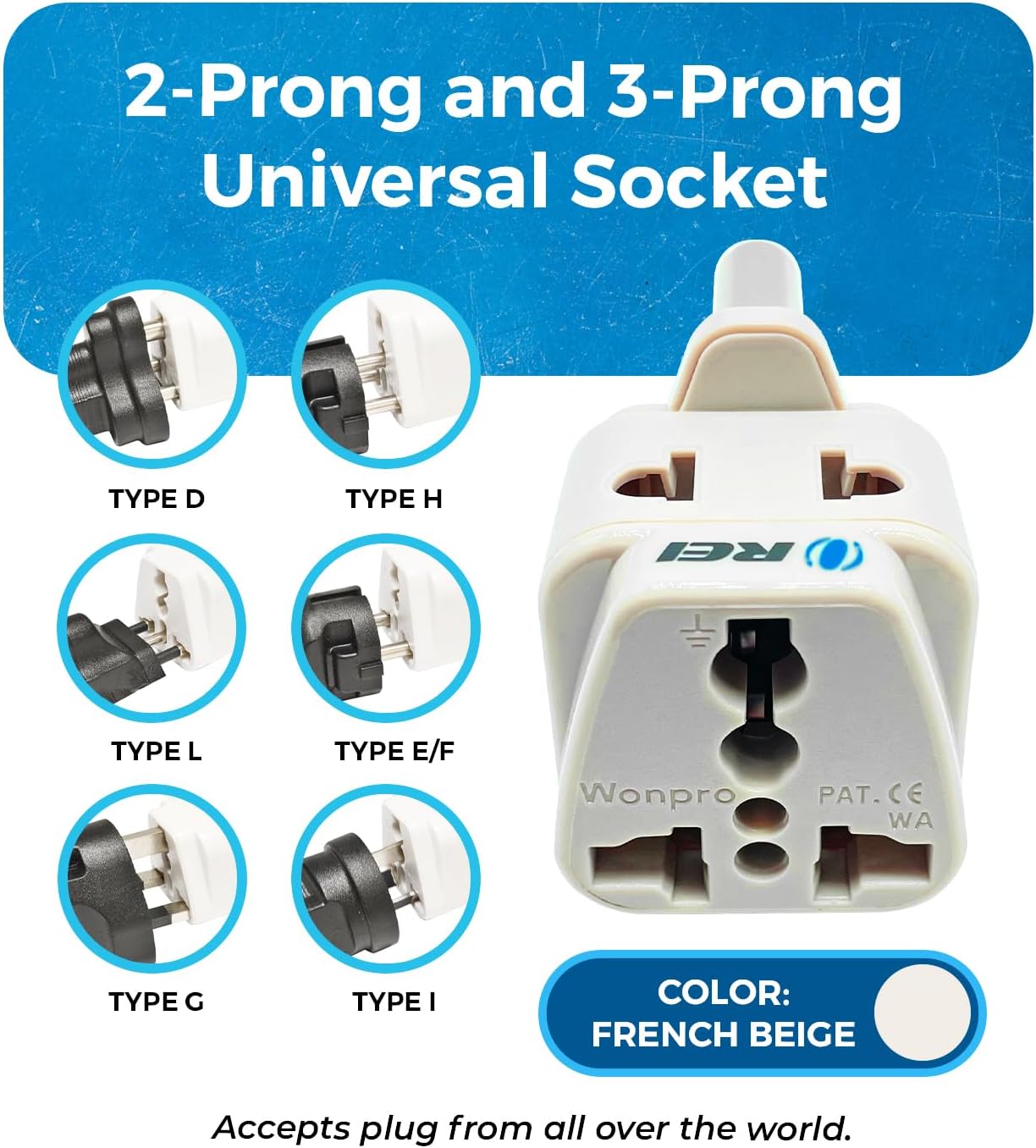
Image: The adapter demonstrating its universal input socket, accepting various 2-prong and 3-prong plug types from around the world.
3. Setup and Installation
- Verify Device Voltage: Before connecting any device, ensure it is compatible with the local voltage (typically 220-240V in Type M regions). Check your device's power adapter or manual for input voltage range (e.g., "Input: 100-240V"). If your device is not dual voltage, a separate voltage converter is required.
- Insert Adapter into Wall Outlet: Plug the OREI Type M adapter firmly into a Type M wall outlet. The adapter's three round prongs will fit into the corresponding holes in the wall socket.
- Connect Your Devices: Insert your device's plug into one of the two universal input ports on the adapter. You can connect a second device to the other port if needed.

Image: A clear view of the OREI Type M plug adapter, showing its universal input and Type M output prongs.
4. Operating Instructions
Once the adapter is securely plugged into the wall outlet and your devices are connected, power will be supplied to your devices. The adapter functions as a pass-through for electricity, allowing your device's power supply to draw power from the wall outlet. No special operation is required beyond proper connection.
- Ensure all connections are snug to prevent intermittent power supply.
- Monitor your devices for proper charging or operation.
- Disconnect devices and the adapter from the wall when not in use.

Image: An illustration of how the adapter allows two devices, such as a laptop and a monitor, to be powered simultaneously.
5. Safety Information and Precautions
- Voltage Conversion: This adapter does NOT convert voltage. Using a 110V-only device in a 220-240V outlet via this adapter will damage the device and may pose a fire hazard. Always verify device voltage compatibility.
- Maximum Load: Do not exceed the maximum capacity of 3000 Watts (250 Volts, 15 Amperes). Overloading can cause overheating and damage to the adapter or connected devices.
- Grounded Connection: The adapter provides a grounded connection. For safety, ensure your devices also support grounded connections if required.
- Indoor Use Only: This adapter is intended for indoor use in dry conditions. Avoid exposure to moisture or extreme temperatures.
- Children and Pets: Keep the adapter out of reach of children and pets.
- Inspection: Periodically inspect the adapter for any signs of damage. Discontinue use if damaged.

Image: A user with a laptop, emphasizing the adapter's safety features including its grounded design, CE certification, RoHS compliance, and fire-proof ABS construction.
6. Maintenance
The OREI Type M Plug Adapter requires minimal maintenance. Keep it clean and dry. To clean, disconnect it from the power outlet and wipe with a dry, soft cloth. Do not use liquid cleaners or immerse in water.
7. Troubleshooting
- No Power to Device:
- Ensure the adapter is fully inserted into the wall outlet.
- Verify your device's plug is fully inserted into the adapter.
- Check if the wall outlet is functional by testing with another device.
- Confirm your device is powered on and its power cable is not damaged.
- Adapter Overheating:
- Immediately disconnect all devices and the adapter from the wall.
- Check the total wattage of connected devices. Ensure it does not exceed 3000 Watts.
- Allow the adapter to cool down before attempting to use it again with a reduced load.
- Device Damage: If a device is damaged after use with the adapter, it is highly likely due to voltage incompatibility. This adapter does not convert voltage.
8. Specifications
| Model Number | WP-M-GN |
| Input Voltage | 250 Volts (Max) |
| Max Capacity | 3000 Watts / 15 Amperes |
| Product Dimensions (L x W x H) | 1.3 x 3.2 x 3.9 inches (3.3 x 8.1 x 9.9 cm) |
| Item Weight | 1.4 ounces (40 grams) |
| Color | Beige |
| Manufacturer | Orei Products |

Image: Technical specifications for the OREI DB-10L adapter, detailing its compact dimensions and light weight.
9. Warranty and Support
OREI provides a Lifetime Limited Warranty for this product. For technical assistance or warranty claims, please contact OREI customer support. Lifetime technical support is available.
For more information, visit the official OREI website or contact their support channels.
Ask a question about this manual
Ask about setup, troubleshooting, compatibility, parts, safety, or missing instructions. Manuals+ will review the question and use this page’s manual context to help answer it.