
Tuttnauer 2340M
Tuttnauer 2340M Manual Autoclave User Manual
Model: 2340M
Brand: Tuttnauer
1. Introduction
This manual provides essential information for the safe and effective operation, maintenance, and troubleshooting of the Tuttnauer 2340M Manual Autoclave. Please read this manual thoroughly before operating the device.
The Tuttnauer 2340M Autoclave is designed for sterilization applications in healthcare and laboratory facilities. It offers a reliable method for sterilizing instruments and materials without compromising safety or operational integrity.

Figure 1: Front view of the Tuttnauer 2340M Manual Autoclave, showing the control panel and door handle.
2. Safety Information
Adherence to the following safety guidelines is crucial for preventing injury and damage to the autoclave:
- Always ensure the autoclave is properly grounded.
- Do not open the door while the chamber is pressurized. The double safety locking device prevents this, but always verify.
- Use only distilled or deionized water to prevent mineral buildup and ensure proper operation.
- Wear appropriate personal protective equipment (PPE), such as heat-resistant gloves, when handling hot items or surfaces.
- Ensure adequate ventilation around the unit.
- Regularly inspect the door gasket and chamber for any signs of wear or damage.
- The unit is equipped with a dual safety thermostat to protect against overheating. Do not bypass or tamper with safety features.
3. Key Features
The Tuttnauer 2340M Autoclave incorporates several design elements for efficient and safe sterilization:
- Automatic Shut-Off: Features an automatic shut-off at the end of both sterilization and dry cycles.
- Durable Chamber: Equipped with a long-life electro-polished chamber and door for enhanced longevity.
- Safety Locking Device: A double safety locking device prevents the door from opening while the chamber is pressurized.
- Front Drain Valve: The drain valve is conveniently located on the front for quick and easy draining of the water reservoir.
- Overheat Protection: Includes a dual safety thermostat to protect against overheating.
4. Setup and Installation
4.1 Unpacking
Carefully remove the autoclave from its packaging. Inspect the unit for any visible damage that may have occurred during transit. Retain all packaging materials for future transport or service needs.
4.2 Placement
Place the autoclave on a stable, level surface capable of supporting its weight (approximately 81 pounds). Ensure there is adequate clearance around the unit for ventilation and access for maintenance. Avoid placing the unit near heat sources or in direct sunlight.
4.3 Power Connection
Connect the power cord to a grounded electrical outlet that meets the specifications outlined in the "Specifications" section of this manual.
4.4 Filling the Water Reservoir
Open the door and locate the water reservoir fill port. Fill the reservoir with distilled or deionized water up to the indicated fill line. Never use tap water, as mineral deposits can damage the unit.
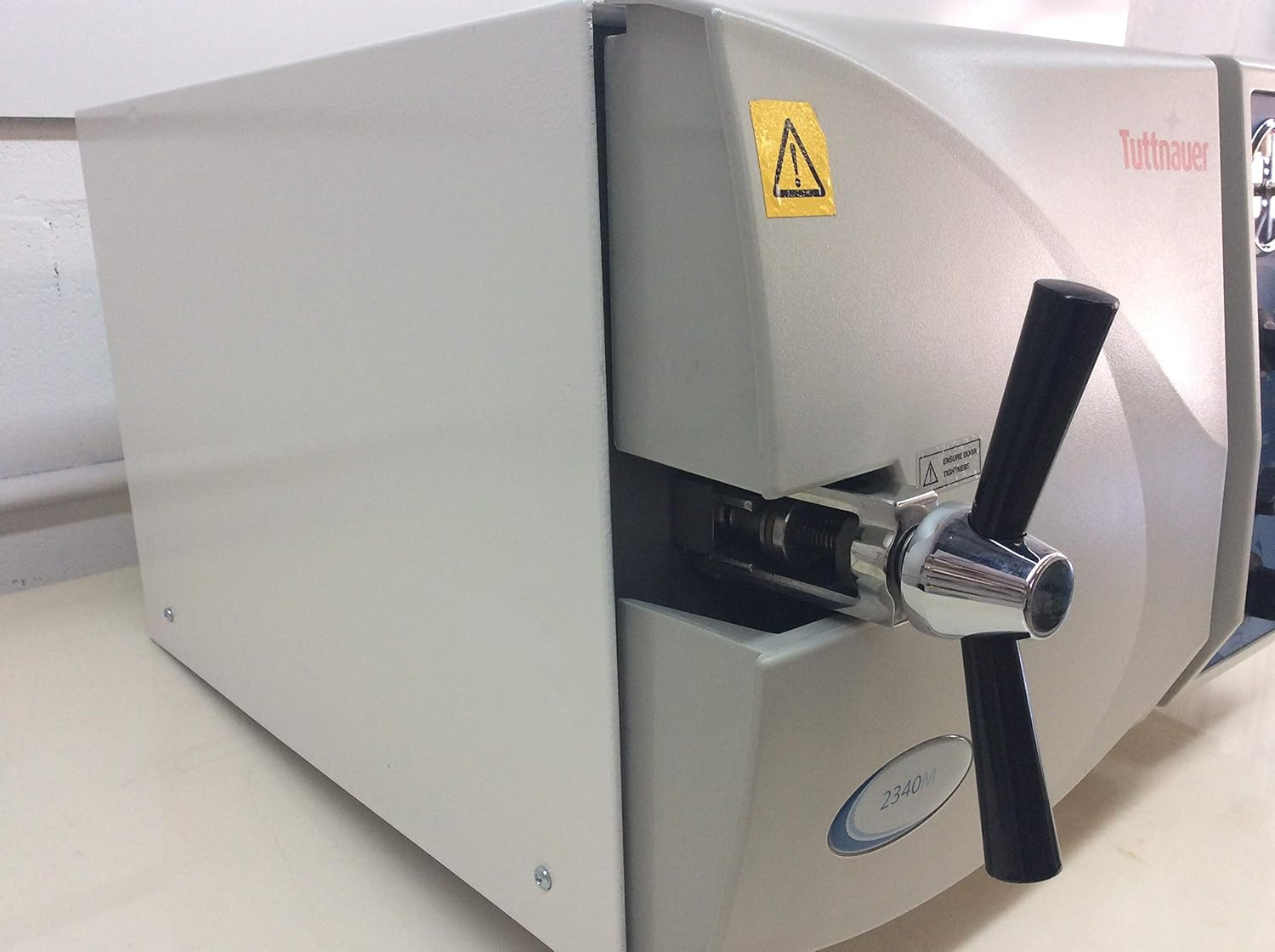
Figure 2: Side view of the autoclave, illustrating the robust door mechanism and handle.
5. Operating Instructions
5.1 Control Panel Overview
The control panel features a pressure gauge, timer knob, temperature selector, and indicator lights for power, heat, and dry cycles.

Figure 3: Detailed view of the control panel, highlighting the timer, temperature, and cycle indicator controls.
5.2 Loading the Autoclave
Arrange items to be sterilized in the chamber, ensuring proper spacing for steam circulation. Use appropriate sterilization pouches or wraps. Do not overload the chamber.

Figure 4: Interior of the autoclave chamber, showing the arrangement of sterilization trays.
5.3 Sterilization Cycle
- Close and secure the door firmly using the door handle. Ensure the "ENSURE DOOR TIGHTNESS" indicator is satisfied.
- Turn the main power switch to "ON". The POWER indicator light will illuminate.
- Select the desired sterilization temperature using the "Temp." knob (e.g., 250°F/121°C or 273°F/134°C).
- Set the sterilization time using the "Timer" knob according to the material being sterilized and recommended guidelines.
- The HEAT indicator light will illuminate as the chamber begins to heat and build pressure. Monitor the pressure gauge.
- Once the set temperature and pressure are reached, the timer will begin counting down.
- Upon completion of the sterilization cycle, the unit will automatically shut off, and the DRY indicator light may illuminate if a dry cycle is selected.
5.4 Drying Cycle (if applicable)
If a drying cycle is required, ensure the appropriate setting is selected on the control panel. The DRY indicator light will signal this phase. Allow the cycle to complete fully before opening the door.
5.5 Unloading
After the cycle is complete and the pressure gauge reads zero, carefully open the door. Use heat-resistant gloves to remove sterilized items, as they will be hot.
6. Maintenance
Regular maintenance ensures the longevity and optimal performance of your Tuttnauer 2340M Autoclave.
6.1 Daily Maintenance
- Wipe down the exterior surfaces with a damp cloth.
- Check the water level in the reservoir and refill with distilled water as needed.
6.2 Weekly Maintenance
- Clean the chamber interior and trays with a non-abrasive cleaner designed for autoclaves.
- Inspect the door gasket for cracks, tears, or hardening. Replace if necessary.
- Drain and refill the water reservoir completely to prevent buildup, especially if the unit is not used daily. The front drain valve facilitates this process.
6.3 Annual Maintenance
- It is recommended to have the autoclave inspected and serviced by a qualified technician annually.
- Calibration of the pressure gauge and temperature sensors may be required.
7. Troubleshooting
This section addresses common issues that may arise during the operation of the Tuttnauer 2340M Autoclave.
| Problem | Possible Cause | Solution |
|---|---|---|
| Unit does not power on. | No power supply; power cord disconnected; circuit breaker tripped. | Check power connection; ensure outlet is functional; reset circuit breaker. |
| Autoclave not reaching desired pressure/temperature. | Insufficient water; door not sealed properly; heating element issue. | Add distilled water; ensure door is tightly closed; contact service technician if heating element is suspected. |
| Steam leaking from door. | Door gasket worn or damaged; door not closed properly. | Inspect and replace door gasket; ensure door is securely latched. |
| Items not dry after cycle. | Insufficient drying time; overloaded chamber; wet items placed in autoclave. | Increase drying time; reduce load size; ensure items are not excessively wet before loading. |
For issues not listed here or if solutions do not resolve the problem, contact Tuttnauer customer support or a qualified service technician.
8. Specifications
Key technical specifications for the Tuttnauer 2340M Manual Autoclave:
- Model: 2340M
- Manufacturer: Tuttnauer
- Product Dimensions: 25 x 35 x 30 inches
- Weight: 81 Pounds
- Chamber Type: Electro-polished
- Safety Features: Double safety locking device, Dual safety thermostat
- Water Requirement: Distilled or Deionized Water only
9. Return Policy
This product is subject to the following return policy:
- A 7-day return and exchange policy applies to all orders.
- Returns and exchanges are accepted only if the item is brand new (unused) and in an unopened box.
- The buyer is responsible for return shipping costs.
- A 15% restocking fee will apply to all autoclaves and small equipment returns.
For detailed information, please refer to the purchase agreement or contact your supplier.
10. Customer Support
For technical assistance, service, or inquiries regarding your Tuttnauer 2340M Autoclave, please contact Tuttnauer customer support or your authorized distributor.
You can find more information and contact details on the official Tuttnauer website: www.tuttnauer.com
Related documents2340M


Ask a question about this manual
Ask about setup, troubleshooting, compatibility, parts, safety, or missing instructions. Manuals+ will review the question and use this page’s manual context to help answer it.