
1. Introduction and Overview
The Atlas Sound AT100D is a high-quality wall mount attenuator designed for precise control over audio system volume. This device can handle up to 100 watts of power and features a skirted knob for making adjustments in 3dB steps. Its plastic Decora finish ensures a simple and discreet appearance, suitable for installation in various environments.
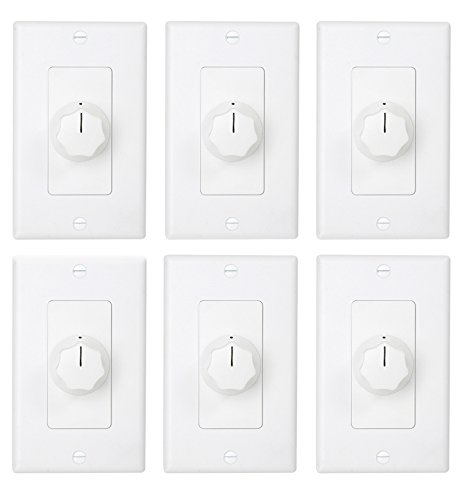
Figure 1: Front view of the AT100D attenuator, showing the Decora white finish and control knob.
2. Key Features
- Precise Volume Control: Skirted knob allows for fine adjustments in 3dB steps.
- Standard Installation: Designed to fit into a standard one-gang electrical box.
- High Power Handling: Capable of managing up to 100 watts of audio power.
- Discreet Design: Plastic Decora finish integrates seamlessly into various room aesthetics.
3. Installation and Setup
Before beginning installation, ensure all power to the audio system is turned off at the circuit breaker to prevent electrical shock. This device is designed for professional installation in a standard one-gang electrical box.
- Prepare the Electrical Box: Ensure a standard one-gang electrical box is properly installed and secured in the desired wall location.
- Wiring Connections: Connect the audio input and output wires to the appropriate terminals on the back of the attenuator. Refer to the wiring diagram provided with the product packaging for specific connections. Typically, this involves connecting the amplifier output to the attenuator input, and the attenuator output to the speaker(s). Ensure correct polarity.
- Mount the Attenuator: Carefully push the attenuator into the electrical box, ensuring wires are not pinched. Secure the attenuator to the electrical box using the provided screws.
- Install Faceplate: Attach the Decora faceplate over the attenuator and secure it with the small screws.
- Restore Power: Once installation is complete and all connections are secure, restore power to the audio system.
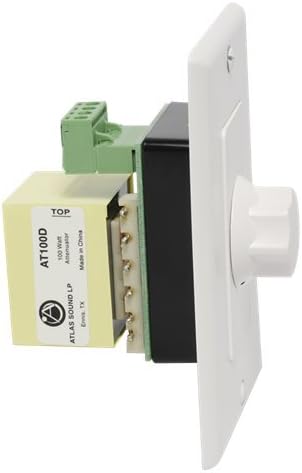
Figure 2: Rear view of the AT100D, illustrating the wiring terminals for audio input and output connections.
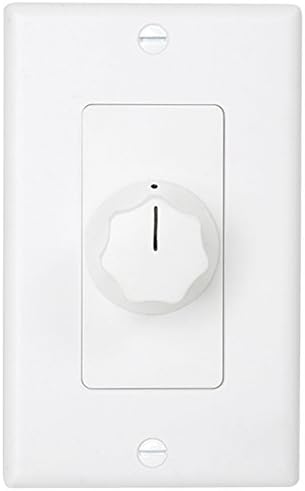
Figure 3: Side view of the AT100D, demonstrating its depth for proper fitting within a standard electrical box.
4. Operating Instructions
The AT100D attenuator provides simple and intuitive volume control for your audio system.
- Adjusting Volume: Rotate the skirted knob clockwise to increase the audio volume and counter-clockwise to decrease it.
- Precise Control: Each click or step of the knob represents a 3dB change in attenuation, allowing for precise volume adjustments.
- Minimum Volume: Rotate the knob fully counter-clockwise to achieve the minimum volume setting (full attenuation).
- Maximum Volume: Rotate the knob fully clockwise to achieve the maximum volume setting (no attenuation).
5. Maintenance
The Atlas Sound AT100D attenuator requires minimal maintenance to ensure long-term performance.
- Cleaning: Use a soft, dry cloth to wipe the surface of the attenuator and faceplate. Avoid using abrasive cleaners, solvents, or harsh chemicals, as these can damage the finish.
- Inspection: Periodically inspect the attenuator and its connections for any signs of wear, damage, or loose wiring. If any issues are found, disconnect power and consult a qualified technician.
- Environmental Conditions: Ensure the attenuator is installed in a dry environment, away from excessive moisture, heat, or direct sunlight, which can affect its performance and lifespan.
6. Troubleshooting
If you experience issues with your AT100D attenuator, consider the following troubleshooting steps:
- No Sound:
- Verify that the audio system (amplifier, source) is powered on and functioning correctly.
- Check all wiring connections to the attenuator for proper seating and polarity.
- Ensure the attenuator knob is not set to the minimum (off) position.
- Low Volume or Distorted Sound:
- Confirm that the attenuator is rated for the power output of your amplifier (up to 100W for AT100D). Overpowering can cause distortion or damage.
- Check speaker impedance compatibility with your amplifier and attenuator.
- Inspect wiring for any shorts or loose connections.
- Ensure the audio source is providing a clean signal.
- Intermittent Sound:
- Check for loose wiring connections at both the attenuator and other audio components.
- Ensure the attenuator knob is clean and free of debris that might interfere with its operation.
If these steps do not resolve the issue, contact Atlas Sound customer support or a qualified audio technician.
7. Specifications
| Model | AT100D |
| Power Handling | 100 Watts |
| Attenuation Steps | 3dB per step |
| Mounting | Standard one-gang electrical box |
| Finish | Plastic Decora White |
| Item Weight | 1.05 pounds (0.48 kg) |
| Package Dimensions | 10.39 x 9.65 x 4.72 inches (26.39 x 24.51 x 11.99 cm) |
| Power Source | Corded Electric (refers to the system it connects to, not the attenuator itself being powered) |
8. Warranty and Support
For detailed warranty information and technical support, please refer to the official Atlas Sound website or contact their customer service department. Keep your purchase receipt as proof of purchase for any warranty claims.
Atlas Sound Contact Information:
- Website: www.atlassound.com (Example link, actual link may vary)
- Customer Service: Refer to the website for current contact methods (phone, email, support forms).

