
Introduction
Thank you for choosing SoundMAGIC E10 Wired Earphones. These earphones are designed to deliver high-fidelity stereo sound with powerful bass and balanced musical detail. The robust aluminum construction and tangle-free cable ensure durability and a comfortable listening experience. This manual provides essential information for the proper setup, operation, and maintenance of your SoundMAGIC E10 earphones.
The SoundMAGIC E10 has received multiple accolades, including the WHAT Hi-Fi? award for best in-ear headphones for six consecutive years, recognized for its detailed, dynamic, and exciting sound quality.
What's in the Box
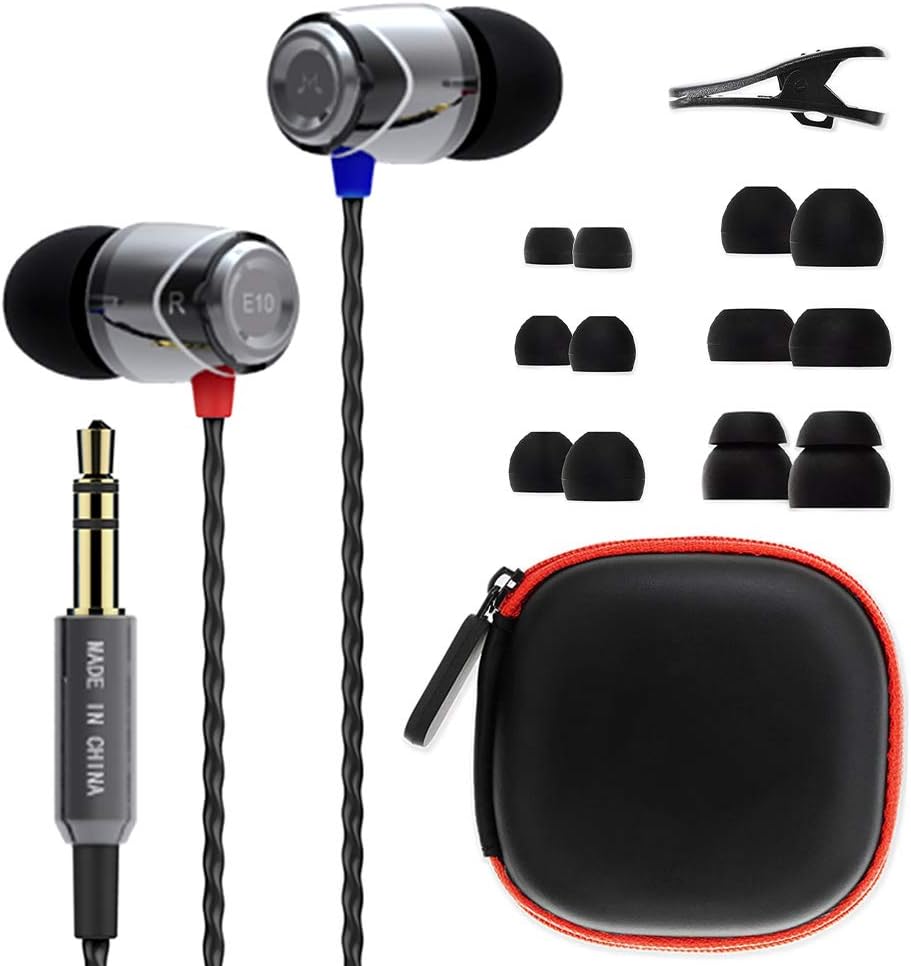
Image: Contents of the SoundMAGIC E10 package, including earphones, various eartips, cable clip, and travel pouch.
- SoundMAGIC E10 Earphones (Gunmetal)
- 3 pairs of dome-shaped silicone eartips (Small, Medium, Large)
- 3 pairs of flat silicone eartips (Small, Medium, Large)
- 1 pair of double flange silicone eartips (Medium)
- Cable clip
- Travel pouch
Setup and Fit
1. Selecting the Right Eartips
Choosing the correct size and style of eartips is crucial for optimal sound quality and comfort. Experiment with the different included eartips (dome-shaped, flat, double flange) to find the best fit for your ears. A proper seal will enhance bass response and noise isolation.

Image: SoundMAGIC E10 earphones shown with different eartip options.
2. Wearing the Earphones
Gently insert the earphones into your ear canals. The ergonomic design ensures a comfortable and secure fit. Ensure the left earphone (marked 'L') is in your left ear and the right earphone (marked 'R') is in your right ear for proper stereo imaging.

Image: A user demonstrating the comfortable in-ear fit of the SoundMAGIC E10 earphones.
3. Connecting to Your Device
Plug the 3.5mm jack into the headphone port of your audio device (smartphone, tablet, laptop, MP3 player, etc.). Ensure the connection is secure.
Operating Instructions
The SoundMAGIC E10 earphones feature an in-line control with a microphone (if applicable to your specific model, though the E10 is typically without a microphone).
- Play/Pause: Press the center button once.
- Next Track: Press the center button twice quickly.
- Previous Track: Press the center button three times quickly.
- Answer/End Call: Press the center button once during an incoming call or during a call.
- Volume Control: Use the volume buttons on your connected device.
Video: Demonstration of SoundMAGIC E10 Noise Isolating in-Ear Earphones (Gunmetal) features and usage. This video highlights the design and some operational aspects.
Maintenance
- Cleaning: Regularly clean the eartips with a soft, damp cloth. Ensure no moisture enters the earphone drivers.
- Storage: When not in use, store your earphones in the provided travel pouch to prevent tangling and damage.
- Cable Care: The twisted-pair cable is designed to be tangle-free. Avoid excessive pulling or sharp bends to prolong its lifespan.
- Moisture: While durable, avoid exposing the earphones to excessive moisture or liquids. They are not submersible.
Troubleshooting
| Problem | Solution |
|---|---|
| No sound or low volume |
|
| Poor sound quality (e.g., weak bass, tinny sound) |
|
| Earphones fall out easily |
|
Specifications
- Model Name: SoundMAGIC E10
- Connectivity Technology: Wired
- Headphones Jack: 3.5 mm Jack
- Noise Control: Sound Isolation
- Material: Aluminum
- Cable Feature: Tangle Free
- Item Weight: 10 Grams (0.353 ounces)
- Product Dimensions: 0.79 x 0.39 x 47.24 inches
- Impedance: 46 Ohm
- Audio Driver Type: Dynamic Driver
- Manufacturer: SoundMAGIC

Image: Exploded view diagram illustrating the 10mm high-quality full-range dynamic driver of the SoundMAGIC E10 earphones.

Image: Close-up view of the SoundMAGIC E10 earphones, emphasizing their durable aluminum construction.
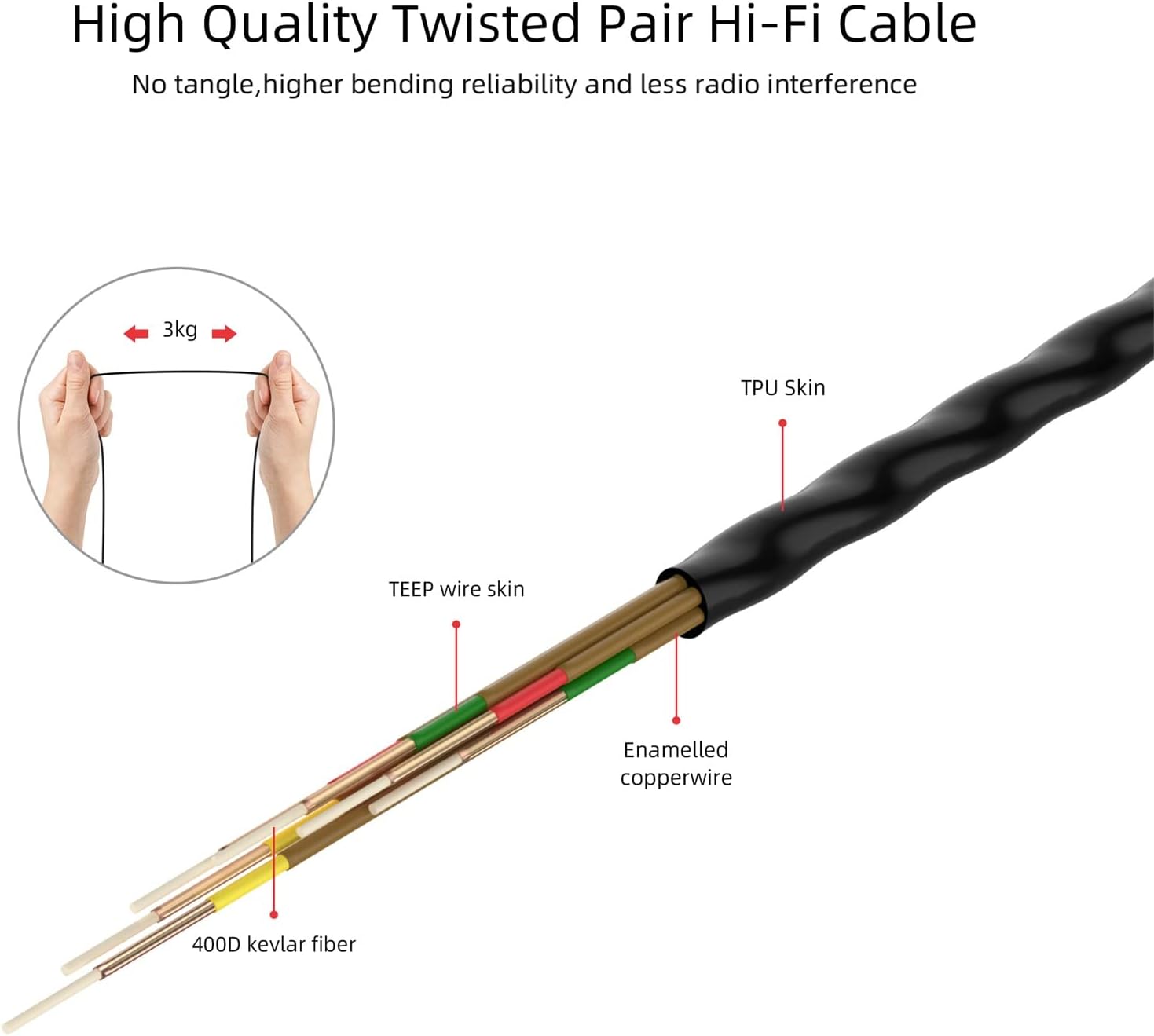
Image: Detailed diagram showcasing the high-quality twisted pair Hi-Fi cable, designed for durability and reduced interference.
Warranty and Support
For warranty information and customer support, please refer to the documentation included with your product or visit the official SoundMAGIC website.


