
1. Introduction
Thank you for purchasing the RCA DHT235A 3.5-Inch LED-lit 720p 60Hz TV. This portable television is designed to provide digital television viewing on a compact screen. This manual provides instructions for the proper setup, operation, and maintenance of your device.
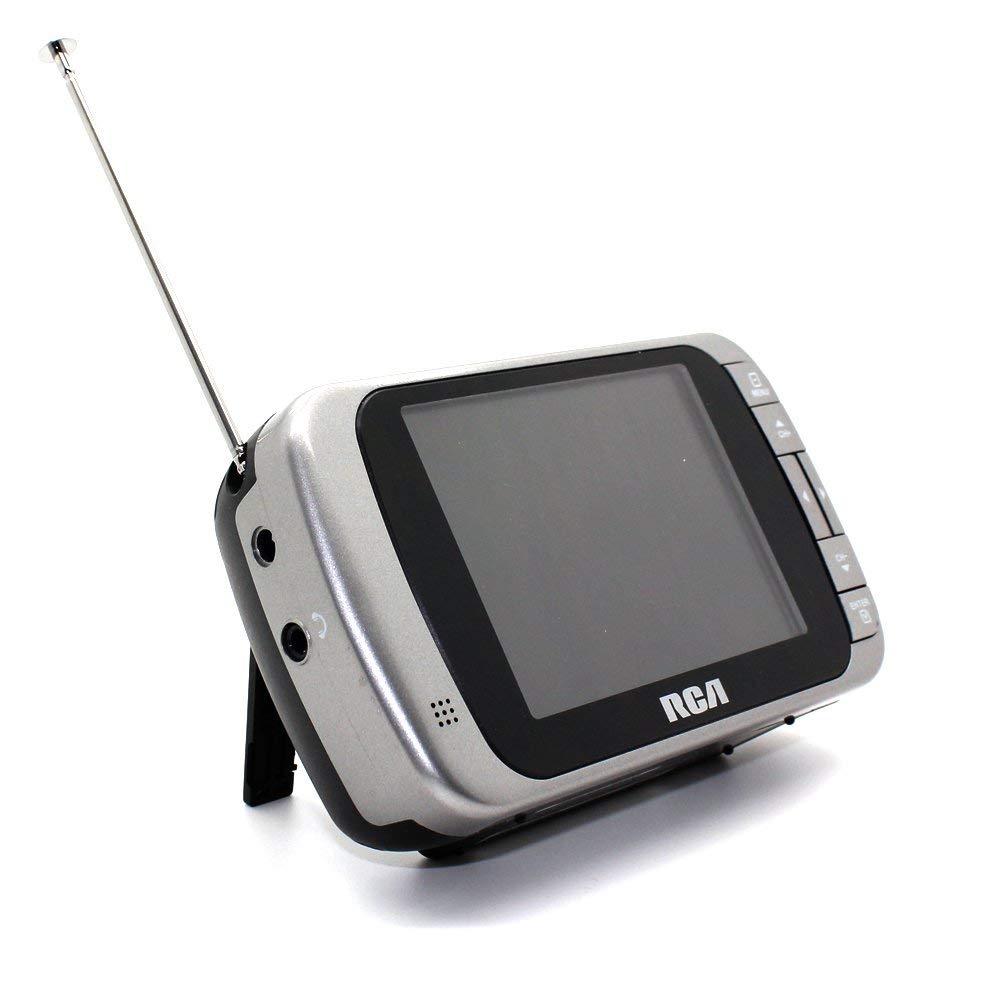
Image 1.1: The RCA DHT235A portable television, featuring its 3.5-inch screen and compact design.
2. Safety Information
- Read all instructions before operating the device.
- Do not expose the unit to rain or moisture to prevent fire or electric shock.
- Do not block ventilation openings. Ensure adequate space around the unit for proper airflow.
- Use only specified power sources (4 AA batteries or compatible AC adapter).
- Avoid dropping or subjecting the unit to strong impacts.
- Do not attempt to service this product yourself. Refer all servicing to qualified service personnel.
- Dispose of batteries properly according to local regulations.
3. Package Contents
Verify that all items are present in the package:
- RCA DHT235A Portable TV Unit
- Stand
- Quick Guide (refer to this manual for detailed instructions)
- Owner's Manual (this document)
4. Product Overview
The RCA DHT235A features a 3.5-inch LED-lit display, designed for portable digital television reception. Key components include:
- 3.5-Inch LED Backlit LCD Display: Provides clear visual output.
- Built-in Speaker: For audio output.
- Headphone Jack: For private listening.
- Embedded Monopole Antenna: For receiving terrestrial ATSC and NTSC signals.
- Battery Compartment: For 4 AA batteries.
- AC Adapter Input (9-24VDC): For external power.
- Control Buttons: For power, channel, volume, and menu navigation.
5. Setup
5.1 Powering the TV
The TV can be powered by 4 AA batteries or an optional AC adapter.
Using Batteries:
- Locate the battery compartment on the back of the TV.
- Open the battery compartment cover.
- Insert 4 AA batteries, ensuring correct polarity (+/-).
- Close the battery compartment cover securely.
Using AC Adapter (Optional):
- Connect a compatible 9-24VDC AC adapter (not included) to the DC input jack on the TV.
- Plug the AC adapter into a standard wall outlet.
5.2 Antenna Setup
Extend the embedded monopole antenna fully for optimal signal reception. For improved reception, especially in areas with weak signals, an external antenna may be connected to the dedicated RCA connector input.
6. Operating Instructions
6.1 Power On/Off
Press the POWER button to turn the TV on or off.
6.2 Initial Channel Scan
Upon first use or after moving to a new location, perform an auto channel scan to find available digital and analog channels.
- Press the MENU button.
- Navigate to the "Channel" or "Setup" menu using the arrow buttons.
- Select "Auto Scan" or "Auto Program" and confirm.
- The TV will scan for available channels. This process may take several minutes.
6.3 Channel Selection
- Use the CH+ and CH- buttons to cycle through available channels.
- For direct channel input, use the numeric keypad (if available on your model) or the "Direct Channel Changing" option in the menu.
6.4 Volume Adjustment
Use the VOL+ and VOL- buttons to adjust the audio volume.
6.5 Menu Navigation
Press the MENU button to access settings. Use the arrow buttons to navigate and the OK or ENTER button to confirm selections. Press MENU again or an EXIT button to leave the menu.
Available menu options include:
- Picture Settings: Adjust brightness, contrast, color.
- Sound Settings: Adjust audio mode, balance.
- Channel Settings: Auto scan, manual scan, channel editing.
- Time Settings: Auto time setting, time zone.
- Language: Select menu language (English, Spanish).
- Closed Captioning: Enable/disable digital closed captioning (E1A-708B compliant).
7. Maintenance
7.1 Cleaning
- Before cleaning, ensure the TV is powered off and disconnected from any external power source.
- Use a soft, dry cloth to wipe the screen and exterior surfaces.
- For stubborn marks, lightly dampen the cloth with water. Do not use abrasive cleaners, waxes, or solvents.
- Avoid spraying liquids directly onto the screen or into any openings.
7.2 Storage
When storing the TV for an extended period, remove the batteries to prevent leakage. Store the unit in a cool, dry place away from direct sunlight and extreme temperatures.
8. Troubleshooting
| Problem | Possible Solution |
|---|---|
| No Power | Ensure batteries are correctly inserted and not depleted. If using AC adapter, verify it is properly connected and the outlet is functional. |
| No Picture/Weak Signal | Extend the antenna fully. Perform an auto channel scan. Try repositioning the TV or antenna. Consider using an external antenna for better reception. Check signal strength display in the menu. |
| No Sound | Increase the volume. Check if headphones are plugged in. Ensure the Mute function is not active. |
| Buttons Not Responding | Turn the TV off and then on again. If the issue persists, remove and reinsert batteries or disconnect/reconnect the AC adapter. |
| Screen Scratches Easily | Handle the screen with care. Use a screen protector if desired (not included). |
| Short Battery Life | Use fresh, high-quality alkaline or rechargeable batteries. Consider using the AC adapter for extended viewing. |
| Low Audio Volume | Ensure volume is set to maximum. For better audio, consider connecting external speakers to the headphone jack. |
9. Specifications
- Model: DHT235A
- Display Size: 3.5 Inches (diagonal)
- Display Type: LED Backlit LCD
- Resolution: 320 x 240 digital RGB (720p compatible)
- Refresh Rate: 60Hz
- Video Decoding: MPEG-2 (MP at ML, MP at HL)
- Audio Decoding: Dolby Digital Audio, Digital multi-lingual
- Tuner: Terrestrial ATSC 8VSB, Terrestrial NTSC CH2 - CH69
- Power Source: 4 AA Batteries or 9-24VDC AC Adapter (optional)
- Battery Life: Approximately 2+ hours of DTV playback on 4 AA batteries
- Audio Output: Headphone jack, Built-in speaker
- Additional Features: Real-time signal strength display, On-screen program information, Direct channel changing, Channel editing, Time zone setting, Auto channel scan, Digital Closed Captioning (E1A-708B compliant), Menu languages (English, Spanish).
- Dimensions: Approximately 4.84 x 1.34 x 2.83 inches
- Weight: Approximately 5.6 ounces
10. Warranty Information
This product is covered by a limited warranty. For detailed warranty terms and conditions, please refer to the warranty card included with your purchase or visit the official RCA website. Keep your proof of purchase for warranty claims.
11. Customer Support
If you encounter any issues or have questions not covered in this manual, please contact RCA customer support. You can find contact information on the official RCA website or through the documentation provided with your product.
Online Support: Visit the official RCA website for FAQs and support resources.
Telephone Support: Refer to your product packaging or the RCA website for current contact numbers.


