
Introduction
The Magnus VT-300 Video Tripod with Fluid Head is a lightweight and portable tripod system designed for stable video recording with DSLRs, small camcorders, and other cameras weighing up to 15 lb. This manual provides detailed instructions for setting up, operating, and maintaining your VT-300 tripod to ensure optimal performance and longevity.
What's in the Box
- VT-300 Video Tripod with Fluid Head
- VT-QRP30 Quick Release Plate
- Pan Bar
- Carry Case with Shoulder Strap
Key Features
- Portable Video Tripod System
- Supports DSLRs, Small/Large Camcorders
- 15 lb Weight Capacity, 64.3" Max Height
- Built-In Pan/Tilt Video Head with fluid effect
- Independent Pan & Tilt Locks
- Quick-Release Camera Plate Included (VT-QRP30) with 1/4"-20 camera mounting screw, registration pin, and anti-skid surface
- Integrated Center Column with geared friction control, adjustable via hand crank
- Integrated Locking Mid-Level Spreader for stability
- Two Leg Stages, Three Sections with Flip-Lock Leg Locks
- Replaceable rubber feet for grip on various surfaces
- Internal Bubble Level for even positioning
- Carry Case with Shoulder Strap Included
Setup Instructions
Follow these steps to set up your Magnus VT-300 tripod for use:
- Unpack the Tripod: Remove the tripod from its carry case.
- Extend the Legs: Release the flip-locks on each leg section and extend the legs to your desired height. Ensure all flip-locks are securely closed after adjustment.
- Adjust Mid-Level Spreader: The integrated mid-level spreader helps stabilize the legs. Adjust it to achieve the desired leg angle and lock it in position.
- Level the Tripod: Use the internal bubble level located on the tripod base to ensure the tripod is perfectly level on uneven ground. Adjust leg lengths as needed.
- Adjust Center Column Height: Turn the hand crank on the center column to raise or lower it for fine-tuning the camera height.
- Attach Quick Release Plate to Camera: Secure the VT-QRP30 Quick Release Plate to the bottom of your camera using the 1/4"-20 mounting screw. Ensure the registration pin is engaged and the anti-skid surface provides a firm grip.
- Mount Camera to Tripod: Slide the quick release plate with your camera into the fluid head receiver until it clicks securely into place.
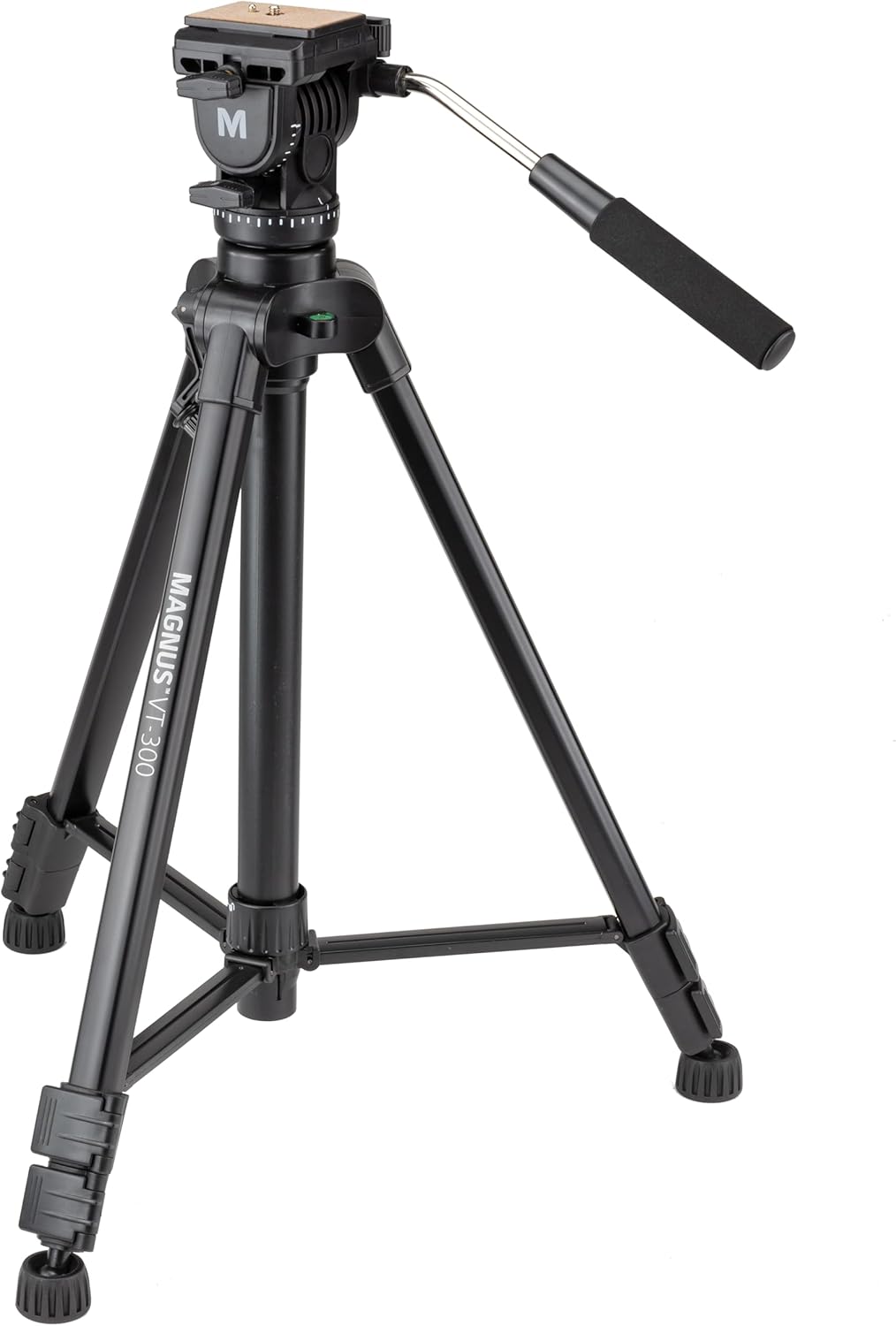
Image: The Magnus VT-300 Video Tripod fully extended, showcasing its overall structure.

Image: Detailed view of the tripod leg features, including the geared column, bubble level, spreader lock, swivel rubber feet, and flip-lock levers for height adjustment.

Image: The fluid head with the VT-QRP30 Quick Release Plate detached, showing the mounting mechanism.
Video: An overview of the Magnus VT-300 Video Tripod with Fluid Head, demonstrating its features and basic setup.
Operating Instructions
The fluid head allows for smooth and precise camera movements:
- Pan Movement: Use the pan bar to smoothly rotate the camera horizontally (360°). Loosen the horizontal lock knob for free movement and tighten it to secure the position.
- Tilt Movement: The fluid head allows for tilting the camera up and down (-90° to 85°). Loosen the vertical lock knob for movement and tighten it to fix the tilt angle.
- Pan Bar Adjustment: The pan bar can be adjusted for comfortable handling during operation.

Image: The Magnus VT-300 Video Tripod with a camcorder mounted, demonstrating its use in a typical setup.
Video: Demonstration of the fluid head's smooth pan and tilt capabilities, highlighting its stability for video recording.
Video: A user demonstrating the height adjustment of the tripod, showing its suitability for various shooting angles, including high-level shots.
Maintenance
To ensure the longevity and optimal performance of your Magnus VT-300 tripod, follow these maintenance guidelines:
- Cleaning: Regularly wipe down the tripod with a soft, dry cloth to remove dust and dirt. For stubborn grime, use a slightly damp cloth and mild soap, then dry thoroughly.
- Lubrication: The fluid head is designed for smooth operation and generally does not require user lubrication. Avoid applying oils or greases unless specifically instructed by Magnus support.
- Storage: When not in use, collapse the tripod legs and store it in the provided carry case to protect it from dust, moisture, and physical damage.
- Inspect Locks: Periodically check all flip-locks and adjustment knobs to ensure they are functioning correctly and securely.
Troubleshooting
If you encounter any issues with your Magnus VT-300 tripod, consider the following:
- Instability: Ensure all leg sections are fully extended and their flip-locks are securely fastened. Verify the mid-level spreader is locked, and the tripod is placed on a stable, level surface using the bubble level.
- Stiff Movements: Check that all pan and tilt lock knobs are fully loosened before attempting to move the fluid head. If movement remains stiff, ensure no debris is obstructing the head's mechanism.
- Camera Not Secure: Confirm the VT-QRP30 Quick Release Plate is correctly attached to your camera and fully inserted into the fluid head receiver until it locks. The quick release lever should be in the locked position.
- Missing Pan Bar: The pan bar is detachable. Always secure it when not in use or store it in the carry case to prevent loss.
Specifications
| Feature | Specification |
|---|---|
| Load Capacity | 15 lb / 6.8 kg |
| Maximum Height (Center Column Extended) | 64.3" / 163 cm |
| Maximum Height (Center Column Lowered) | 52" / 132 cm |
| Minimum Height | 25" / 63.5 cm |
| Folded Length | 26.5" / 67.3 cm |
| Video Head Type | Built-in Pan/Tilt Fluid Effect Video Head |
| Pan Range | 360° |
| Tilt Range | -90° to 85° |
| Camera Plate | VT-QRP30 Quick Release Plate with 1/4"-20 screw |
| Center Column | Integrated with geared friction control |
| Spreader | Integrated locking mid-level spreader |
| Leg Stages/Sections | 2/3 |
| Leg Lock Type | Flip-lock |
| Leveling Bubble | Yes, non-illuminated |
| Material | Aluminum, Plastic |
| Item Weight | 4.5 lb / 2 kg |
Warranty and Support
The Magnus VT-300 Video Tripod with Fluid Head comes with a Limited 1 Year Manufacturer's Warranty. For warranty claims or technical support, please contact Magnus customer service.


