Introduction
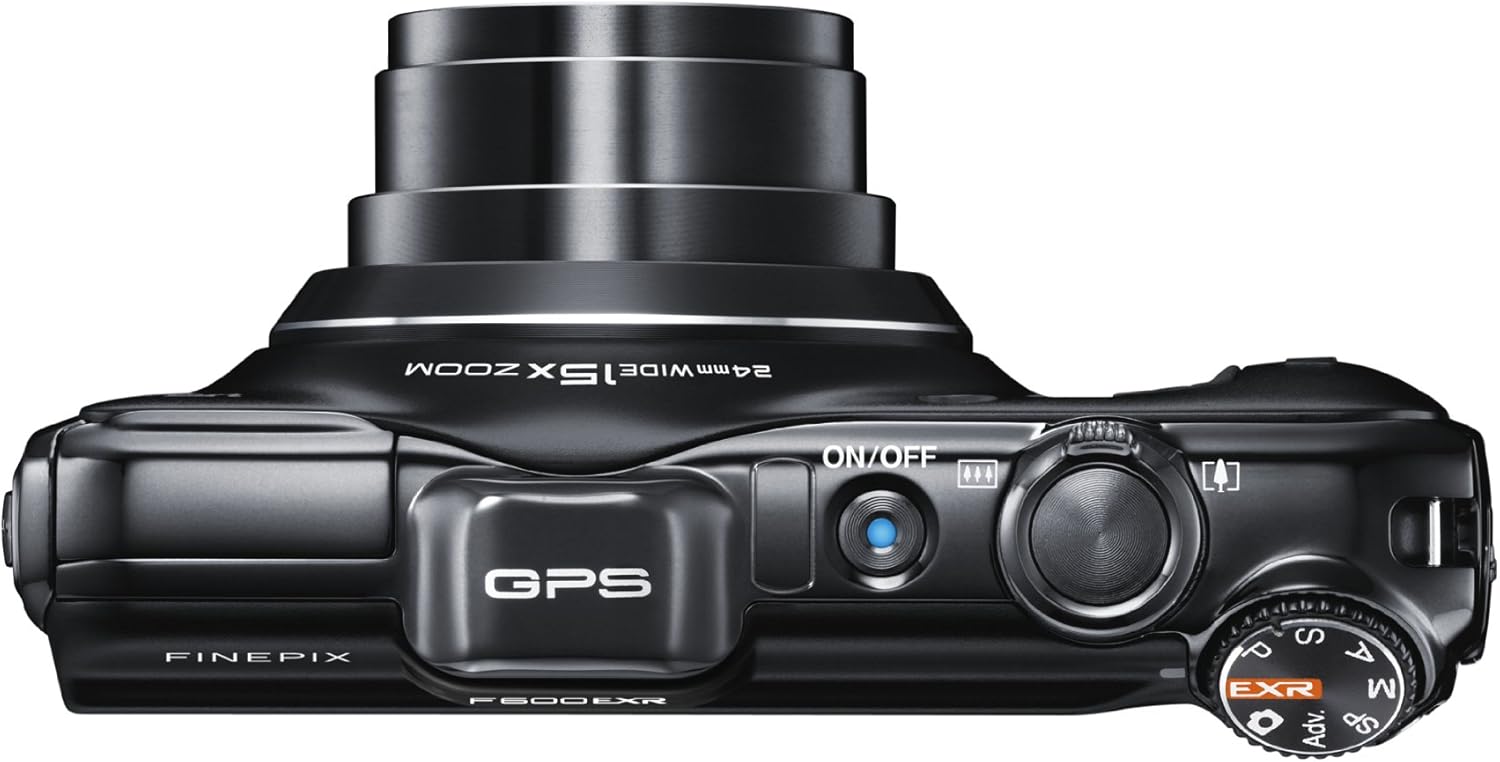
The Fujifilm FinePix F600EXR is a compact digital camera designed for capturing high-quality images and videos. Featuring a 16-megapixel EXR-CMOS sensor and a FUJINON 15x super wide-angle optical zoom lens, it is equipped with advanced technologies to deliver exceptional results in various lighting conditions. This manual provides essential information for setting up, operating, and maintaining your camera.
What's in the Box
- Fujifilm FinePix F600EXR Digital Camera
- USB Cable
- Battery
- Battery Charger
- Wrist Strap
- Instruction Manual (this document)
Setup
1. Charging the Battery
Before first use, fully charge the provided battery using the battery charger. Insert the battery into the charger and plug the charger into a power outlet. The indicator light on the charger will show the charging status.
2. Inserting the Battery and Memory Card
- Open the battery/memory card compartment cover on the bottom of the camera.
- Insert the charged battery into the battery slot, ensuring correct orientation as indicated inside the compartment.
- Insert a compatible SD, SDHC, or SDXC memory card into the memory card slot until it clicks into place.
- Close the compartment cover securely.
3. Attaching the Wrist Strap
Thread the provided wrist strap through the strap eyelet on the camera body to prevent accidental drops.
Operating the Camera
1. Powering On/Off
Press the ON/OFF button located on the top of the camera to power it on or off. The lens will extend when powered on.
2. Basic Shooting Modes
Rotate the mode dial on the top-right of the camera to select your desired shooting mode:
- EXR Auto Mode: Automatically detects 54 scene types and optimizes settings, including sensor mode (HR High Resolution, SN High Sensitivity/Low Noise, DR Dynamic Range). Features Motion Detection to reduce blur.
- P (Program AE): Camera sets aperture and shutter speed for optimal exposure.
- A (Aperture-Priority AE): You set the aperture, camera sets shutter speed.
- S (Shutter-Priority AE): You set the shutter speed, camera sets aperture.
- M (Manual): You control both aperture and shutter speed.
- Scene Modes: Pre-set modes for specific scenarios (e.g., Portrait, Landscape, Sport).
- Motion Panorama 360: Capture seamless panoramic images.
- Pro Low-Light & Pro Focus: Advanced shooting modes for challenging conditions.
3. Taking Photos
- Frame your shot using the 3.0-inch LCD screen.
- Press the shutter button halfway down to focus.
- Press the shutter button fully down to take the picture.
4. Using the Zoom
Use the zoom lever around the shutter button to adjust the 15x optical zoom (24-360mm equivalent) and 2x Intelligent Digital Zoom for closer shots.
5. Recording Videos
Select the movie mode on the mode dial or press the dedicated video record button (if available) to start/stop Full HD (1080p) video capture with stereo sound. The camera also supports high-speed movie options up to 320 frames per second.
6. GPS Functionality
The built-in GPS includes a Landmark Navigator feature, which displays nearby points of interest and their distance. Photo Navigation helps you find your way back to previously photographed locations, and Tracking Data allows you to create travel routes with associated pictures.
Maintenance
1. Cleaning the Camera
- Use a soft, lint-free cloth to clean the camera body.
- For the lens, use a lens brush or a blower to remove dust, then gently wipe with a lens cleaning cloth and solution if necessary.
- Avoid using harsh chemicals or abrasive materials.
2. Storage
When not in use, store the camera in a cool, dry place away from direct sunlight and extreme temperatures. Remove the battery if storing for extended periods.
Troubleshooting
Camera Does Not Power On
- Ensure the battery is fully charged and correctly inserted.
- Check if the battery contacts are clean.
Images Are Blurry
- Check focus settings and ensure the camera has locked focus before taking the shot.
- Use a faster shutter speed or enable image stabilization in low light conditions.
- Clean the lens if it is smudged.
Memory Card Error
- Ensure the memory card is correctly inserted.
- Try formatting the memory card (this will erase all data).
- Test with a different compatible memory card.
Specifications
| Feature | Detail |
|---|---|
| Sensor Type | 16 MP EXR-CMOS |
| Optical Zoom | 15x (24-360mm equivalent) |
| Digital Zoom | 2x Intelligent Digital Zoom |
| LCD Screen | 3.0-inch, 460K dots |
| Video Resolution | Full HD 1080p |
| Image Stabilization | Optical |
| File Format | RAW, JPEG |
| Memory Card Compatibility | SD, SDHC, SDXC |
| Special Features | GPS, Landmark Navigator, Motion Panorama 360 |
| Connectivity | USB, HDMI |
| Weight | 7.52 ounces |
Warranty Information
This Fujifilm product is covered by a limited manufacturer's warranty. Please refer to the warranty card included in your product packaging for specific terms and conditions. Retain your proof of purchase for warranty claims.
Support
For further assistance, technical support, or service inquiries, please visit the official Fujifilm support website or contact their customer service. Contact information can be found on the Fujifilm website or in your product documentation.
Product Images