
1. Introduction
The Silicon Power Armor A80 is a rugged portable external hard drive designed for durability and high-speed data transfer. It features military-grade shockproof, IPX7 waterproof, and pressure-resistant protections, ensuring your data remains safe in various environments. The drive also incorporates a convenient cable-carry design for easy portability.
2. What's in the Box
Please verify that all items are present in the package:
- 1 x Silicon Power Armor A80 External Hard Drive
- 1 x USB 3.0 Cable (107 mm) - Integrated
- 1 x USB 3.0 Cable (550 mm) - Longer cable for extended reach
3. Key Features
- Military-Grade Shockproof Protection: Conforms to U.S. military drop-test standards (MIL-STD-810F), providing robust protection against accidental drops.
- IPX7 Waterproof and Pressure-Resistant: Designed to withstand water immersion (up to 1 meter for 30 minutes) and pressure up to 300kg, safeguarding data from rain, spills, and crushing forces.
- Anti-Dust Function: Prevents fine particles from entering the drive, maintaining internal integrity.
- Integrated Cable-Carry Design: Features an innovative slot for convenient storage of the short USB cable, enhancing portability.
- Ultra-Fast USB 3.0 Interface: Enables rapid data transfer speeds, backward compatible with USB 2.0.
- Durable Metallic Casing: Heavy-duty aluminum exterior provides strong protection and a sleek appearance.

Image: The Armor A80 is shown with water splashing, highlighting its IPX7 waterproof rating.

Image: The Armor A80 is depicted amidst rocks, illustrating its 300kg pressure-resistant capability.

Image: The Armor A80 is shown in a sandy environment, emphasizing its anti-dust protection.

Image: A visual comparison of USB 3.2 Gen 1 (640MB/s) and USB 2.0 (60MB/s) transfer speeds, with the Armor A80 connected.
4. Setup and Connection
The Armor A80 is designed for plug-and-play functionality with most operating systems.
4.1 Connecting the Drive
- Locate the USB Port: The USB 3.0 port on the Armor A80 is protected by a rubber cap. Gently lift the cap to expose the port.
- Choose Your Cable:
- For compact use, detach the integrated short USB 3.0 cable from its storage slot on the side of the drive.
- For extended reach, use the longer 550 mm USB 3.0 cable provided in the box.
- Connect to Your Device: Plug the USB 3.0 cable into the drive's port and then into an available USB 3.0 (or USB 2.0) port on your computer (PC or Mac), Xbox, or PS4.
- Power On: The drive is bus-powered and does not require an external power adapter. It will power on automatically once connected to a powered USB port.
- Initial Recognition: Your operating system should automatically detect and install the necessary drivers. The drive will appear as a removable storage device.
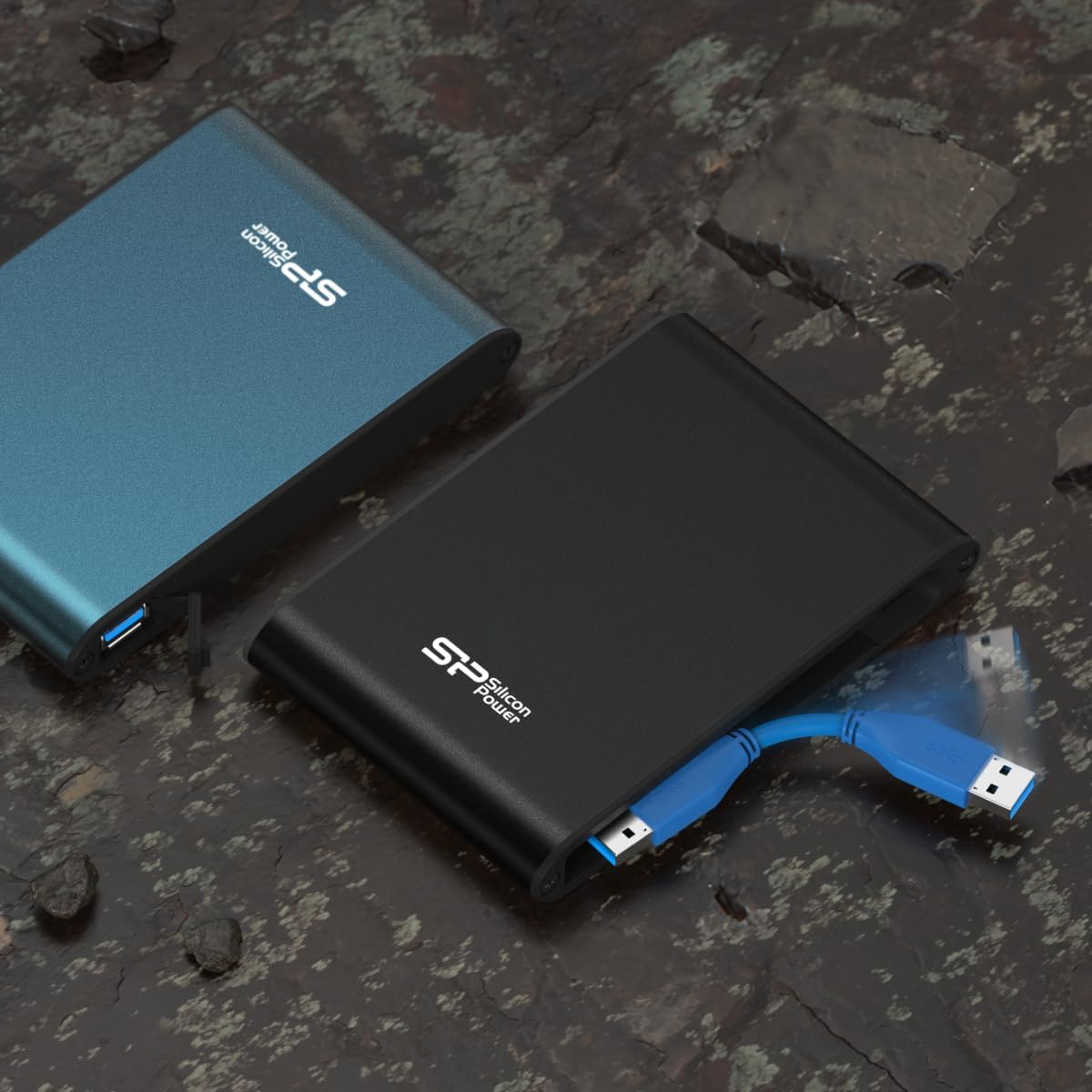
Image: The Armor A80 with its short, integrated USB cable extended for connection.

Image: A side view of the Armor A80, illustrating how the short USB cable is stored within the drive's casing.
5. Operating the Drive
5.1 Data Transfer
- Drag and Drop: To transfer files, simply drag and drop them into the drive's folder.
- Copy and Paste: Alternatively, right-click on files/folders and select 'Copy', then navigate to the drive's folder, right-click, and select 'Paste'.
- Speed: For optimal transfer speeds, ensure you are connected to a USB 3.0 port. USB 2.0 ports will function but at slower speeds.
5.2 Ejecting the Drive Safely
Always safely eject the drive before disconnecting it to prevent data corruption:
- Windows: Click the 'Safely Remove Hardware and Eject Media' icon in the system tray, then select the Armor A80.
- Mac: Drag the drive icon from your desktop to the Trash, or right-click the drive icon and select 'Eject'.
6. Maintenance and Care
- Keep Port Covered: Always ensure the rubber cap over the USB port is securely closed when the drive is not in use to maintain its waterproof and dustproof integrity.
- Cleaning: Use a soft, dry cloth to clean the exterior of the drive. Avoid harsh chemicals or abrasive materials.
- Storage: Store the drive in a cool, dry place away from direct sunlight and extreme temperatures.
- Avoid Extreme Conditions: While rugged, prolonged exposure to extreme conditions (e.g., deep water, excessive pressure, high heat) should be avoided to ensure longevity.
7. Troubleshooting
- Drive Not Detected:
- Ensure the USB cable is securely connected to both the drive and your device.
- Try connecting to a different USB port on your device.
- Test the drive with a different USB cable if available.
- Restart your computer or gaming console.
- Slow Transfer Speeds:
- Ensure you are connected to a USB 3.0 port. USB 2.0 ports will result in slower speeds.
- Close any unnecessary applications running in the background.
- Drive Requires Formatting: If the drive is not recognized or prompts for formatting, it may need to be initialized or formatted for your specific operating system. Refer to your OS documentation for instructions on disk management. Warning: Formatting will erase all data on the drive.
8. Specifications
| Feature | Detail |
|---|---|
| Model Number | SP010TBPHDA80S3B |
| Capacity | 1 TB |
| Interface | USB 3.1 (backward compatible with USB 3.0/2.0) |
| Dimensions (LxWxH) | 5.5 x 3.7 x 0.7 inches (139.45 x 94 x 18.1 mm) |
| Weight | 10.3 ounces (270g) |
| Operating Temperature | 5°C - 55°C |
| Storage Temperature | -40°C - 70°C |
| Power Supply | DC 5V (USB bus-powered) |
| Operating System Compatibility | Windows 10/8.1/8/7/Vista/XP, Mac OS 10.5.x, Linux 2.6.x, Xbox One, Xbox 360, PS4, PS4 Pro, PS4 Slim (PS4 System Software v4.50 or higher) |
| Color | Blue |
9. Warranty and Support
9.1 Warranty Information
The Silicon Power Armor A80 is backed by a 3-year warranty. This warranty covers manufacturing defects and guarantees complete services and technical support. Please retain your proof of purchase for warranty claims.
9.2 Customer Support
For technical assistance, troubleshooting, or warranty inquiries, please visit the official SP Silicon Power website or contact their customer support directly. Contact information can typically be found on the product packaging or the official website.


