
1. Introduction
This manual provides essential information for the proper installation, operation, and maintenance of your Rosslare AC-S43 Standalone Keypad. Please read this manual thoroughly before attempting to install or operate the device to ensure safe and efficient use.
2. Product Overview
The Rosslare AC-S43 is a robust mullion-style piezoelectric keypad designed for access control applications. It features a durable construction suitable for various environments.
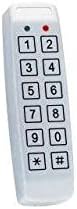
Figure 1: Rosslare AC-S43 Standalone Keypad. This image shows the white, rectangular keypad with a numeric layout (0-9, *, #) and two indicator lights at the top.
Key Features:
- Mullion-style design for narrow frame installations.
- Piezoelectric keypad technology for enhanced durability.
- Suitable for various access control systems.
3. Setup and Installation
Proper installation is crucial for the keypad's functionality and longevity. It is recommended that installation be performed by a qualified technician.
- Mounting: Securely mount the keypad in the desired location, ensuring it is protected from extreme weather conditions if installed outdoors. Use appropriate screws and anchors for the mounting surface.
- Wiring: Connect the keypad to your access control system according to the wiring diagram provided with your specific system. Pay close attention to power, data, and relay connections. Ensure all connections are secure and insulated.
- Power Connection: Apply power to the keypad and the access control system. Observe indicator lights for initial power-on status.
- Initial Programming: Refer to your access control system's manual for initial programming steps, including setting master codes and user codes.
4. Operating Instructions
The Rosslare AC-S43 keypad is used to grant or deny access based on entered codes.
- Entering a User Code: To gain access, enter your assigned user code followed by the '#' key (or as configured by your system).
- Indicator Lights:
- A green light typically indicates successful code entry and access granted.
- A red light typically indicates an invalid code or access denied.
- Other light patterns may indicate system status or programming mode, refer to your system's documentation.
- Programming (Advanced): Programming functions, such as adding or deleting user codes, changing master codes, or adjusting system settings, are typically accessed by entering a master code followed by specific command sequences. Consult your access control system's manual for detailed programming instructions.
5. Maintenance
Regular maintenance ensures optimal performance and extends the lifespan of your keypad.
- Cleaning: Clean the keypad surface with a soft, damp cloth. Do not use abrasive cleaners, solvents, or harsh chemicals, as these can damage the finish and internal components.
- Inspection: Periodically inspect the keypad for any signs of physical damage, loose connections, or wear. Address any issues promptly.
- Environmental Protection: Ensure the keypad remains protected from excessive moisture, dust, and extreme temperatures, especially if not rated for outdoor use.
6. Troubleshooting
If you encounter issues with your Rosslare AC-S43 keypad, refer to the following common problems and solutions:
| Problem | Possible Cause | Solution |
|---|---|---|
| Keypad is unresponsive. | No power; loose wiring; internal fault. | Check power supply and wiring connections. If problem persists, contact support. |
| Code entry does not grant access. | Incorrect code; code not programmed; system fault. | Verify the code. Ensure the code is correctly programmed into the access control system. Check system status. |
| Indicator lights not functioning correctly. | Wiring issue; internal fault. | Inspect wiring. If lights remain erratic, contact support. |
For more complex issues, consult your access control system's documentation or contact Rosslare technical support.
7. Specifications
- Model: AC-S43
- Manufacturer: Rosslare Security
- Type: Mullion Keypad, Piezoelectric
- ASIN: B005GDGG0O
- Item Weight: 0.01 ounces (approximate)
- Date First Available: February 3, 2011
- Description: Rosslare Security AC-S43 Mullion - Keypad Only - 2x6 Matrix Piezoelectric Keypad
8. Warranty and Support
Specific warranty details for the Rosslare AC-S43 are not provided within this product information. For warranty claims, technical support, or service inquiries, please contact Rosslare Security directly or refer to the warranty documentation included with your purchase.
You may also visit the official Rosslare website for further assistance and contact information.


