
1. Introduction
This manual provides essential information for the proper setup, operation, and maintenance of your Futaba R203GF 3-Channel S-FHSS Receiver. The R203GF is designed for use with 2.4GHz FHSS/S-FHSS radio control systems, offering reliable communication and minimizing interference.
Key features include:
- Frequency Hopping Spread Spectrum (FHSS) technology for interference reduction.
- Easy Link function to prevent signal conflicts through a pre-assigned ID code.
- High-voltage operation, compatible with 4.8V to 7.4V power sources.
- Compact and lightweight design.
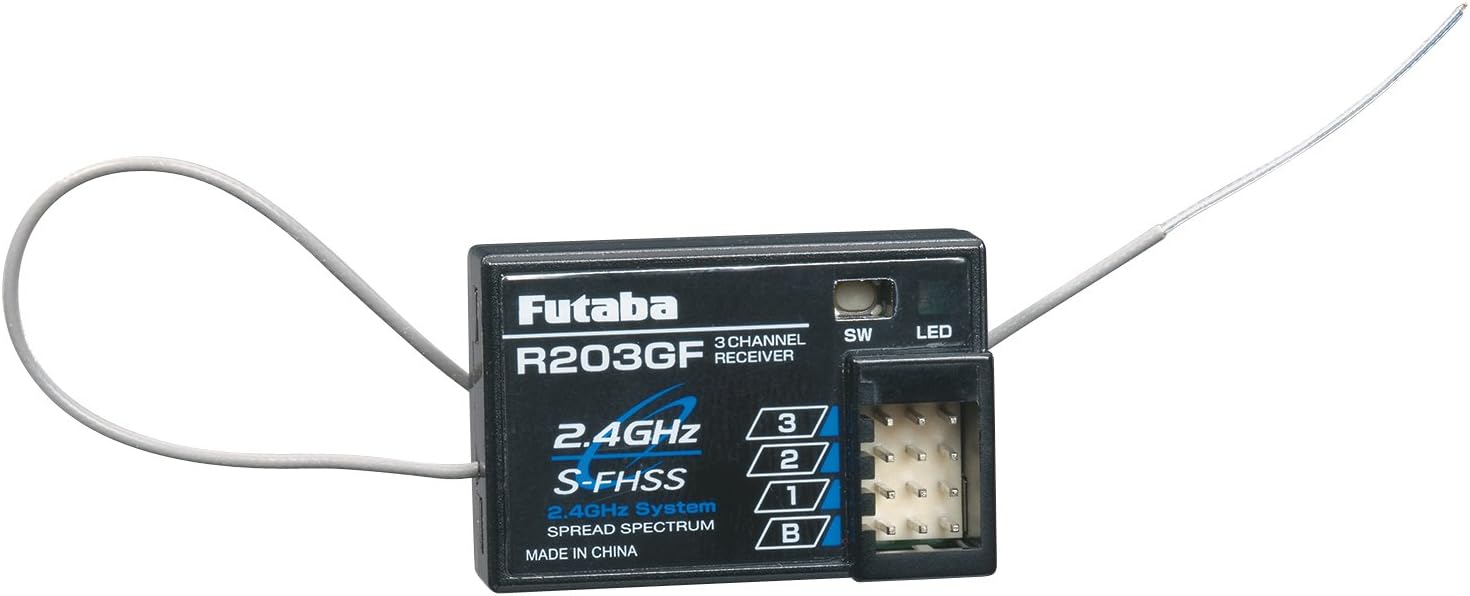
Figure 1: Futaba R203GF 3-Channel S-FHSS Receiver. This image shows the compact black receiver unit with its antenna and connection ports labeled for channels 1, 2, 3, and Battery (B).
2. Safety Precautions
Always observe the following safety guidelines to ensure safe operation and prevent damage to the receiver or other components:
- Voltage Compatibility: Ensure your power source (battery) and servos are compatible with the receiver's operating voltage range (4.8V - 7.4V). Exceeding this range can cause permanent damage.
- Polarity: Always connect components with correct polarity. Incorrect connections can damage the receiver and connected devices.
- Antenna Placement: Position the antenna away from metal objects and other electronic components to maximize signal reception. Do not cut or shorten the antenna wire.
- Moisture: Protect the receiver from moisture and extreme temperatures.
- Binding: Perform the binding procedure in a safe environment, ensuring no unexpected movements of connected servos or motors.
3. Setup and Binding
3.1 Connecting Components
Connect your servos and power source to the receiver's designated ports. The R203GF features three channels (1, 2, 3) and a battery/power port (B).
- Channel 1: Typically for Steering (for surface models) or Aileron (for aircraft).
- Channel 2: Typically for Throttle/Brake (for surface models) or Elevator (for aircraft).
- Channel 3: Auxiliary channel for additional functions.
- Battery (B) Port: Connect your receiver battery or Electronic Speed Controller (ESC) with BEC function here. Ensure the voltage is within 4.8V-7.4V.
3.2 Binding Procedure (Easy Link)
The binding process establishes a unique link between your Futaba S-FHSS transmitter and the R203GF receiver.
- Turn on your Futaba S-FHSS transmitter.
- Connect the receiver battery or power source to the 'B' port on the R203GF receiver. The LED on the receiver will begin to blink.
- Press and hold the 'SW' (Switch) button on the receiver for approximately 2 seconds. The LED will change from blinking to solid green, indicating successful binding.
- Release the 'SW' button.
- Turn off the receiver, then turn off the transmitter.
- Turn on the transmitter first, then the receiver. The LED on the receiver should immediately illuminate solid green, confirming the link.
- Test all channels to ensure proper operation before use.
Note: If the LED blinks red, it indicates a binding error or loss of signal. Repeat the binding procedure.
4. Operation
Once the receiver is successfully bound to your transmitter and all components are connected, you can begin operation.
- Always turn on the transmitter first, then the receiver.
- Always turn off the receiver first, then the transmitter.
- Perform a range check before each use, especially in new environments.
- Ensure the antenna is positioned correctly and not obstructed.
- The receiver's LED will be solid green when a strong signal is received. A blinking red LED indicates a low battery voltage (if battery failsafe is active) or loss of signal.
4.1 Battery Failsafe Function
The R203GF features a battery failsafe function, set at 3.8V for a 4-cell NiCd/NiMH battery. If the receiver battery voltage drops below this threshold, the failsafe will activate, typically returning the throttle to a neutral or predetermined safe position. This helps prevent loss of control due to low battery power.
5. Maintenance
Proper maintenance ensures the longevity and reliable performance of your receiver.
- Cleaning: Keep the receiver clean and free from dust, dirt, and debris. Use a soft, dry cloth for cleaning. Avoid using solvents or harsh chemicals.
- Storage: Store the receiver in a dry, cool place away from direct sunlight and extreme temperatures.
- Inspections: Periodically inspect the antenna wire for any damage or kinks. Check all connections for secure fit.
- Moisture Protection: If operating in damp conditions, consider using a waterproof coating or enclosure for the receiver.
6. Troubleshooting
| Problem | Possible Cause | Solution |
|---|---|---|
| Receiver LED blinks red. | Loss of signal, low receiver battery voltage, or binding error. | Check transmitter power and range. Recharge/replace receiver battery. Re-perform binding procedure. |
| No response from servos/motor. | Incorrect wiring, receiver not bound, transmitter off, or faulty component. | Verify all connections. Ensure receiver is bound and LED is solid green. Check transmitter power. Test components individually. |
| Erratic servo movement. | Interference, loose connections, or faulty servo. | Check antenna placement. Secure all connections. Test with a different servo. Avoid operating near strong electrical noise sources. |
| Receiver does not power on. | No power, incorrect polarity, or damaged receiver. | Check battery connection and charge. Verify correct polarity. If still no power, receiver may be damaged. |
7. Specifications
| Feature | Detail |
|---|---|
| Model Number | FUTL7603 (R203GF) |
| Dimensions | 1.54 x 1.02 x 0.39 inches (39 x 26 x 10 mm) |
| Weight | 0.28 oz (8 g) |
| Operating Voltage | 4.8V - 7.4V (shared with servo) |
| Battery Failsafe Voltage | 3.8V (set for 4-cell NiCd/NiMH battery) |
| Current Drain | 30mA at no signal |
| Antenna Length | 7-1/2 inches (190 mm) |
| Frequency | 2.4GHz S-FHSS/FHSS |
| Channels | 3 |
| Compatible Devices | 3-channel radio control systems with FHSS or S-FHSS protocol |
| Connector Type | JST |
8. Warranty and Support
The Futaba R203GF 3-Channel S-FHSS Receiver comes with a one-year limited warranty from the date of purchase. This warranty covers defects in materials and workmanship under normal use.
For warranty claims or technical support, please contact your authorized Futaba dealer or visit the official Futaba website for contact information.
Please retain your proof of purchase for warranty service.


