
1. Product Overview
The Ideal Lux ODEON PL22 is a contemporary ceiling light fixture designed for indoor use. This chrome-finished chandelier provides ambient lighting through multiple G4 halogen bulbs, creating an elegant focal point in any room.
Key features include:
- Chrome finish
- Designed for up to 22 G4 halogen bulbs (max 10W each)
- Operates on 230V
- IP20 protection rating (suitable for dry indoor environments)
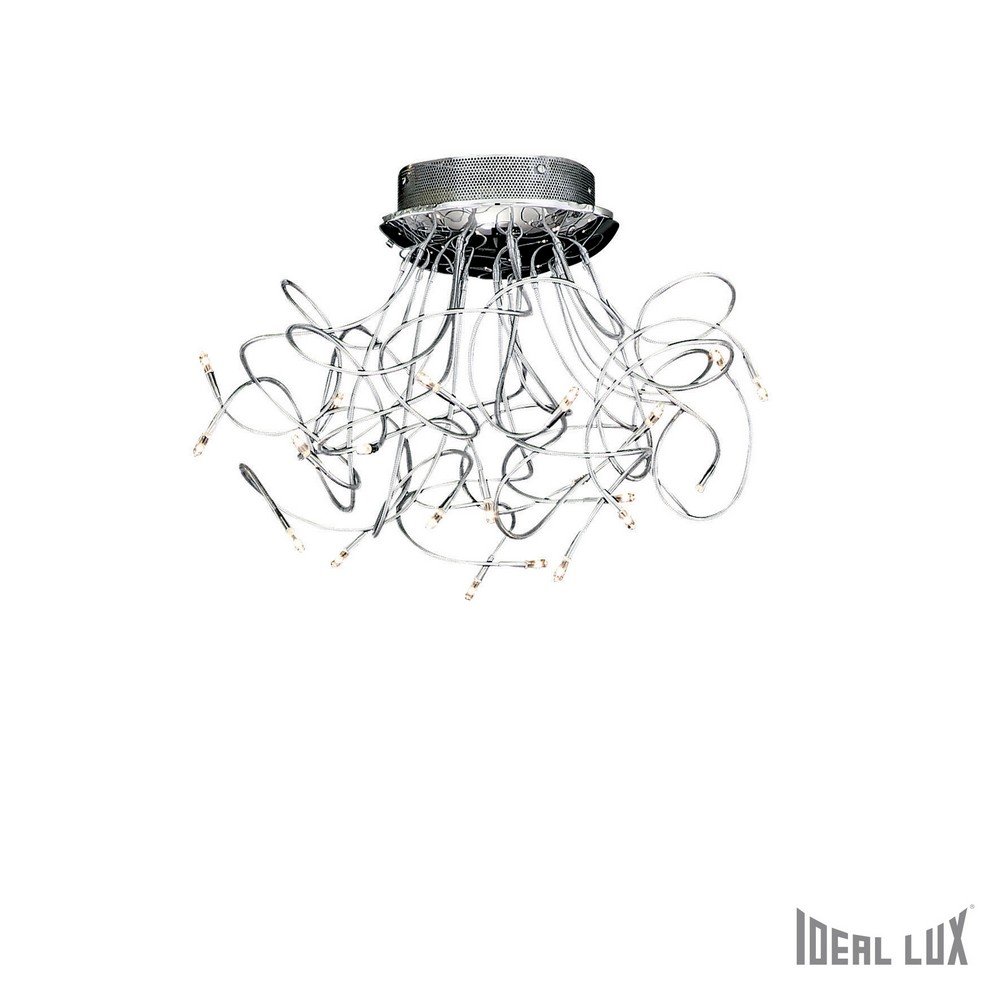
Figure 1: Ideal Lux ODEON PL22 Ceiling Light. This image displays the chrome-finished chandelier with its numerous G4 bulb sockets, designed for ceiling installation.
2. Safety Information
Please read all safety instructions carefully before installation and use. Failure to follow these instructions may result in electric shock, fire, or personal injury.
- Disconnect Power: Always ensure the main power supply to the installation area is switched off at the circuit breaker before beginning any installation, maintenance, or bulb replacement.
- Professional Installation: Installation should be performed by a qualified electrician in accordance with all local electrical codes and regulations.
- Voltage: This fixture is designed for 230V electrical systems. Do not connect to any other voltage.
- Bulb Wattage: Do not exceed the maximum wattage of 10W per G4 bulb. Using higher wattage bulbs can cause overheating and damage the fixture or create a fire hazard.
- IP20 Rating: This fixture is rated IP20, meaning it is protected against solid objects larger than 12.5mm but has no protection against water. Do not install in bathrooms, outdoors, or any areas where it may be exposed to moisture.
- Handling: Handle glass components and bulbs with care. Avoid touching halogen bulbs directly with bare hands, as oils can reduce bulb life. Use a clean cloth or gloves.
- Heat: Halogen bulbs generate heat. Ensure adequate ventilation around the fixture and avoid placing flammable materials near it.
3. Package Contents
Carefully unpack the box and ensure all components are present and undamaged. If any parts are missing or damaged, do not proceed with installation and contact your supplier.
- Ideal Lux ODEON PL22 Ceiling Light Fixture
- Mounting Bracket
- Mounting Hardware (screws, wall plugs)
- Instruction Manual (this document)
- G4 Halogen Bulbs (may be sold separately, check packaging)
4. Setup and Installation
This section provides general guidelines for installing the Ideal Lux ODEON PL22 ceiling light. It is strongly recommended that installation be carried out by a qualified electrician.
4.1. Preparation
- Turn off Power: Locate the main circuit breaker for the room where the light will be installed and switch off the power. Verify that the power is off using a voltage tester.
- Choose Location: Select a suitable ceiling location that can support the weight of the fixture (approximately 5.1 kg for the fixture, 6.63 kg packaged). Ensure there are no hidden wires or pipes.
- Gather Tools: You will need a screwdriver, wire strippers, electrical tape, drill, and possibly a ladder.
4.2. Mounting the Fixture
- Attach Mounting Bracket: Secure the provided mounting bracket to the ceiling junction box using the screws and wall plugs appropriate for your ceiling type. Ensure it is firmly attached.
- Connect Wiring: Carefully connect the electrical wires from the ceiling to the fixture's wires. Typically, this involves connecting live (brown/red) to live, neutral (blue/black) to neutral, and earth (green/yellow) to earth. Use appropriate terminal blocks or connectors and ensure all connections are secure.
- Secure Fixture: Carefully lift the light fixture and align it with the mounting bracket. Secure the fixture to the bracket using the provided screws, ensuring it is flush against the ceiling and stable.
4.3. Installing Bulbs
- Insert G4 Bulbs: Gently push the pins of each G4 halogen bulb into the corresponding sockets. Do not force them.
- Avoid Touching: Use a clean cloth or gloves when handling halogen bulbs to prevent oils from your skin from affecting their lifespan.
Once installation is complete, restore power at the circuit breaker.
5. Operating Instructions
The Ideal Lux ODEON PL22 ceiling light does not feature an integrated switch or dimmer. It is designed to be controlled by a standard wall switch connected to your household electrical circuit.
- Turning On/Off: Use the wall switch connected to the fixture to turn the light on or off.
- Dimming: This fixture is not compatible with dimmers as specified in the product description. Attempting to use a dimmer may damage the fixture or bulbs.
6. Maintenance
6.1. Cleaning
Regular cleaning will help maintain the appearance and performance of your light fixture.
- Disconnect Power: Always turn off the power supply to the fixture at the circuit breaker before cleaning.
- Dusting: Use a soft, dry, lint-free cloth to gently dust the chrome finish and glass components.
- Stubborn Marks: For more stubborn marks, lightly dampen a soft cloth with water. Do not use abrasive cleaners, solvents, or polishes, as these can damage the finish.
- Drying: Ensure the fixture is completely dry before restoring power.
6.2. Bulb Replacement
When a G4 halogen bulb reaches the end of its life, replace it with a new G4 halogen bulb of the same wattage (max 10W).
- Turn off Power: Switch off the power to the fixture at the circuit breaker and allow the old bulb to cool completely.
- Remove Old Bulb: Gently pull the old G4 bulb straight out of its socket.
- Insert New Bulb: Using a clean cloth or gloves, gently push the pins of the new G4 bulb into the socket until it is fully seated.
- Restore Power: Once all bulbs are replaced, restore power at the circuit breaker.
7. Troubleshooting
If you encounter issues with your Ideal Lux ODEON PL22 ceiling light, refer to the following common troubleshooting steps:
| Problem | Possible Cause | Solution |
|---|---|---|
| Light does not turn on |
|
|
| Light flickers |
|
|
| Bulbs burn out quickly |
|
|
If the problem persists after trying these steps, contact a qualified electrician or your supplier for further assistance.
8. Specifications
- Brand: Ideal Lux
- Model Number: 020204
- Product Type: Ceiling Light / Chandelier
- Color/Finish: Chrome
- Dimensions (Fixture): Ø 1300 mm (Diameter) x H 160 mm (Height)
- Weight (Product): 5.1 kg
- Weight (Packaged): 6.63 kg
- Input Voltage: 230 Volts
- Bulb Type: G4 Halogen
- Max Wattage per Bulb: 10 Watts
- Number of Bulbs: Up to 22 (as per product description)
- IP Rating: IP20 (Indoor use only, no water protection)
- Switch: Not integrated (controlled by external wall switch)
- Dimmer: Not compatible
9. Warranty and Support
Information regarding specific warranty terms and customer support contacts for the Ideal Lux ODEON PL22 is not provided in this document. Please refer to your purchase receipt, the product packaging, or the Ideal Lux official website for warranty details and support options.
For technical assistance or inquiries, it is recommended to contact the retailer from whom the product was purchased or a certified electrician.


