
Introduction
This manual provides essential instructions for the safe and proper installation, operation, and maintenance of your Satco 80-1142 3-Wire, 2-Pole Snap-in Convenience Outlet. Please read this manual thoroughly before use and retain it for future reference.
The Satco 80-1142 is a compact, 3-wire, 2-pole convenience outlet designed for snap-in installation. It is rated for 15A-125V and features a standard US-style plug format.
Important Safety Information
WARNING: Risk of electric shock. Improper installation or use can result in serious injury or death. Always consult a qualified electrician if you are unsure about any part of the installation process.
- Always disconnect power at the circuit breaker or fuse box before installing or servicing the outlet.
- Ensure all wiring connections are secure and comply with local electrical codes.
- Do not exceed the specified electrical ratings (15A-125V).
- This product is intended for indoor use only.
- Keep children away from electrical outlets.
Package Contents
Verify that all components are present before beginning installation:
- 1 x Satco 80-1142 3-Wire, 2-Pole Snap-in Convenience Outlet
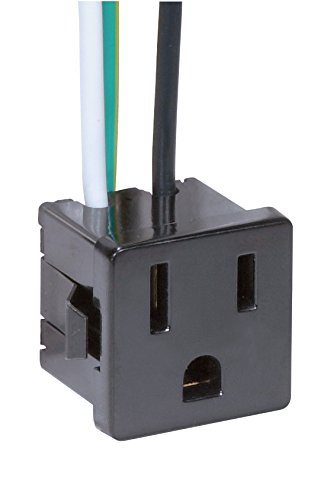
Image: Satco 80-1142 3-Wire, 2-Pole Snap-in Convenience Outlet with attached wires. The outlet is black, featuring two vertical slots and one U-shaped ground slot. Three wires (white, green, black) extend from the rear of the unit.
Setup and Installation
This outlet is designed for snap-in installation into a compatible opening. Ensure the mounting surface is suitable and the opening size matches the outlet's dimensions.
Tools Required (Not Included):
- Wire strippers
- Screwdriver (if securing wires to terminals, though this is a pre-wired unit)
- Voltage tester
Installation Steps:
- Disconnect Power: Locate the circuit breaker or fuse controlling the power to the installation area and turn it OFF. Verify power is off using a voltage tester.
- Prepare Opening: Ensure the mounting opening is clean and correctly sized for the snap-in mechanism of the outlet. The product description mentions an opening size of 1" x 1" x 1", which is likely a general dimension, but the actual snap-in cutout will be specific to the outlet's body.
- Wire Connections: The Satco 80-1142 comes with pre-attached 3-wire, 2-pole wiring. Connect these wires to your electrical system according to standard wiring practices:
- Black Wire: Connect to the "Hot" or "Live" wire.
- White Wire: Connect to the "Neutral" wire.
- Green Wire: Connect to the "Ground" wire.
- Snap-in Installation: Carefully align the outlet with the prepared opening. Apply firm, even pressure to snap the outlet into place until it is flush with the mounting surface. The snap-in tabs on the sides of the outlet will secure it.
- Restore Power: Once the outlet is securely installed and all wiring connections are verified, restore power at the circuit breaker or fuse box.
- Test Functionality: Plug a small appliance or lamp into the newly installed outlet to confirm it is functioning correctly.
Operation
The Satco 80-1142 convenience outlet operates as a standard 15A-125V electrical receptacle. Simply insert the plug of your electrical device into the outlet. Ensure the device's electrical requirements do not exceed the outlet's rating.
- Always use devices with compatible plug types (US A-style).
- Avoid overloading the outlet with multiple high-power devices.
- Do not force plugs into the outlet.
Maintenance
The Satco 80-1142 outlet requires minimal maintenance. Regular inspection is recommended to ensure continued safe operation.
- Cleaning: Disconnect power before cleaning. Wipe the surface of the outlet with a dry, soft cloth. Do not use liquid cleaners or abrasive materials.
- Inspection: Periodically check the outlet for any signs of damage, such as cracks, discoloration, or loose connections. If any damage is observed, disconnect power and replace the outlet immediately.
- Loose Plugs: If plugs feel loose when inserted, the outlet may be worn and should be replaced by a qualified professional.
Troubleshooting
If you experience issues with your Satco 80-1142 outlet, refer to the following common problems and solutions:
| Problem | Possible Cause | Solution |
|---|---|---|
| No power from the outlet. |
|
|
| Outlet feels warm. |
|
|
| Plug does not fit or is loose. |
|
|
If troubleshooting steps do not resolve the issue, consult a qualified electrician.
Specifications
| Model Number | 80-1142 |
| Brand | Satco |
| Type | 3-Wire, 2-Pole Snap-in Convenience Outlet |
| Electrical Rating | 15A-125V |
| Mounting Type | Snap-in |
| Plug Format | A- US style |
| Product Dimensions | Approximately 10 x 10 x 10 inches (Package dimensions, actual outlet is smaller) |
| Item Weight | 1.58 ounces |
| Material | Glass (Note: This material specification from product data may be a general category, actual outlet components are typically plastic/metal for electrical safety.) |
| Included Components | Satco 80-1142 3 Wire, 2 Pole Snap-In Convenience Outlet |
Warranty and Support
Warranty Information: For details regarding the product warranty, please contact the manufacturer, Satco, directly. The product data indicates "Contact manf for warranty info."
Customer Support: If you have questions or require technical assistance, please visit the official Satco website or contact their customer service department. Refer to the product packaging or Satco's official resources for current contact information.
You can visit the Satco Store on Amazon for more products: Satco Store