
1. Introduction
Thank you for choosing the Wiltec CPF-250 Pressure Pond Filter. This system is designed to provide efficient mechanical and biological filtration, combined with an integrated UV-C clarifier, to ensure clear and healthy water in your pond. This manual contains important information regarding the safe installation, operation, and maintenance of your filter. Please read it thoroughly before use and keep it for future reference.
2. Safety Instructions
- Always disconnect the power supply before performing any maintenance, cleaning, or installation work.
- Ensure the power cable and plug are undamaged. Do not operate the device if any part is damaged.
- The UV-C lamp emits harmful radiation. Never look directly at the illuminated UV-C lamp. Only operate the UV-C unit when it is fully enclosed within the filter housing.
- This device is intended for pond water filtration only. Do not use it for other liquids.
- Ensure all electrical connections are protected from water and moisture.
- Keep the device out of reach of children and pets.
- The filter must be installed at least 2 meters away from the pond edge to prevent accidental immersion.
3. Product Overview and Components
The Wiltec CPF-250 is a robust pressure filter system featuring an 11W UV-C unit, multiple filter sponges, and bioballs for comprehensive water purification.

This image shows the Wiltec CPF-250 pressure pond filter positioned beside a clear pond, demonstrating a typical installation scenario. The filter is black with blue accents, connected by hoses to the pond, which is inhabited by several orange koi fish. The surrounding area features natural rocks and lush green foliage, indicating an outdoor garden environment.
3.1 Internal Filter Structure

This diagram provides a transparent view of the Wiltec CPF-250 pressure pond filter's internal components. It highlights the 11W UV-C lamp, the mechanism for cleaning sponges, and the arrangement of six filter sponges for mechanical filtration, along with bioballs for biological filtration. Input and output ports are clearly marked.
3.2 UV-C Sterilization
The integrated 11W UV-C unit helps to reduce harmful bacteria, pathogens, and effectively removes floating algae, contributing to crystal clear pond water.

A close-up image of the integrated 11W UV-C lamp within the filter, emitting a blue light. This illustrates the effective and powerful UV-C sterilization process designed to reduce harmful bacteria and pathogens and remove floating algae.
3.3 Filter Sponges
The filter utilizes both coarse and fine sponges for multi-stage mechanical filtration, creating an optimal environment for beneficial bacteria.

This diagram visually explains the different types of filter sponges used in the CPF-250. It shows blue coarse sponges designed for filtering larger impurities and yellow fine sponges for smaller impurities, emphasizing their role in creating an ideal environment for beneficial bacteria.
3.4 Exploded View and Parts List

An exploded diagram of the CPF-250 filter, showing all its individual components disassembled. A corresponding table lists each numbered part, including the handle, UV-C connection unit, UV-C lamp, O-rings, quartz glass sleeve, lid, rubber seal, inlet/outlet, fixing nuts, flow meter, support rods, coarse filter sponges, fine filter sponges, fixing plate, removable plate, support plate, bioballs, clamp, and container.
| No. | Part Name | No. | Part Name |
|---|---|---|---|
| 1 | Handle | 12 | Flow Meter |
| 2 | Handle Fixing | 13 | Support Rods |
| 3 | UV-C Connection Unit | 14 | Coarse Filter Sponges |
| 4 | UV-C Lamp | 15 | Fine Filter Sponges |
| 5 | O-ring 1 | 16 | Fixing Plate |
| 6 | Quartz Glass Sleeve | 17 | Removable Plate |
| 7 | O-ring 2 | 18 | Support Plate |
| 8 | Lid | 19 | Bioballs |
| 9 | Rubber Seal | 20 | Clamp |
| 10 | Inlet and Outlet | 21 | O-ring 3 |
| 11 | Fixing Nuts for Inlet/Outlet | 22 | Container |
4. Installation
4.1 Pre-Installation Checks
- Unpack all components and check for any damage.
- Ensure all necessary parts are present according to the parts list.
- Familiarize yourself with the filter's dimensions to plan its placement.

A detailed diagram illustrating the physical dimensions of the Wiltec CPF-250 filter. It shows the filter's height (510 mm), width (382 mm), and volume (25 L). Also included are various hose connection sizes (20mm, 25mm, 32mm, 38mm) for proper setup.
4.2 Placement Options
The CPF-250 filter can be installed either above ground or partially buried, depending on your pond design and aesthetic preferences. Always ensure the filter is placed on a stable, level surface and at least 2 meters away from the pond edge.

This image displays two common installation methods for pond filters. The left side shows a filter unit placed above ground next to a pond, while the right side illustrates a smaller, round filter fixture partially buried in a garden, demonstrating flexible placement options.
4.3 Assembly and Connections
Follow these steps to assemble and connect your filter system:
- Connect the pond pump to the filter's inlet.
- Connect the filter's outlet to your desired water return point (e.g., waterfall, stream, or directly back into the pond).
- Ensure all hose connections are secure and leak-free. Use hose clamps if necessary.
- Connect the power cable for the UV-C unit to a suitable, weather-protected power outlet.

A four-step instructional diagram detailing the process for cleaning the filter material. It shows how to identify when cleaning is needed (orange float rises), how to turn the switch towards the outlet, press the button multiple times to clean the sponges, and finally reset the glass plate after cleaning.
4.4 Product Overview Video
Watch this video for a visual overview of the Wiltec CPF-250 filter.
This video provides a detailed 360-degree view of the Wiltec CPF-250 pressure pond filter, showcasing its design and external features from all angles.
5. Operation
5.1 Initial Startup
- Ensure all connections are secure and the filter is correctly positioned.
- Start the pond pump. Water will begin to flow into the filter.
- Once water is flowing through the filter and back into the pond, connect the power supply for the UV-C unit. The indicator light on the filter lid will confirm the UV-C lamp is operating.
- Allow the filter to run continuously. It may take several days for the pond water to become completely clear, especially if it was very cloudy initially.
5.2 Continuous Operation
For optimal results, the filter system should operate 24 hours a day, 7 days a week during the pond season. This ensures continuous mechanical, biological, and UV-C treatment of the pond water.
6. Maintenance and Cleaning
Regular maintenance is crucial for the efficient operation and longevity of your Wiltec CPF-250 filter.
6.1 Cleaning the Filter Sponges
The CPF-250 features a convenient cleaning function. When the orange float on the filter lid rises, it indicates that the filter material requires cleaning.
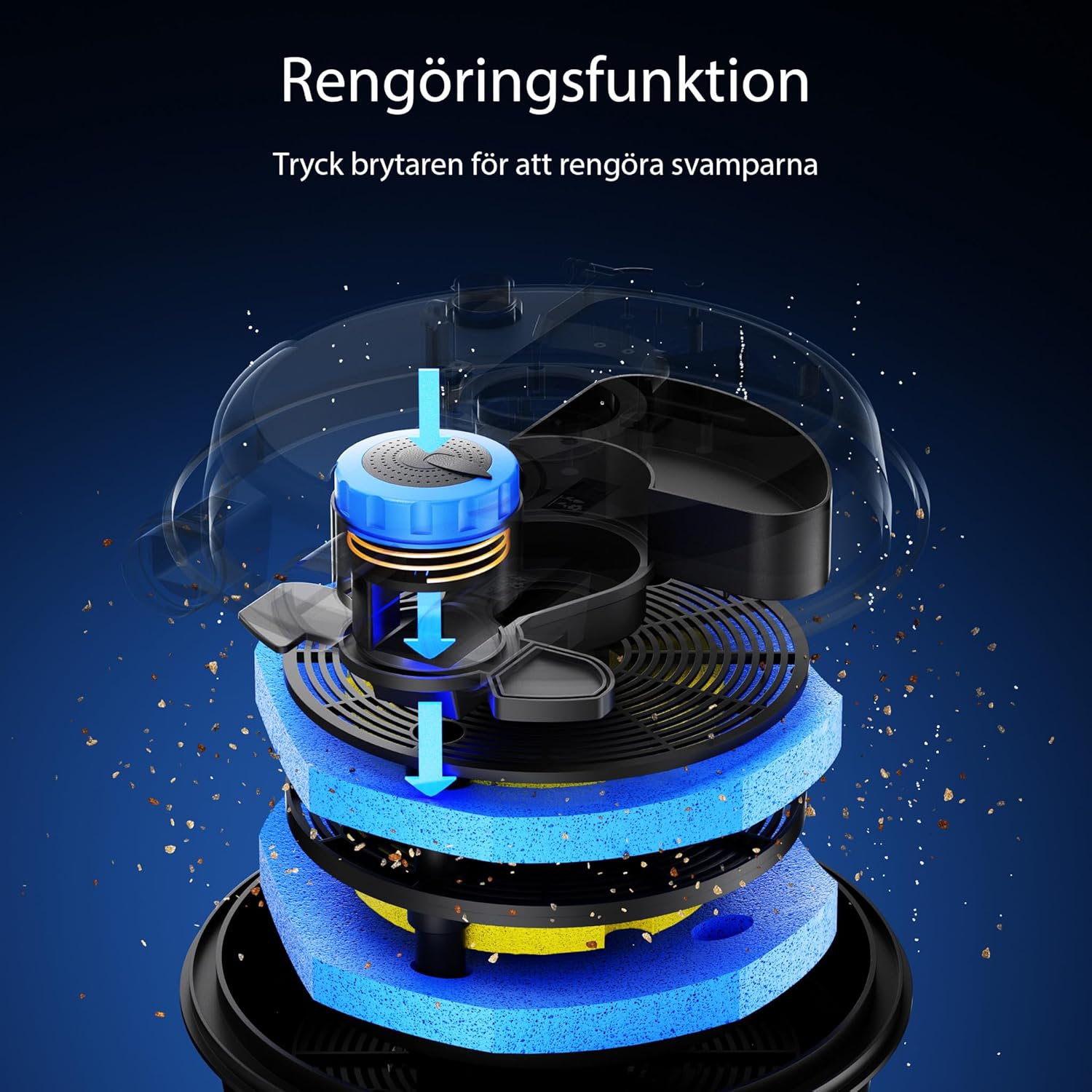
A cutaway diagram illustrating the internal cleaning function of the filter. It shows how pressing a switch activates a mechanism that cleans the filter sponges, with blue arrows indicating the water flow during the cleaning process.
Follow these steps for cleaning:
- Step 1: Observe the orange float. When it rises, the filter material needs cleaning. Remove the glass plate from the outlet.
- Step 2: Turn the switch on the filter lid towards the designated cleaning outlet.
- Step 3: Press the cleaning button repeatedly to activate the internal cleaning mechanism, which squeezes and rinses the sponges. Dirty water will exit through the cleaning outlet.
- Step 4: Once the water runs clear, return the switch to the normal operating position and replace the glass plate.
A four-step instructional diagram detailing the process for cleaning the filter material. It shows how to identify when cleaning is needed (orange float rises), how to turn the switch towards the outlet, press the button multiple times to clean the sponges, and finally reset the glass plate after cleaning.
6.2 UV-C Lamp Replacement
The UV-C lamp has an effective lifespan of approximately 8000 operating hours (about 1 year of continuous use). It should be replaced annually, ideally at the start of the pond season, to maintain optimal performance. Refer to the exploded view diagram for lamp access and replacement instructions.
7. Troubleshooting
| Problem | Possible Cause | Solution |
|---|---|---|
| Pond water remains cloudy/green | Clogged filter sponges, faulty UV-C lamp, insufficient pump flow, oversized pond for filter. | Clean filter sponges. Check/replace UV-C lamp. Ensure pump flow matches filter requirements. Verify filter capacity against pond size. |
| Reduced water flow from outlet | Clogged filter sponges, blocked hoses, pump malfunction. | Perform filter cleaning. Check and clear any blockages in hoses. Inspect and clean the pond pump. |
| UV-C indicator light off | UV-C lamp faulty, power supply issue, quartz glass sleeve dirty. | Check power connection. Replace UV-C lamp. Clean quartz glass sleeve. |
| Water leakage | Loose connections, damaged O-rings, cracked housing. | Tighten all hose connections. Inspect and replace damaged O-rings. Contact customer support if housing is cracked. |
8. Technical Specifications
Below are the key technical specifications for the Wiltec CPF-250 Pressure Pond Filter:

A panel presenting key technical specifications of the filter, including a total power consumption of 15W, a maximum flow rate of 10000 L/h, an IP44 protection rating, and a 5-meter cable length.
| Feature | Specification |
|---|---|
| Model Number | 50105 |
| Dimensions (L x W x H) | 43 x 41.5 x 53 cm |
| Item Weight | 6.7 kg |
| Material | Plastic |
| Color | Black |
| Power Source | Corded Electric |
| UV-C Unit Power | 11 W |
| Max. Flow Rate | 10000 L/h |
| Recommended Pond Size (without fish) | Up to 10000 L |
| Recommended Pond Size (with fish) | Up to 5000 L |
| IP Rating | IP44 |
8.1 Pond Size Recommendations

A comparison chart that outlines recommended flow rates and corresponding pond sizes for both ponds with fish and ponds without fish. It includes visual examples of a vibrant koi pond and a serene waterfall feature, illustrating the filter's application.
9. Warranty and Customer Support
Wiltec products are manufactured to high-quality standards. In the unlikely event of a defect, please refer to your purchase documentation for warranty details. For technical assistance, spare parts, or further inquiries, please contact Wiltec customer support through the retailer where you purchased the product or visit the official Wiltec website.


