
1. Introduction
This manual provides instructions for the proper setup, operation, and maintenance of your AmScope SE305R-PY-LED Binocular Stereo Microscope. This instrument is designed for inspecting biological specimens, rocks, stamps, jewelry, and other large specimens that may require handling or manipulation. It features a forward-mounted binocular viewing head, interchangeable eyepieces, 1x and 3x objectives, and both upper and lower LED illumination.
2. What's in the Box?
Carefully unpack all components and verify against the list below. If any items are missing or damaged, please contact AmScope customer support.
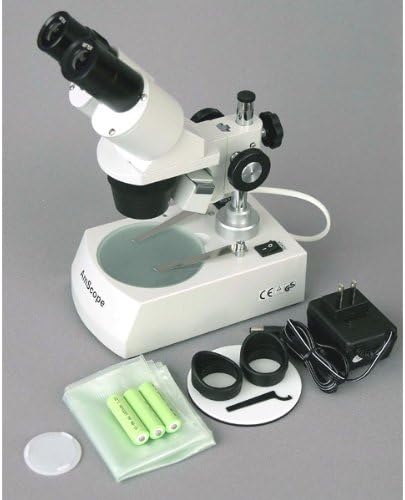
Figure 1: All components included with the AmScope SE305R-PY-LED stereo microscope. This image shows the main microscope unit, eyepieces, stage plates, eye guards, stage clips, power adapter, and a dust cover.
- AmScope SE305R-PY-LED stereo microscope with forward head and pillar stand
- WF10x18mm eyepieces (one pair)
- WF15x13mm eyepieces (one pair)
- 1x objective (pre-installed)
- 3x objective (pre-installed)
- Black/white stage plate, 95mm
- Frosted stage plate, 95mm
- (2) Eye guards
- (2) Stage clips
- LED bulb (pre-installed)
- Focusing wrench
- Dust cover
- Power cord (120V adapter)
- Instructions (this manual)
3. Setup
- Unpacking: Carefully remove all components from the packaging. Place the microscope base on a stable, level surface.
- Eyepiece Installation: Insert the desired pair of eyepieces (WF10x or WF15x) into the binocular tubes. Gently push them down until they are seated firmly.
- Stage Plate Placement: Choose either the frosted stage plate (for transparent specimens with lower illumination) or the reversible black/white stage plate (for opaque specimens with upper illumination). Place it into the circular opening on the microscope base.
- Power Connection:
- AC Power: Connect the provided power cord to the microscope's power input and then to a standard 120V AC outlet.
- Battery Power (Optional): For portable use, insert compatible batteries (not included) into the battery compartment located on the underside of the base.
- Dust Cover: Keep the dust cover over the microscope when not in use to protect optical components.

Figure 2: The AmScope SE305R-PY-LED microscope main unit, showing the binocular head, objectives, and stage.
4. Operating Instructions
- Power On/Off: Locate the power switch on the side of the microscope base and flip it to the "ON" position to activate the LED illumination.
- Placing a Specimen: Place your specimen on the center of the stage plate. Use the stage clips to secure it if necessary.
- Adjusting Magnification:
- Eyepieces: The microscope comes with WF10x and WF15x eyepieces. Select the desired pair for initial magnification.
- Objectives: The microscope has 1x and 3x objectives. Rotate the objective turret to select the desired objective. The total magnification is the product of the eyepiece magnification and the objective magnification (e.g., 10x eyepiece * 1x objective = 10x total magnification).
- Focusing:
- Look through the eyepieces.
- Rotate the large bilateral coarse focus knobs (located on both sides of the pillar stand) to move the microscope head up or down until the specimen comes into sharp focus.
- Illumination Control:
- The microscope features both upper (reflected) and lower (transmitted) LED illumination.
- Use the switch on the base to select upper, lower, or both illuminations.
- Upper Illumination: Ideal for opaque specimens, reflecting light off the surface.
- Lower Illumination: Ideal for transparent or translucent specimens, transmitting light through them. Use with the frosted stage plate.
- Interpupillary Distance Adjustment: While looking through the eyepieces, adjust the distance between the two eyepiece tubes by gently pulling them apart or pushing them together until you see a single, clear circular field of view.
- Dioptric Adjustment: If one eye is stronger than the other, use the diopter adjustment ring on one of the eyepiece tubes to fine-tune the focus for that eye after the main focus has been set.
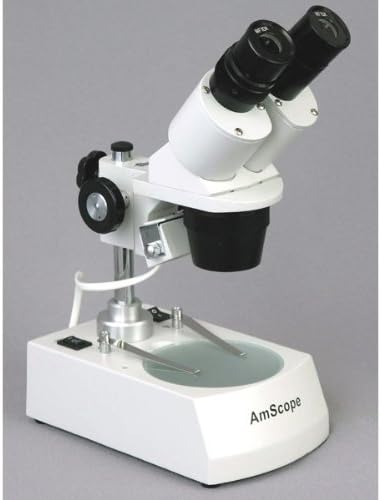
Figure 3: Side view illustrating the coarse focus knob and the objective lens housing.
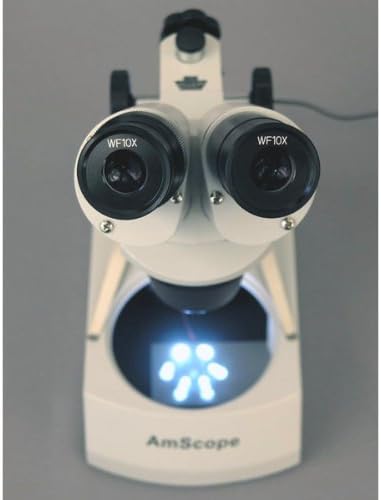
Figure 4: Top-down view showing the stage plate and the active lower LED illumination.
5. Maintenance
- Cleaning Lenses: Use only specialized lens cleaning paper and lens cleaning solution. Gently wipe the lens surfaces. Avoid touching lenses with bare fingers.
- Cleaning Body: Wipe the microscope body with a soft, damp cloth. Do not use harsh chemicals or abrasive cleaners.
- Storage: Always cover the microscope with the provided dust cover when not in use. Store in a dry, dust-free environment.
- Bulb Replacement: The LED bulb is designed for long life. If replacement is necessary, contact AmScope support for guidance.
6. Troubleshooting
| Problem | Possible Cause | Solution |
|---|---|---|
| No image visible | Eyepieces not inserted correctly; objective not aligned; focus too far off; specimen not on stage. | Ensure eyepieces are fully seated. Rotate objective turret until it clicks into place. Adjust coarse focus. Place specimen on stage. |
| Image is blurry or unclear | Improper focus; dirty lenses; interpupillary distance incorrect; diopter not adjusted. | Adjust coarse focus. Clean lenses with lens paper. Adjust interpupillary distance. Adjust diopter for individual eye focus. |
| No illumination | Power switch off; power cord disconnected; batteries depleted (if applicable); bulb failure. | Turn power switch on. Check power cord connection. Replace batteries. Contact support if bulb is suspected to be faulty. |
| Uneven illumination | Stage plate or specimen obstructing light path. | Ensure stage plate is correctly seated and specimen is centered. |
7. Specifications
| Feature | Detail |
|---|---|
| Head | Forward-mounted binocular, 45-degree inclination |
| Magnification | 10x, 15x, 30x, 45x |
| Objective Power | 1x, 3x |
| Eyepieces (DIN, 30.5mm) | WF10x18mm, WF15x13mm |
| Working Distance | 2-1/8" (53mm) |
| Focus | Bilateral coarse |
| Microscope Stand | Pillar stand |
| Stage Plate (95mm) | Frosted and reversible black/white |
| Illumination Type | Upper (reflected) and lower (transmitted) |
| Light Source | LED |
| Power | 120V AC (UL listed) or Battery Powered |
| Product Dimensions | 8.98 x 12.4 x 18.15 inches |
| Item Weight | 6.96 pounds |
| Material | Metal |
8. Warranty and Support
For warranty information, technical support, or service inquiries, please contact AmScope directly. AmScope is a brand of United Scope, headquartered in Irvine, CA.
Please refer to the official AmScope website or your purchase documentation for the most current contact information and warranty details.
You can also visit the AmScope Store on Amazon for additional product information and support resources.


