1. Important Safety Information
Please read all safety and operating instructions carefully before using this product. Keep these instructions for future reference.
- Power Source: Operate the TV only from the type of power source indicated on the marking label.
- Ventilation: Ensure proper ventilation. Do not block any ventilation openings.
- Water and Moisture: Do not expose the TV to rain or moisture. Do not use near water.
- Cleaning: Unplug the TV from the wall outlet before cleaning. Use a dry cloth for cleaning.
- Servicing: Do not attempt to service this product yourself. Refer all servicing to qualified service personnel.
- Proposition 65 Warning: This product contains chemicals known to the State of California to cause cancer and birth defects or other reproductive harm.
2. Product Overview
The Supersonic SC-1312 is a compact 13.3-inch ELED FHD TV designed for versatility, featuring a built-in DVD player and multiple connectivity options. It is suitable for various environments, including RVs, kitchens, and small spaces.

Image: Front view of the Supersonic SC-1312 13.3-inch ELED FHD TV.
Key Features:
- 13.3-inch ELED Full HD (1080p) Display.
- Integrated DVD Player compatible with DVD, CD, CDR, CDRW, DVD+/- R, DVD+/- RW, VCD, and SVCD formats.
- Multiple Inputs: HDMI, USB, VGA, CVBS (RCA), RF (Coaxial).
- Dual Tuners for over-the-air broadcasting.
- Multi-Language On-Screen Display (OSD).
- AC/DC Compatibility for flexible power options.
- Can function as a computer monitor via PC input.
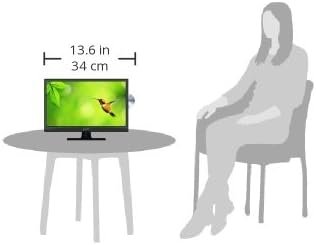
Image: A visual representation of the TV's dimensions (13.6 inches wide) in comparison to a seated person, illustrating its compact size.
3. Package Contents
Verify that all items are present in the package:
- Supersonic SC-1312 13.3-Inch ELED FHD TV with Built-in DVD Player
- Remote Control
- AC Power Adapter
- DC Car Adapter (12V)
- User Manual

Image: The remote control, user manuals, AC power adapter, and DC car adapter included with the Supersonic SC-1312 TV.
4. Product Connections and Controls
Familiarize yourself with the input and output ports located on the rear of the TV.

Image: Rear panel of the TV with labeled ports including Power Input, USB Input, HDMI Input, VGA Input, PC Audio Input, Y/Pb/Pr Input, RF Input, Headphone Output, CVBS/L/R Input, and Coaxial Output.
Rear Panel Connections:
- Power Input (DC 12V): Connect the provided AC adapter or DC car adapter here.
- USB Input: For connecting USB storage devices to play media files.
- HDMI Input: Connect HDMI-enabled devices such as gaming consoles, streaming sticks, or Blu-ray players.
- VGA Input: Connect a computer for use as a monitor.
- PC Audio Input: For audio when using the VGA input.
- Y/Pb/Pr Input: Component video input for compatible devices.
- RF Input: Connect an antenna or cable TV signal.
- Headphone Output: Connect headphones for private listening.
- CVBS/L/R Input: Composite video and stereo audio input (RCA).
- Coaxial Output: Digital audio output.
5. Setup
5.1 Power Connection
- For AC power, connect the AC adapter to the TV's DC 12V input and then plug the adapter into a standard wall outlet.
- For DC power (e.g., in an RV or vehicle), connect the DC car adapter to the TV's DC 12V input and then plug the adapter into a 12V power socket.
5.2 Connecting External Devices
- HDMI Devices: Use an HDMI cable to connect your device (e.g., streaming stick, game console) to the HDMI input on the TV.
- USB Devices: Insert a USB flash drive into the USB port to access compatible media files.
- VGA (PC) Connection: Connect a VGA cable from your computer to the TV's VGA input. Connect an audio cable from your computer's audio output to the TV's PC Audio Input.
- Analog Devices (CVBS/Y/Pb/Pr): Use appropriate RCA cables to connect older devices to the CVBS or Y/Pb/Pr inputs.
5.3 Antenna Connection
Connect a coaxial cable from your antenna or cable TV wall outlet to the RF input on the TV.
5.4 Initial Power-On and Channel Scan
- After connecting power and any desired devices, press the Power button on the TV or remote control to turn it on.
- The TV may display a loading screen for approximately 15 seconds.
- Follow the on-screen prompts to select your preferred language and perform an automatic channel scan for over-the-air broadcasts.
6. Operating Instructions
6.1 Basic TV Functions
- Power On/Off: Press the Power button on the remote or TV.
- Volume Control: Use the VOL +/- buttons on the remote or TV.
- Channel Selection: Use the CH +/- buttons or number pad on the remote.
- Input Source: Press the SOURCE button on the remote to cycle through available inputs (TV, HDMI, USB, VGA, Y/Pb/Pr, AV, DVD).
6.2 DVD Player Operation
The TV features a built-in DVD player. The disc slot is typically located on the side of the TV.

Image: A family watching the Supersonic TV, highlighting its built-in DVD player functionality.
- Insert a DVD or CD into the disc slot with the label facing forward. The TV will automatically switch to DVD mode or you may need to select 'DVD' as the source.
- Playback will usually begin automatically. Use the remote control for playback functions (Play, Pause, Stop, Fast Forward, Rewind, Skip).
- To eject a disc, press the Eject button on the remote control.
- Note that switching to DVD mode or starting a DVD may involve a brief loading screen. The DVD player is designed to resume playback from the last position even after a power cycle.
6.3 On-Screen Display (OSD) Menu
Press the MENU button on the remote to access the OSD menu. Use the arrow buttons to navigate and the OK button to confirm selections. Common menu options include:
- Picture Settings: Adjust brightness, contrast, color, sharpness, and picture mode.
- Sound Settings: Adjust volume, bass, treble, balance, and sound mode.
- Channel Settings: Perform channel scans, edit channels, and set parental controls.
- Time Settings: Set time, date, and sleep timer.
- Setup: Change language, aspect ratio, and other system settings.
7. Maintenance
7.1 Cleaning the TV
- Always unplug the TV before cleaning.
- Use a soft, dry cloth to wipe the screen and cabinet.
- For stubborn marks on the screen, use a screen-cleaning solution specifically designed for electronics, applied to the cloth, not directly to the screen.
- Do not use abrasive cleaners, waxes, or solvents.
7.2 Storage
If storing the TV for an extended period, ensure it is unplugged, clean, and stored in a cool, dry place away from direct sunlight and extreme temperatures.
8. Troubleshooting
Refer to this section for solutions to common issues you may encounter.
| Problem | Possible Cause / Solution |
|---|---|
| No power | Ensure the power adapter is securely connected to the TV and a working power outlet. Check the power source (AC or DC). |
| No picture, but sound is present | Check the input source selection. Ensure external devices are properly connected and powered on. Adjust brightness/contrast settings. |
| No sound, but picture is present | Check volume level and mute status. Ensure audio cables are correctly connected for external devices. Check sound settings in the OSD menu. |
| Remote control not working | Replace batteries in the remote. Ensure there are no obstructions between the remote and the TV's IR sensor. Point the remote directly at the TV. |
| DVD not playing or ejecting | Ensure the disc is inserted correctly. Try a different disc. Use the Eject button on the remote. Clean the disc if it is dirty or scratched. |
| Bad pixel on screen | Gently rub the affected spot with the ball of your finger (not nail) using a soft cloth. This may resolve the issue. |
| Long loading screen | The TV typically has a 15-second loading screen upon power-on and when switching to DVD mode. This is normal operation. |
9. Specifications
Technical specifications for the Supersonic SC-1312 TV:
| Feature | Specification |
|---|---|
| Brand | Supersonic |
| Model Number | SC-1312 |
| Screen Size | 13.3 Inches |
| Display Technology | ELED |
| Resolution | 1080p Full HD |
| Aspect Ratio | 16:9 |
| Refresh Rate | 480 Hz |
| Connectivity Technology | HDMI, USB, VGA, RF, CVBS, Y/Pb/Pr |
| Special Feature | Built-in DVD Player, Flat Screen |
| Speaker Type | Built-In |
| Wattage | 24 watts |
| Product Dimensions | 13.6 x 4.69 x 11.45 inches (approx.) |
| Item Weight | 3.8 Pounds |
| Color | Black |
10. Warranty and Support
For warranty information and technical support, please refer to the documentation included with your product or contact Supersonic customer service directly. Warranty terms may vary based on region and retailer.
Please retain your proof of purchase for any warranty claims.


