
Harman Kardon HK206
Harman Kardon Rev A00 Computer Speakers
Model: HK206
Introduction
This manual provides comprehensive instructions for the setup, operation, maintenance, and troubleshooting of your Harman Kardon Rev A00 Computer Speakers. Please read this manual thoroughly before using your speakers to ensure optimal performance and longevity.
What's in the Box
Upon unboxing, please verify that all components listed below are present:
- Two (2) Harman Kardon Rev A00 Computer Speakers
- One (1) Power Supply
- One (1) Installation Guide

Image: The Harman Kardon Rev A00 Computer Speakers shown with the included power supply. The image displays both speakers, one with a volume knob, and the power adapter with its cables.
Setup Instructions
Follow these steps to set up your Harman Kardon Rev A00 Computer Speakers:
- Placement: Position the two speakers on either side of your computer monitor or desired listening area. Ensure they are placed on a stable, flat surface.
- Connect Speakers: The speakers are typically connected to each other via an integrated cable. Ensure this connection is secure.
- Connect to Audio Source: Locate the 3.5mm audio jack cable extending from one of the speakers. Plug this cable into the audio output port (headphone jack) of your computer, laptop, or other compatible audio device.
- Connect Power: Plug the power supply cable into the designated power input port on one of the speakers. Then, plug the power supply into a standard electrical outlet.
- Power On: Turn on the speakers using the volume knob, which often doubles as a power switch. A small indicator light may illuminate when the speakers are powered on.

Image: A rear view of one Harman Kardon Rev A00 speaker, showing the integrated cables for power and audio input. This view helps in identifying connection points.
Operating Instructions
Once your speakers are set up, follow these steps for operation:
- Power On/Off: Rotate the volume knob clockwise to turn the speakers on. Continue rotating clockwise to increase the volume. Rotate counter-clockwise to decrease volume and turn the speakers off.
- Volume Control: Adjust the volume using the knob located on the front of the left speaker. You can also control the volume from your connected device (computer, laptop).
- Audio Playback: Ensure your audio source (computer, laptop) is playing sound. The speakers will output the audio from the connected 3.5mm audio jack.
- Stereo Sound: These speakers provide 2.0 channel stereo audio. For optimal stereo separation, ensure the speakers are positioned appropriately relative to your listening position.
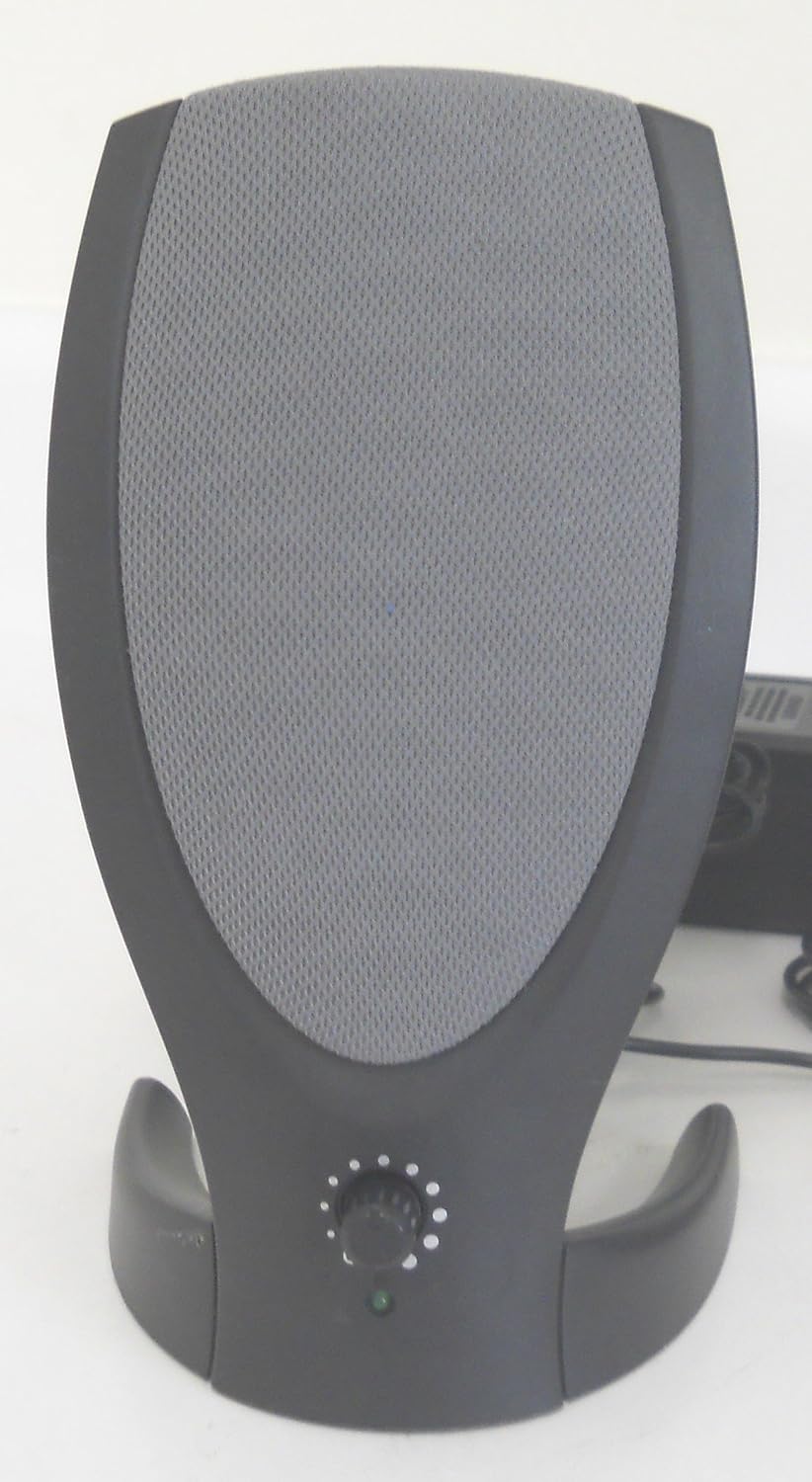
Image: A close-up view of one Harman Kardon Rev A00 speaker, highlighting the volume control knob and power indicator light at its base. This is the primary control interface for the speakers.
Maintenance and Care
To ensure the longevity and optimal performance of your Harman Kardon Rev A00 Computer Speakers, follow these maintenance guidelines:
- Cleaning: Use a soft, dry cloth to wipe down the exterior surfaces of the speakers. Avoid using liquid cleaners, aerosols, or abrasive materials, as they may damage the finish or internal components.
- Dust Removal: Regularly dust the speaker grilles and vents to prevent dust buildup, which can affect sound quality and internal cooling. A soft brush or compressed air can be used carefully.
- Avoid Liquids: Keep the speakers away from water and other liquids. These speakers are not waterproof.
- Temperature and Humidity: Store and operate the speakers in a dry environment with moderate temperatures. Avoid extreme heat, cold, or high humidity.
- Cable Management: Ensure cables are not kinked, pinched, or placed where they can be tripped over. Proper cable management helps prevent damage to the wiring and connections.
Troubleshooting
If you encounter issues with your Harman Kardon Rev A00 Computer Speakers, refer to the following common problems and solutions:
| Problem | Possible Cause | Solution |
|---|---|---|
| No Sound |
|
|
| Distorted Sound |
|
|
| Only One Speaker Works |
|
|
If the problem persists after trying these solutions, please refer to the Warranty and Support section for further assistance.
Specifications
| Feature | Detail |
|---|---|
| Model Name | Rev A00 |
| Speaker Type | Computer |
| Recommended Uses | For Computers, personal |
| Compatible Devices | Desktop, Laptop |
| Controller Type | Button, Touch (Volume Knob) |
| Surround Sound Channel Configuration | 2.0 |
| Color | Black |
| Number of Items | 2 (Speakers) |
| Speaker Size | 2 Inches |
| Power Source | DC |
| Woofer Diameter | 2 Inches |
| Water Resistance Level | Not Water Resistant |
| Audio Driver Type | Dynamic Driver |
| Connectivity Protocol | 3.5mm audio jack (Wired) |
| Series Number | 206 |
| Manufacturer | Harmon Kardon |
| Item Weight | 2.35 pounds |
| Item Model Number | HK206 |
| Date First Available | June 26, 2011 |
| Speaker Maximum Output Power | 25 Watts |
| Audio Output Mode | Stereo |
| Mounting Type | Tabletop Mount |
Warranty and Support
Your Harman Kardon Rev A00 Computer Speakers come with a Limited Warranty. For specific details regarding the warranty period, coverage, and terms, please refer to the warranty card included in your original packaging or visit the official Harman Kardon support website.
For technical support, troubleshooting assistance beyond this manual, or warranty claims, please contact Harman Kardon customer service. Contact information can typically be found on the manufacturer's official website or in the product documentation.
Important Note: Any unauthorized attempts to repair or modify the product may void the warranty.
Related documentsHK206

Ask a question about this manual
Ask about setup, troubleshooting, compatibility, parts, safety, or missing instructions. Manuals+ will review the question and use this page’s manual context to help answer it.